Features in concrete numbers
types
Delivery terms in the cost tool
EXW, FOB, CFR, CIF, DAP and DDP in the cost tool. Quotation options are configured separately.
Quotations and trade documents
Calculate for yourself. Write for the customer. From transaction terms to a quotation you can check.
See the highlights first1,000 units × US$6.80 / unit
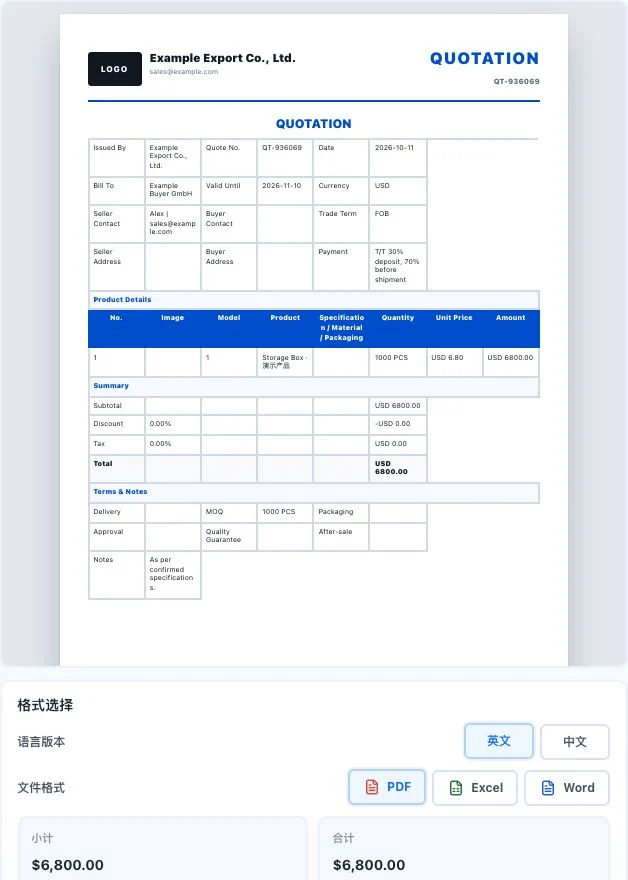
Uses the same Example demo companies and Storage Box inputs. USD 6,800 is a demo amount. Format controls are visible, but no export or sending occurred. This is not an actual transaction document.
Compare to see clearly
The figures below are from the current cost tool's actual screenshot, in US dollars. Example inputs, exchange rates, fees and transport assumptions are not actual market quotes.
| The task | You provide | The software helps organize | You confirm |
|---|---|---|---|
| Internal costs | Product costs, fees, taxes and transport conditions | Estimated details for the relevant terms | Actual fees, exchange rates and business applicability |
| Customer quotation | Items, quantities, unit prices and agreements | A quotation file customers can read | External prices and all business commitments |
See these highlights
Useful capabilities are found in each specific task.
Features in concrete numbers
EXW, FOB, CFR, CIF, DAP and DDP in the cost tool. Quotation options are configured separately.
01 / Explore more details
Compare total prices and cost details across six delivery terms.
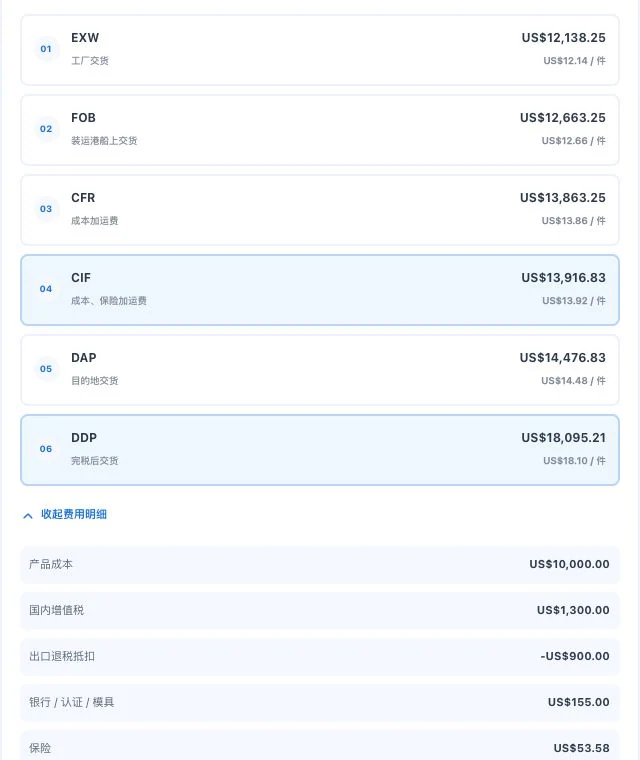
Cost-detail crop with original default demo inputs. Results use entered parameters; they are not confirmed taxes, actual transport quotes, or customer orders.
02 / Explore more details
Quantities, unit prices, currency and terms in one preview.
Uses the same Example demo companies and Storage Box inputs. USD 6,800 is a demo amount. Format controls are visible, but no export or sending occurred. This is not an actual transaction document.
Features in concrete numbers
Commercial invoice, purchase order, packing list, booking request, bill-of-lading draft, shipping notice, customs draft, credit notice and sales receipt.
03 / Explore more details
Enter cargo, packaging and transport information according to each document's purpose.
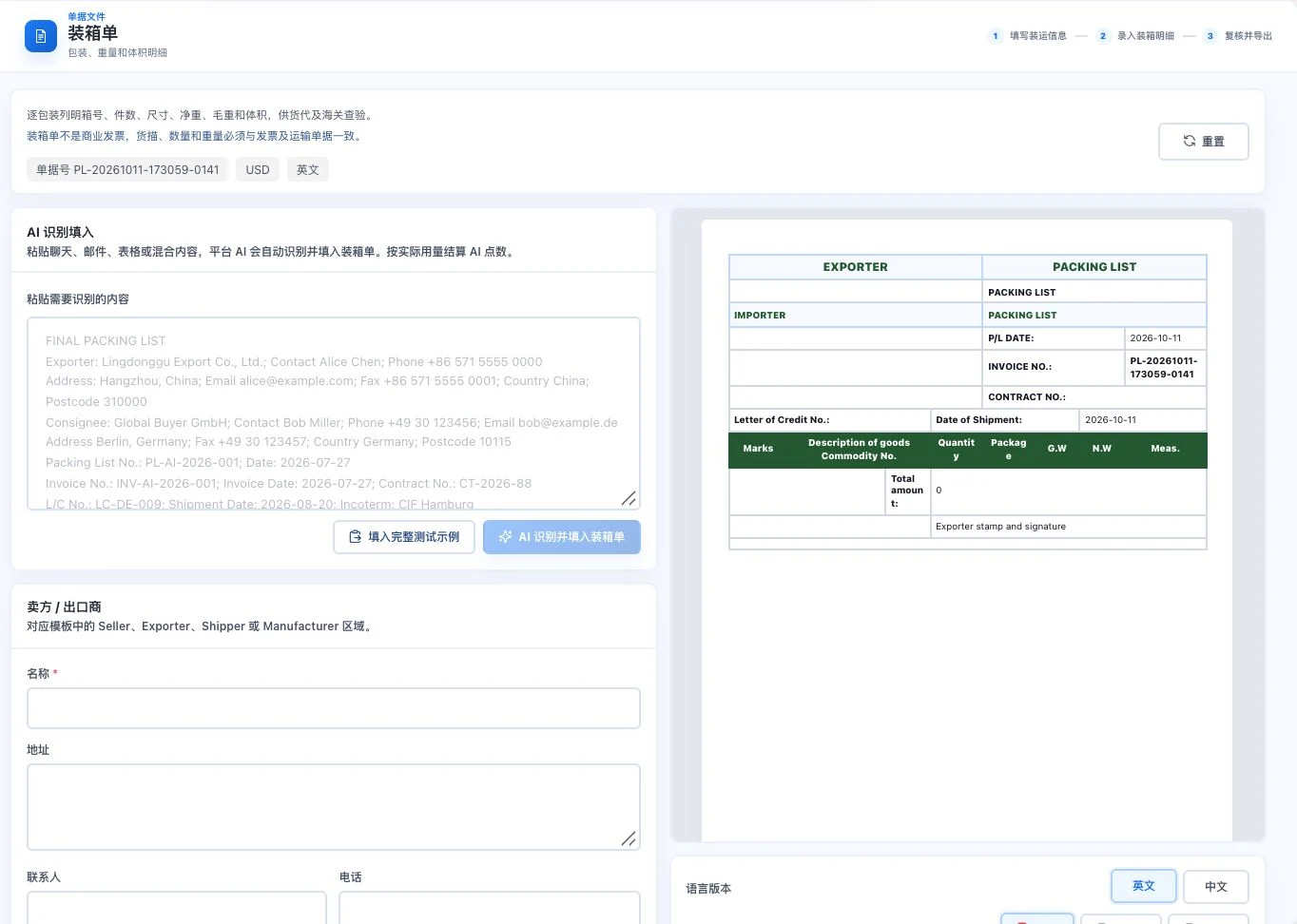
Original default blank form and preview with a total package count of 0. No AI call, full transaction entry, or export occurred. This is not an actual packing record.
Features in concrete numbers
PDF, Excel and Word. Actual export depends on account and service conditions.
Numbers come from current feature definitions or real interfaces. Workflow numbers explain the presentation on this page; demonstration data is not a promise of efficiency or business results.View all features and conditions
Designed for everyday work
Check products, transport, taxes and delivery terms together as the estimate's basis.
Learn moreConfirm items, quantities, unit prices, currency and terms individually in the preview.
Learn morePrepare relevant documents with actual cargo, packaging and transport information.
Learn moreTake a closer look
Compare factory delivery and destination delivery using the same demonstration inputs. Handle cost estimates and customer quotations separately, with human checks.
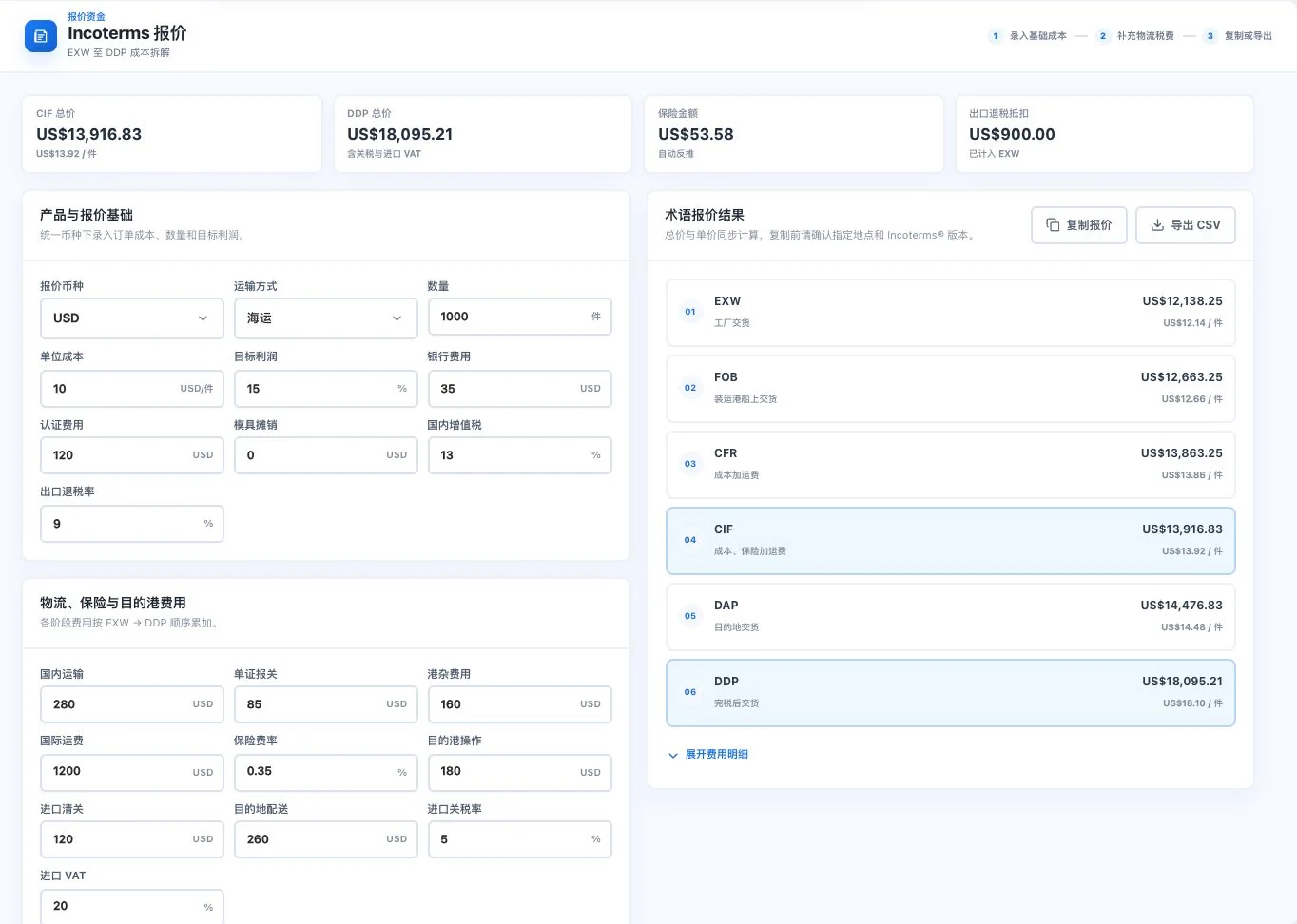
Quantity, costs, rates, and freight are original default demo inputs. Amounts are input-driven calculations. No copy or export occurred. These are not customer quotations, actual logistics prices, or confirmed taxes.
Cost-detail crop with original default demo inputs. Results use entered parameters; they are not confirmed taxes, actual transport quotes, or customer orders.
Internal estimates and customer quotations
Confirm the cost breakdown and agreed customer price in their respective places.
Cost tools break down delivery-term costs using quantities, costs, logistics, insurance and taxes. Use results as internal references and check exchange rates, charges and shipping assumptions. Cost estimates do not directly generate customer quotation PDFs.
Enter products, quantities, currency and terms in the quotation with a preview of the customer file alongside. Internal costs stay out of the customer file and do not overwrite external prices. Confirm final unit prices, payment and delivery dates before exporting under account conditions.
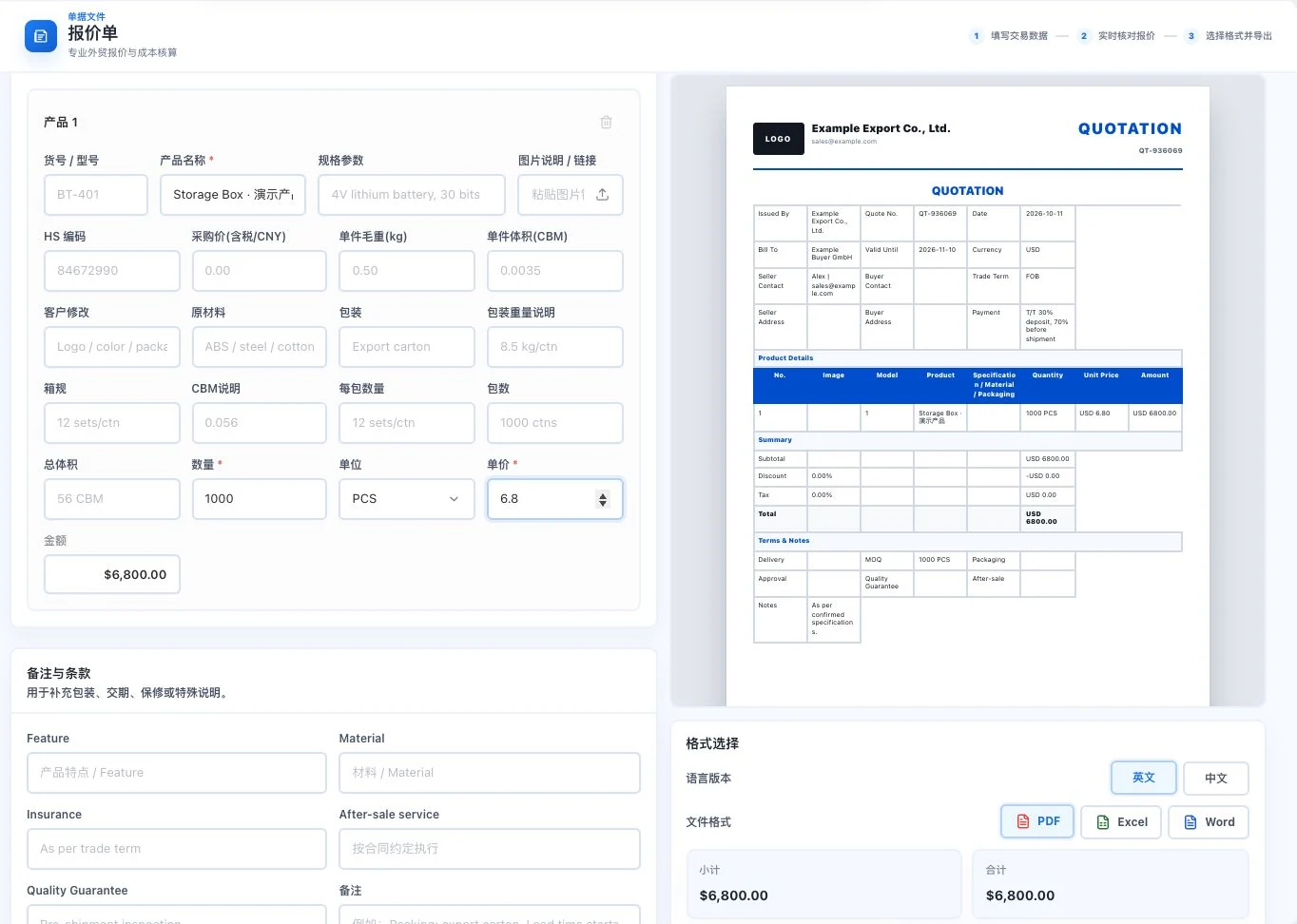
Example Export Co. and Example Buyer GmbH are demo inputs. Storage Box uses 1,000 units × USD 6.80. Preview only; no export or customer sending occurred.
Confirm cost inputs, exchange rates and delivery terms. Review details before copying or exporting estimates.
Products, quantities, unit prices, currency and terms belong to this specific transaction.
Check amounts and agreements in a Chinese or English preview, then prepare PDF, Excel or Word.
Use total costs as the quotation without explaining the relevant charges and conditions.
Check internal cost details separately from the customer quotation. State products, prices and transaction agreements clearly in the customer file.
The current quotation example is 1,000 units × US$6.80 = US$6,800. The cost-tool example uses different inputs.
9 professional trade document types
Put product, packaging, transport and adjustment information into the appropriate business documents.
Commercial invoices describe the parties, goods and amounts. Purchase orders specify items, delivery dates and payment terms. For packing and shipment, packing lists focus on package counts, weight and volume, while booking requests and shipping notices explain transport information.
Prepare bill-of-lading and customs drafts for carriers or specialists to confirm. Link discounts, returns and error adjustments to the original commercial invoice with reasons. Sales receipts record confirmed payments; they do not replace bank receipts or statutory tax invoices.
Original default blank form and preview with a total package count of 0. No AI call, full transaction entry, or export occurred. This is not an actual packing record.
Confirm amounts in commercial invoices and purchasing agreements in purchase orders separately.
Check packing lists, booking requests, bill-of-lading drafts and shipping notices against actual goods and transport conditions.
Keep linked business records and confirmation evidence for customs drafts, credit notices and sales receipts.
Reconstruct the transaction for every file, risking confusion between amounts, packaging and transport details.
Review your transaction information for each document's purpose, distinguishing business documents from those still requiring specialist issuance.
9 is the current number of professional document entry points, not approval by carriers, customs or tax authorities.
From commercial invoices and purchase orders to packing lists and booking requests, each document has a structure and each detail a place to check. Prepare information with less blank-page work.
Explore this featureOrganize business information by document type
Current entry-directory count. Bills of lading and customs documents are drafts requiring specialist confirmation. Commercial invoices are not tax invoices.
Explore every feature
16 features, with body text directly visible. Read real interfaces alongside process notes, or open individual feature pages for more detailed inputs, outputs and examples.
LDG-042
Understand how costs enter different delivery terms before preparing a customer quotation.
Break down costs under different international delivery terms. View details and copy or export tables. This estimate does not directly generate a quotation PDF.
Enter quantity, costs, margin, and basic conditions.
Add logistics, insurance, and stage-specific taxes to compare six delivery terms.
Expand the details for review, then copy or export the calculation sheet.
Users confirm taxes, freight, and conditions. Cost calculations do not directly generate customer quotation PDFs.
Quantity, costs, rates, and freight are original default demo inputs. Amounts are input-driven calculations. No copy or export occurred. These are not customer quotations, actual logistics prices, or confirmed taxes.
Cost-detail crop with original default demo inputs. Results use entered parameters; they are not confirmed taxes, actual transport quotes, or customer orders.
LDG-043
Prepare comparable calculations for different collection arrangements.
Estimate differences in tied-up funds using payment periods, rates and payment conditions. Results do not provide credit approval or guarantee payment.
Enter order value, production time, and transit time.
Adjust payment plans, advance percentages, payment periods, and rates separately.
Compare net receipts, tied-up funds, and total costs, then export a reference.
The original model calculates tied-up capital at 6% annually. Reference rates are not credit approval, bank quotations, or guaranteed collection.
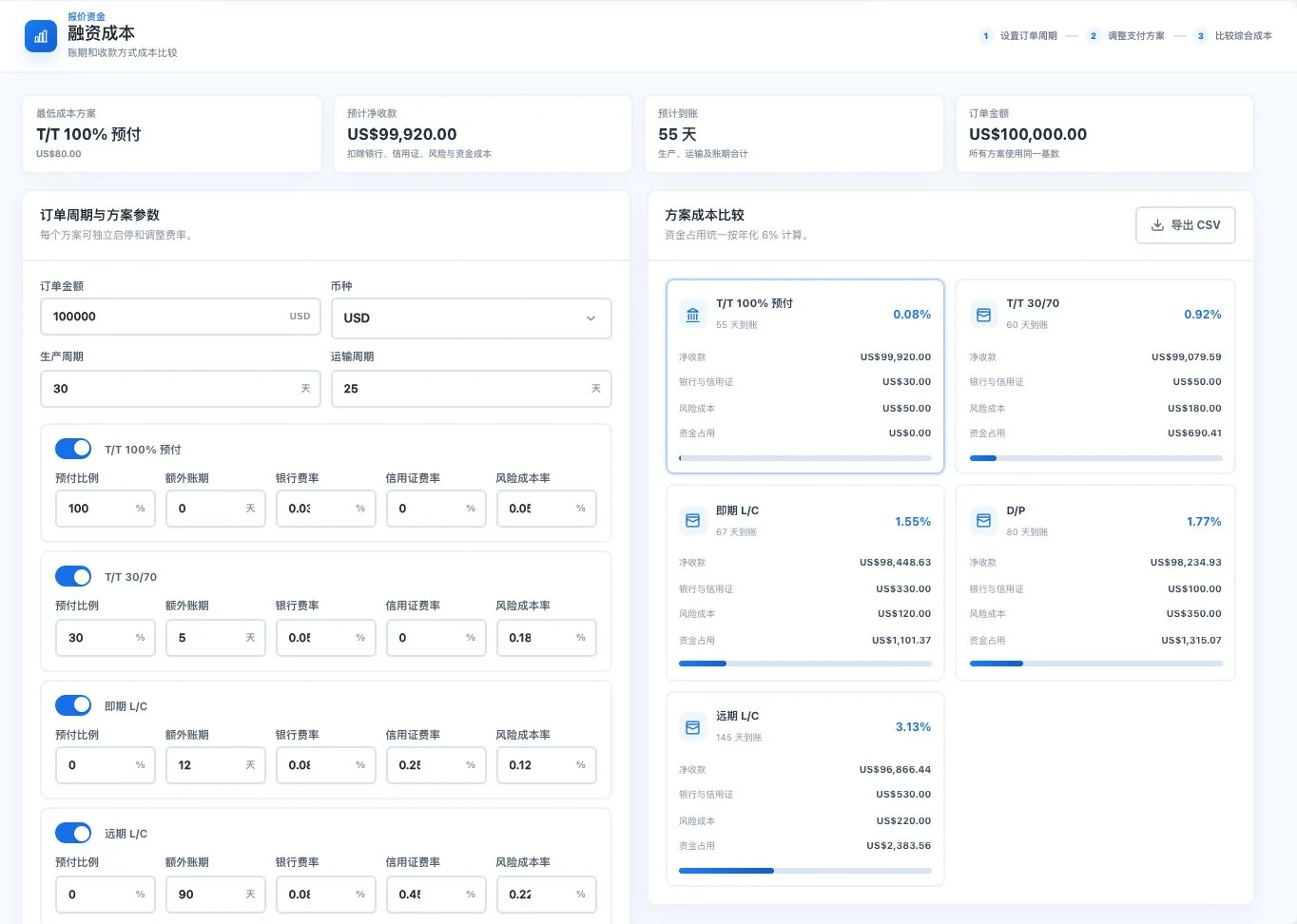
USD 100,000 order value, 30 production days, and 25 transit days are default demo parameters. Tied-up capital uses the interface’s 6% annual assumption. This is not actual credit approval, a receipt commitment, or a bank quote.
LDG-044
Prepare a same-timestamp reference for cross-currency discussions.
Read external exchange rates and calculate conversions, retaining the data timestamp. Reference rates are not bank transaction quotes.
Select source currency, target currency, and amount.
Read the available exchange rate and view its timestamp or coverage status.
Verify before conversion and confirm the actual settlement quote separately.
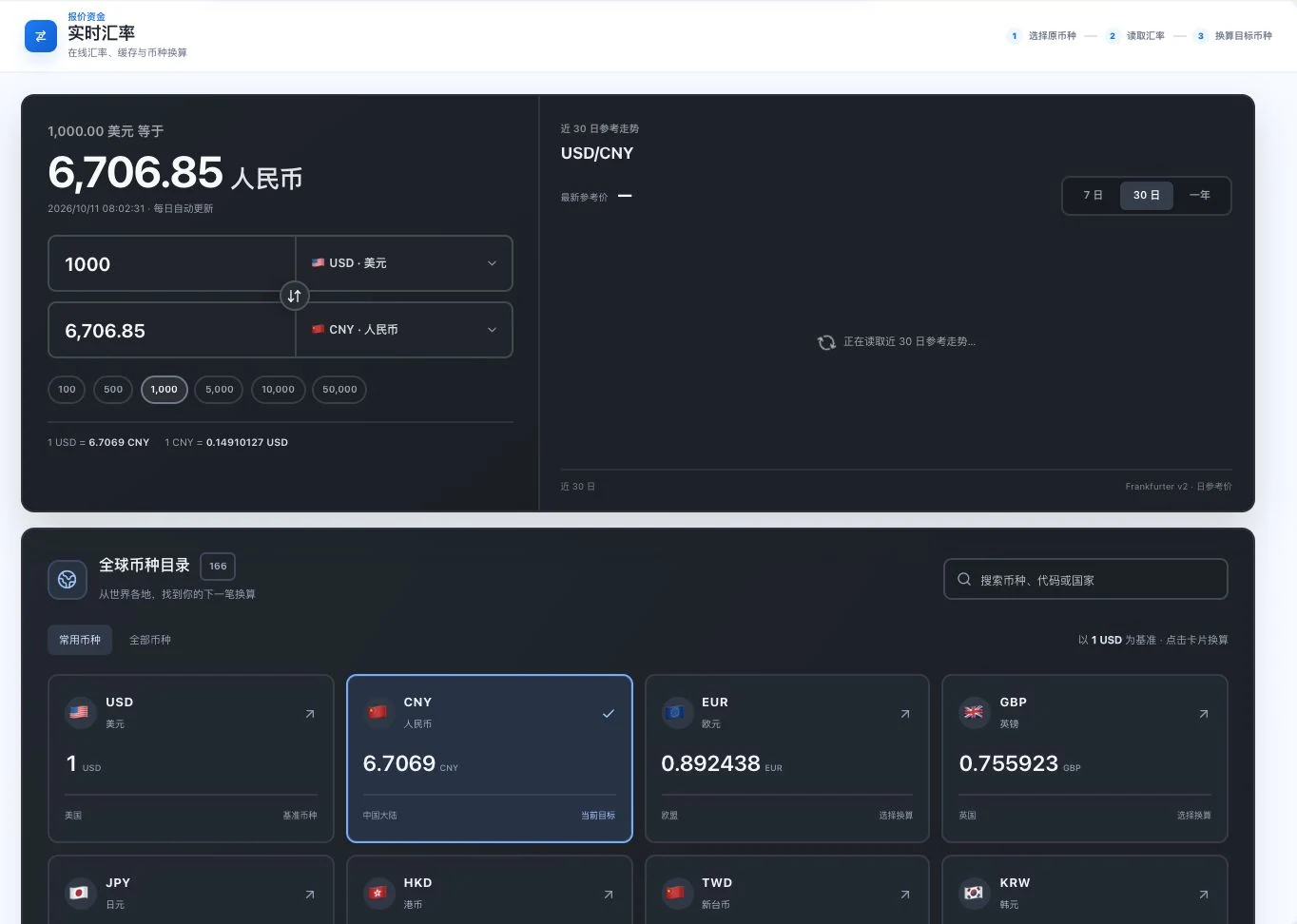
USD/CNY reference conversion and timestamp were visible during capture; the 30-day trend was still loading. The pictured rate is a historical reference, not a current quote or bank execution rate.
External exchange rates depend on source availability. Reference rates are not bank execution rates.
LDG-045
Connect classification research with tariff-source verification.
Find product classification and tariff-source links, then check the applicable market and conditions. Complete worldwide tariff coverage is not promised.
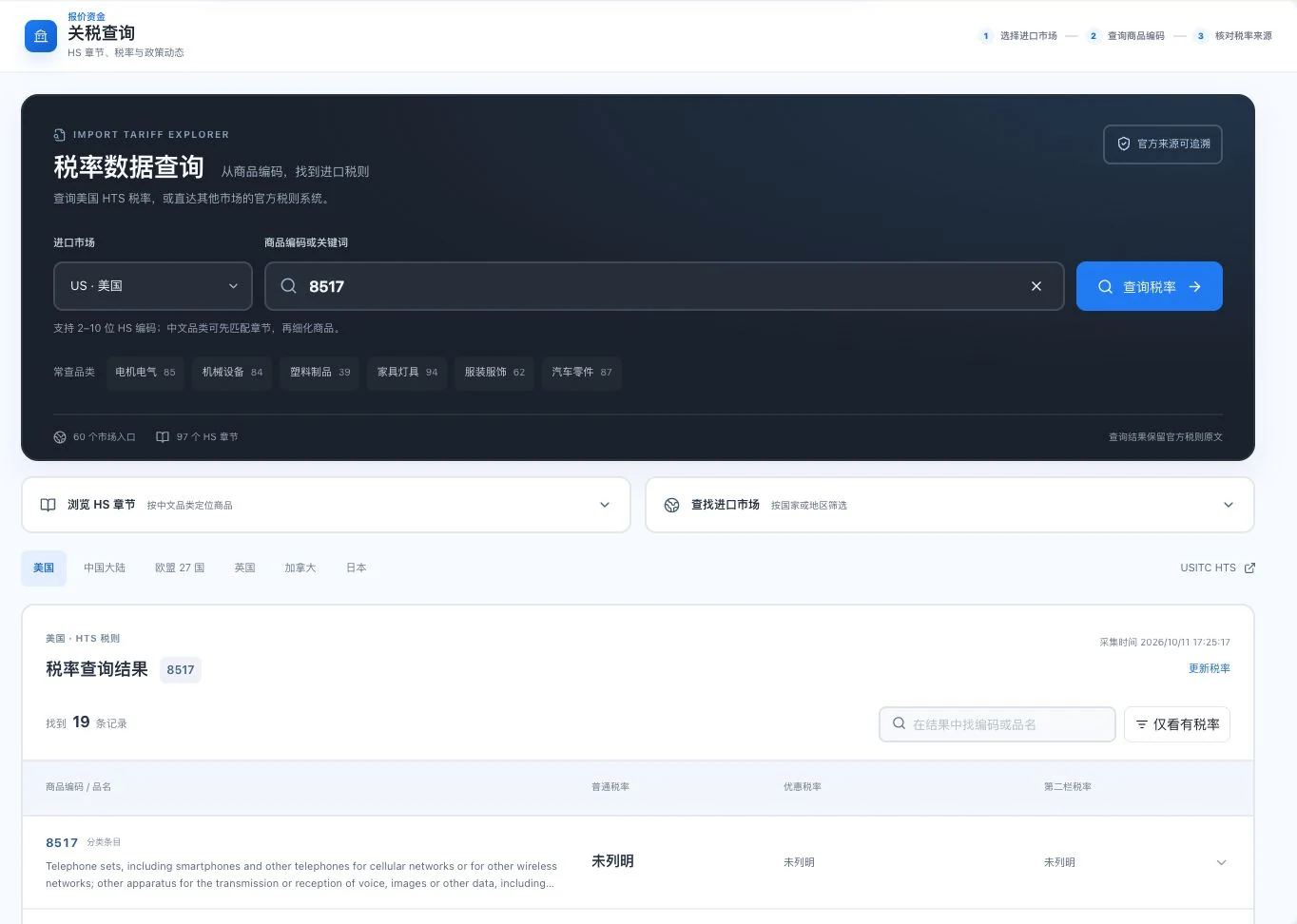
At capture, 8517 returned 19 classification records. Visible tariff fields were unspecified. Record counts do not confirm applicable tariffs; check official schedules and the specific goods.
Choose the target import market and product classification.
Find the commodity code and current tariff-source entry point.
Return to the source to confirm conditions, dates, and exceptions.
Global tariff completeness is not promised. Actual classification and import conditions require professional review.
LDG-046
Handle customer documents and internal calculations separately to explain this transaction clearly.
Enter products, quantities, currency and transaction terms. Preview Chinese or English quotations and export PDF, Excel or Word. Internal costs stay out of customer files and do not overwrite customer unit prices. Export depends on account conditions.
Enter products, quantity, currency, and transaction terms.
Choose a Chinese or English preview and check internal costs separately.
Confirm customer unit prices, then export PDF, Excel, or Word according to permissions.
Internal costs are excluded from customer documents and do not automatically overwrite customer prices. Export availability depends on the account.
Example Export Co. and Example Buyer GmbH are demo inputs. Storage Box uses 1,000 units × USD 6.80. Preview only; no export or customer sending occurred.
Uses the same Example demo companies and Storage Box inputs. USD 6,800 is a demo amount. Format controls are visible, but no export or sending occurred. This is not an actual transaction document.
LDG-047
Give both parties the same goods and amount information to compare.
Prepare transaction information and files for company commercial invoices. A commercial invoice is not a VAT invoice or tax-authority-issued document.
Check the seller, buyer, and transaction information.
Enter goods, quantity, unit price, currency, and transport information.
View the preview, review each item, then generate the business document.
A commercial invoice is not a VAT invoice or a tax invoice issued by a tax authority.
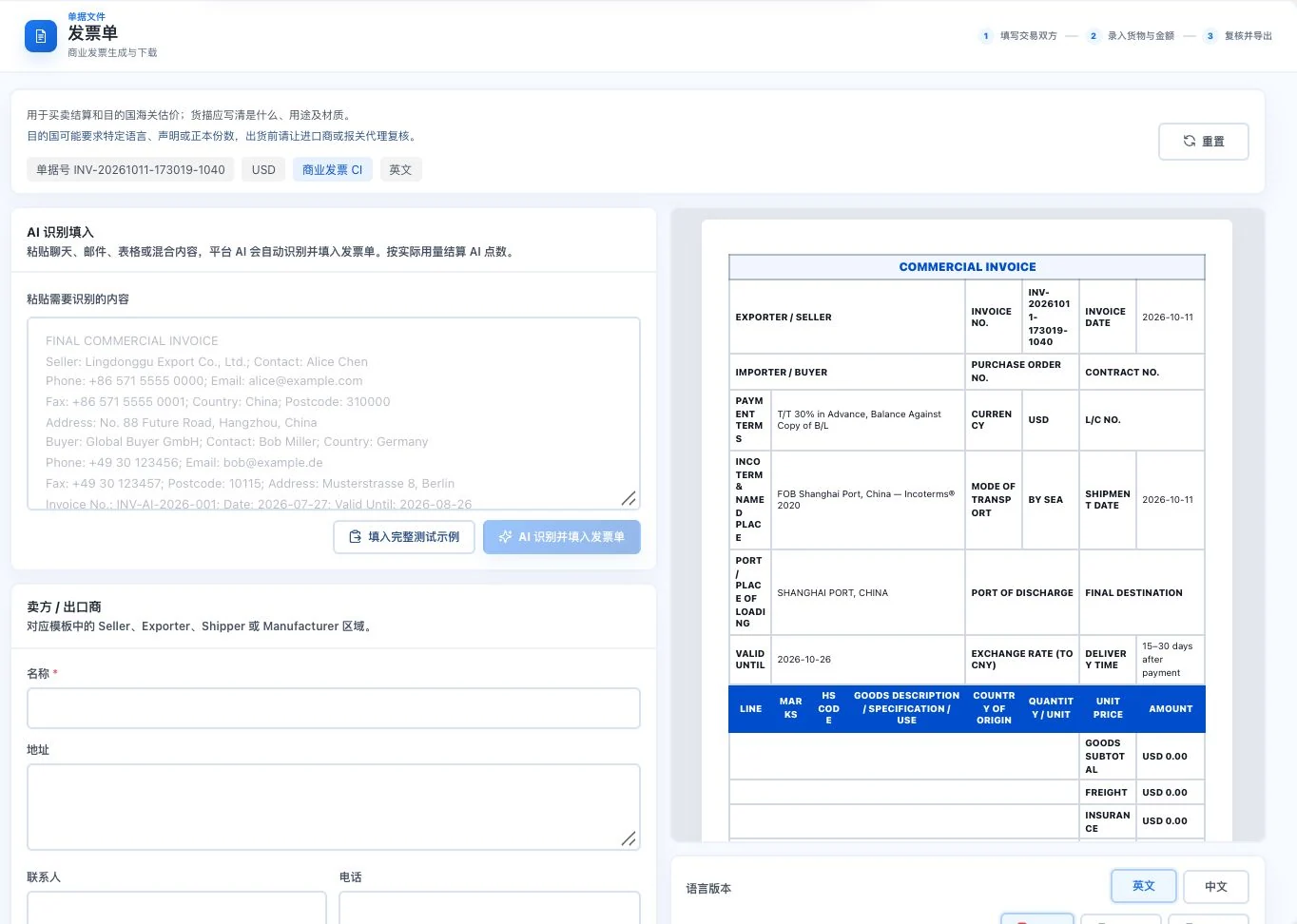
The original form is empty except for default dates and transaction terms. Light text on the left is prompt example text. No AI call, full example entry, or export occurred. A commercial invoice is not a tax invoice.
LDG-048
Keep required purchasing terms in one order.
Specify purchased items, quantities, delivery dates and payment terms. Review before generating the business document.
Enter the purchasing parties and order information.
Enter line items, quantity, lead times, and payment terms individually.
Review this agreement, then prepare the purchasing document.
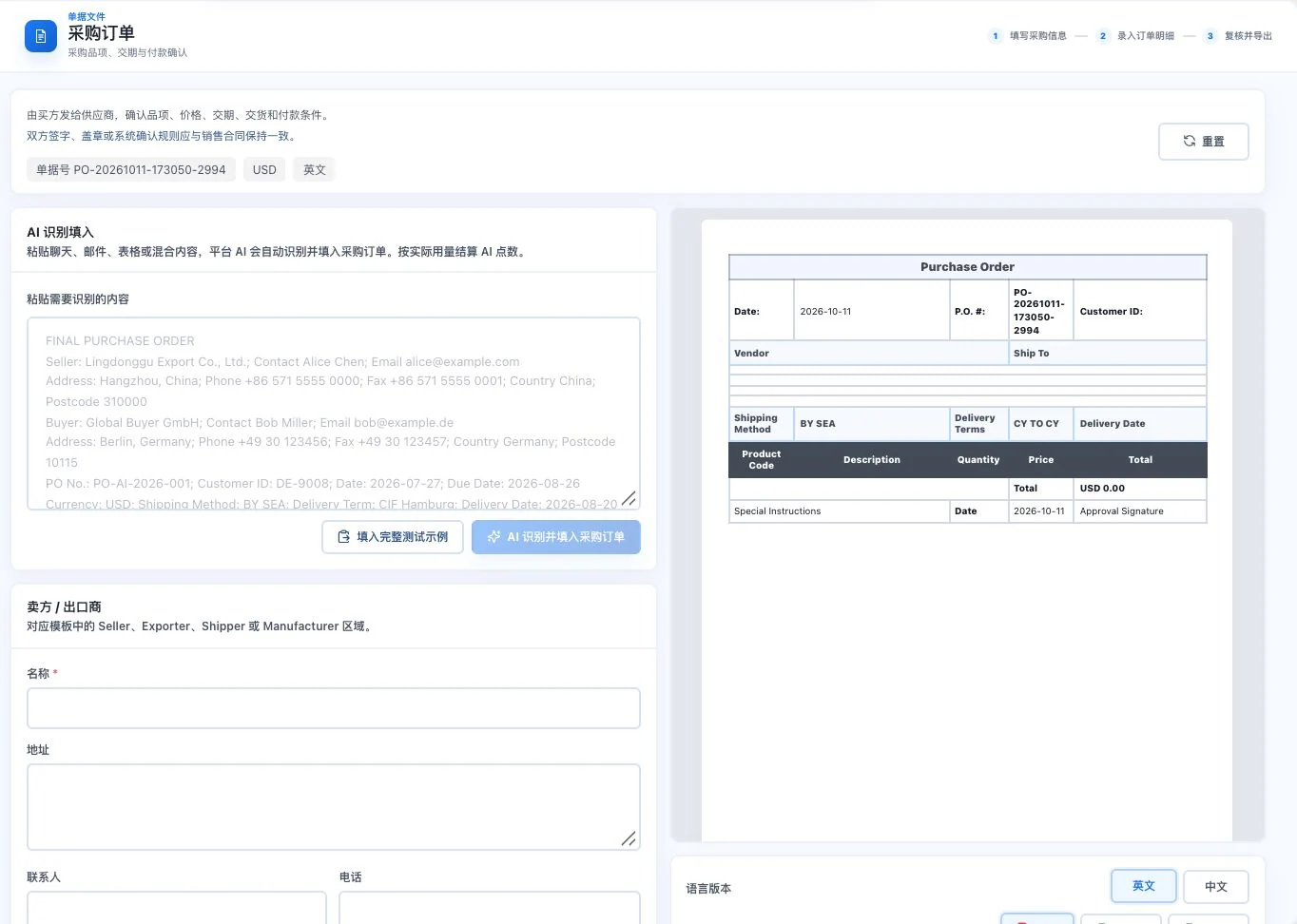
Seller, buyer, and items are blank. The preview uses default dates and transport conditions. Prompt examples were not inserted; no AI call or export occurred. This is not a confirmed order.
Both parties must confirm document contents against the actual contract, lead times, and payment arrangements.
LDG-049
Provide packing details that logistics staff, recipients, and relevant business staff can verify together.
Specify packaging, package counts, weight and volume to prepare a document for the relevant staff to check.
Original default blank form and preview with a total package count of 0. No AI call, full transaction entry, or export occurred. This is not an actual packing record.
Check shipping and packaging information.
Enter package counts, carton counts, weight, and volume.
Review the preview against actual packaging, then prepare the document.
Weight, dimensions, and packaging must match the actual goods. Documents do not replace on-site inspection.
LDG-050
Organize booking-request information for further processing.
Organize booking requests and shipping instructions. Check transport and cargo information before exporting.
Enter transport requirements and shipping instructions.
Add cargo, packaging, and relevant transport information.
Review and export for the relevant parties to confirm space.
The business document does not indicate carrier acceptance or confirmation of freight rates and sailing schedules.
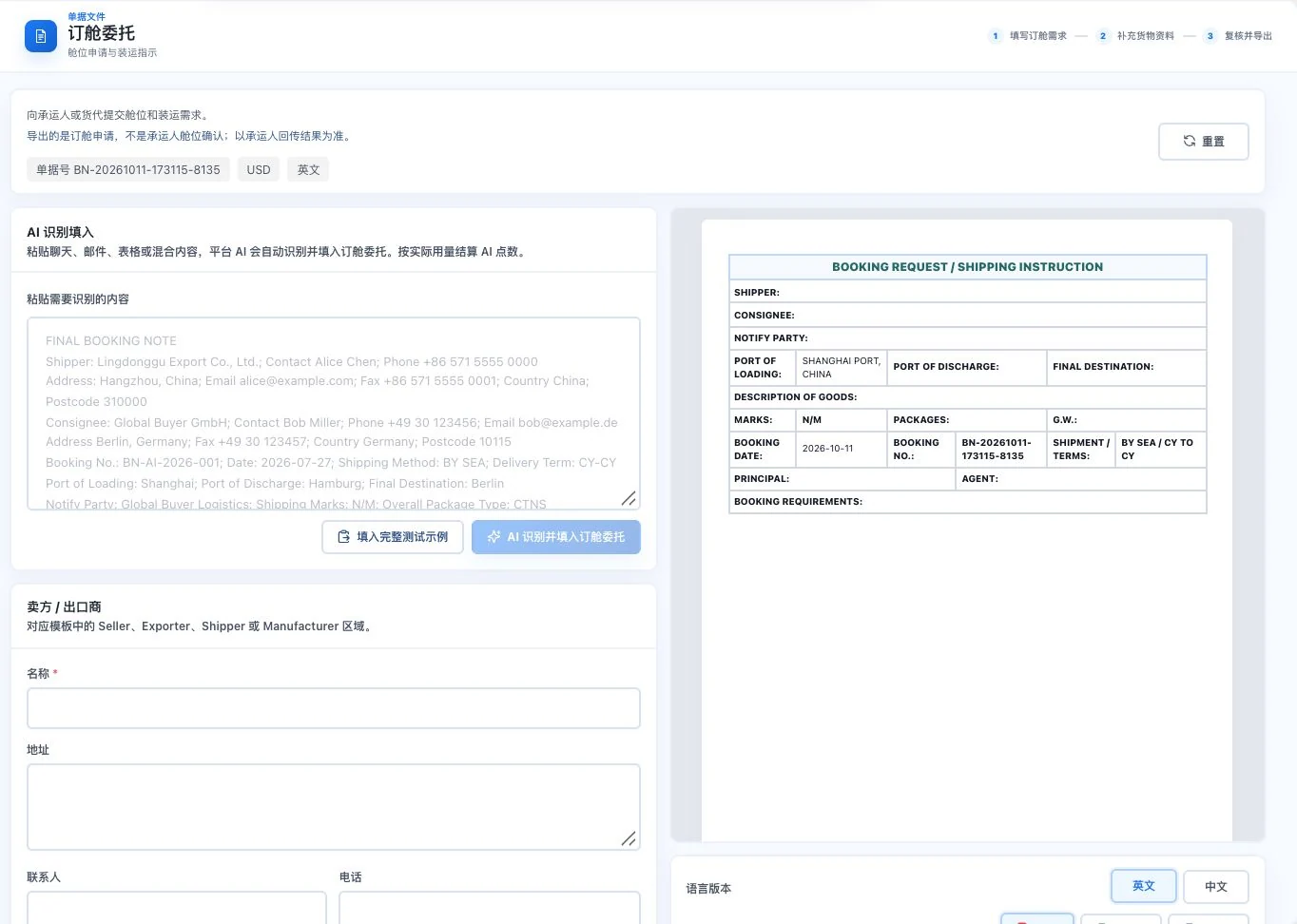
Original default blank form retains only default dates, ports, and similar conditions. No AI call, export, or booking submission occurred. Carrier space confirmation is not implied.
LDG-051
Specify bill-of-lading details for the relevant parties to confirm.
Prepare a bill-of-lading draft for the carrier to check. The carrier issues the formal bill of lading.
Check shipping, receiving, and relevant transport details.
Organize cargo and shipping information and view the draft.
Export for further carrier review and issuance.
This feature prepares a draft. The carrier issues the official bill of lading.
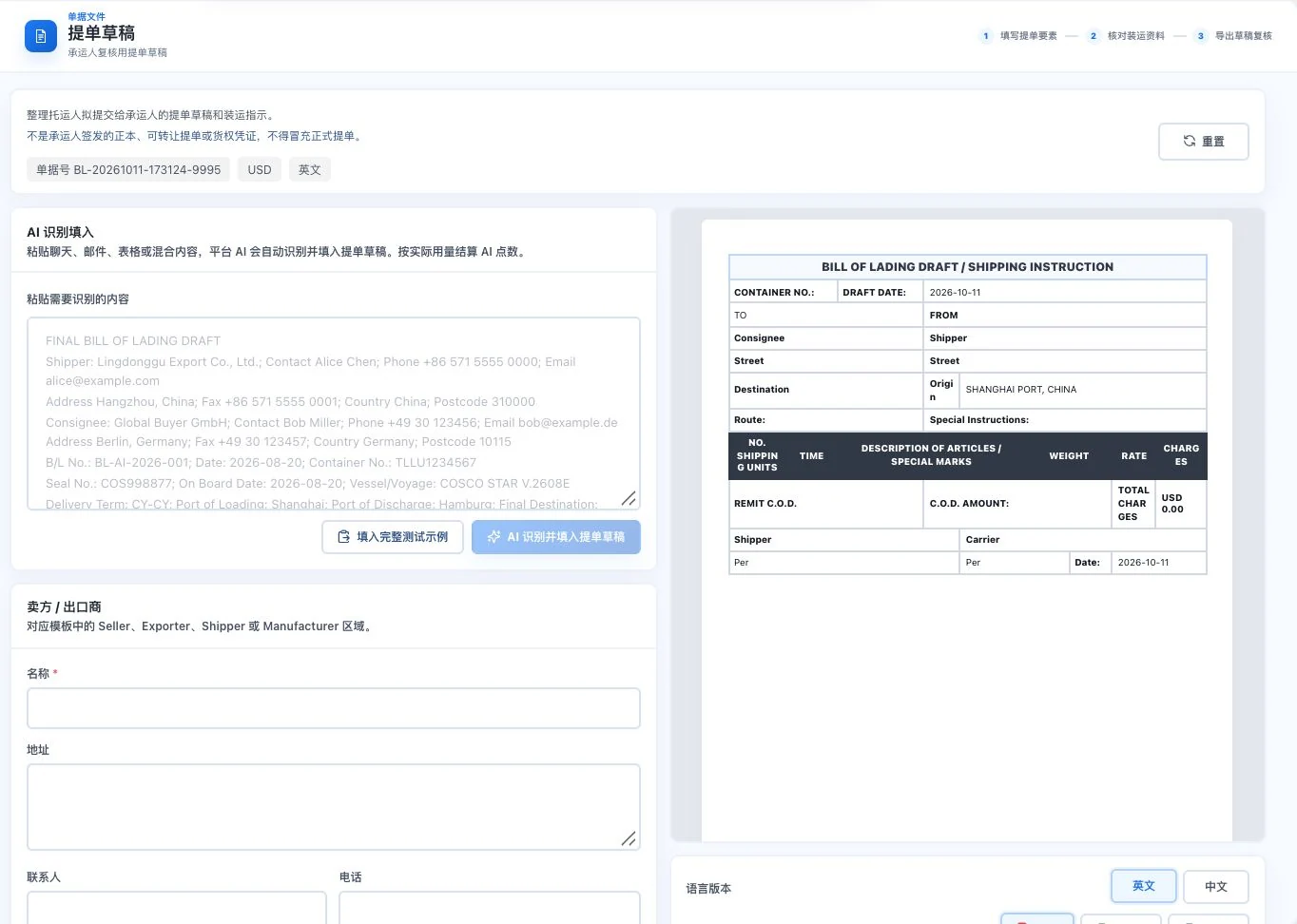
Default blank form and draft template. No AI call or export occurred. This is not a carrier-issued official bill of lading or proof of transport or title.
LDG-052
Pass required transport updates using the same information.
Organize schedules, shipment and cargo information to prepare a shipping-notice document.
Check the invoice and cargo information for this shipment.
Add sailing, shipping, and transport information.
Review, then prepare the shipping-advice document.
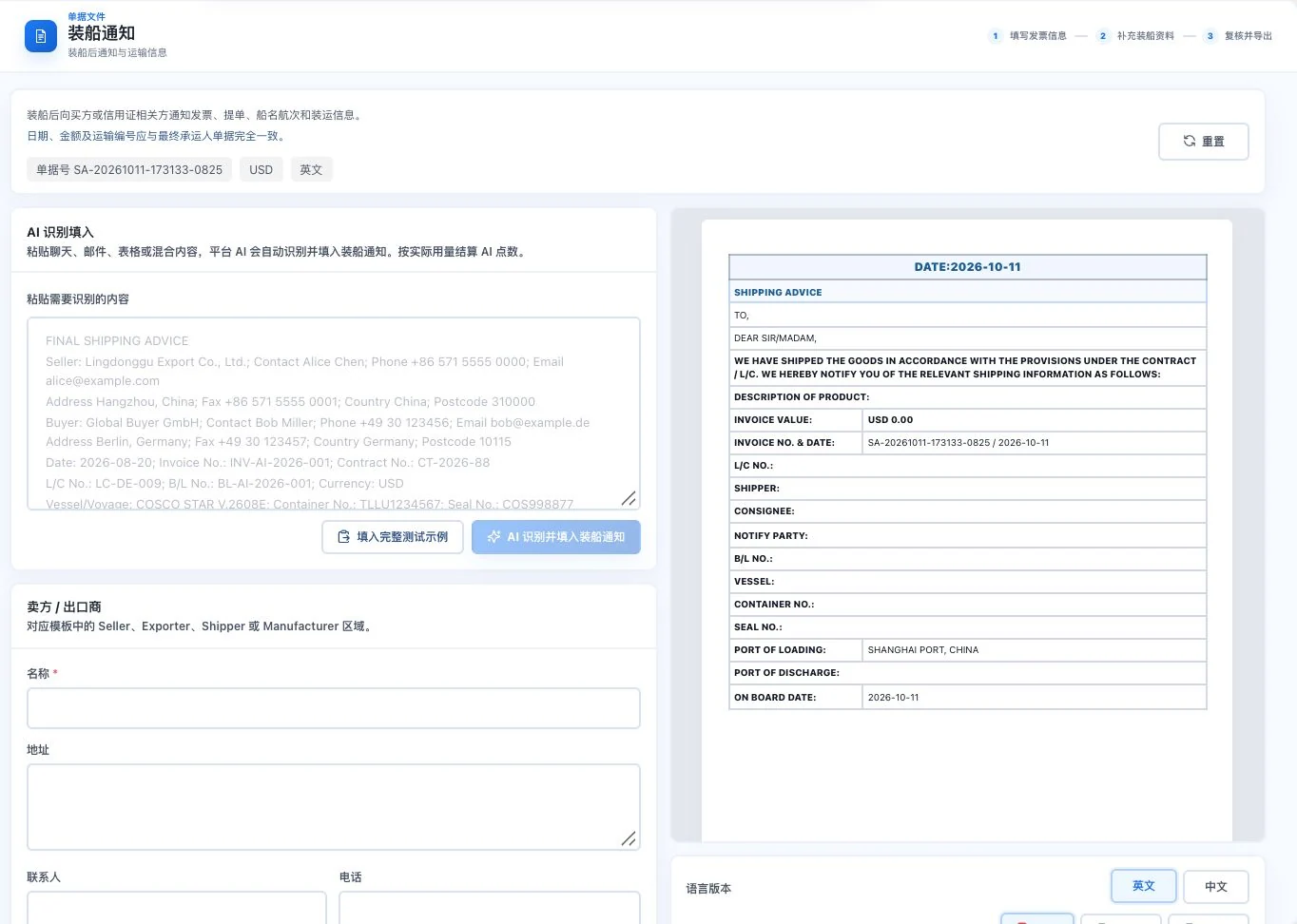
Original default blank form and notice template with amount 0. No AI call, export, or buyer notification occurred. This does not mean cargo has shipped.
Confirm sailing schedules and shipment facts. This notice is not a carrier receipt.
LDG-053
Prepare organized business information for professional declarants.
Organize business information needed for customs and generate a draft for specialist review. This does not complete a customs declaration.
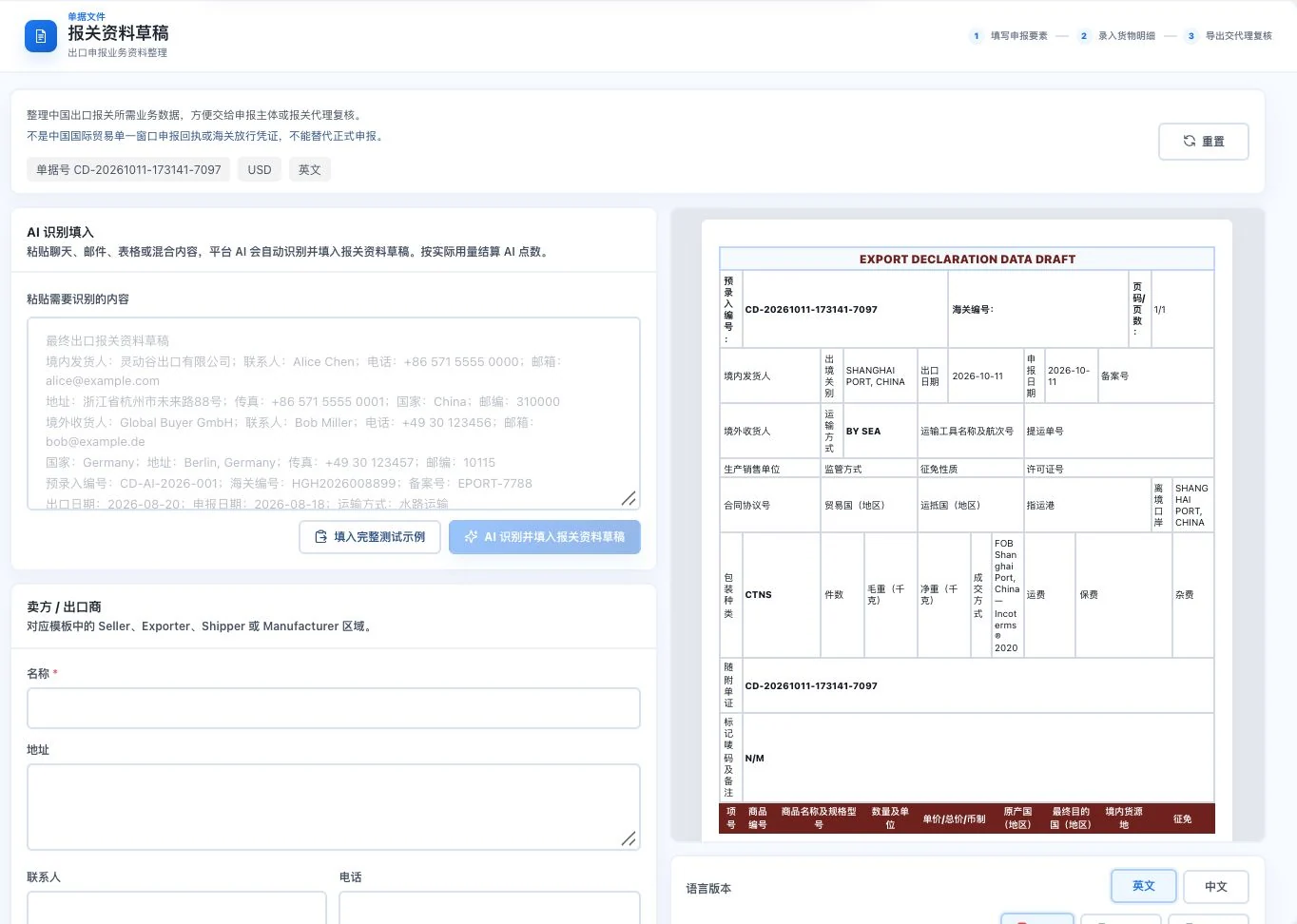
Original default blank form and business-information draft, without inserted prompt examples. No AI call, export, or customs declaration occurred. This is not customs-release evidence.
Enter this export transaction and declaration details.
Check goods details and corresponding transaction information.
Export a draft for further professional review.
A draft does not mean a declaration has been submitted or customs approval granted. Professionals must confirm classification and declaration requirements.
LDG-054
Make the relationship between the adjustment and original transaction clear.
Prepare discounts, returns or error adjustments related to an original commercial invoice. Both parties must still confirm transaction, financial and tax treatment.
Link the original commercial invoice requiring adjustment.
Enter reasons and records for allowances, returns, or error corrections.
Review the parties’ agreement and prepare the relevant notice.
Transaction confirmation and financial or tax treatment still require review by both parties and relevant professionals.
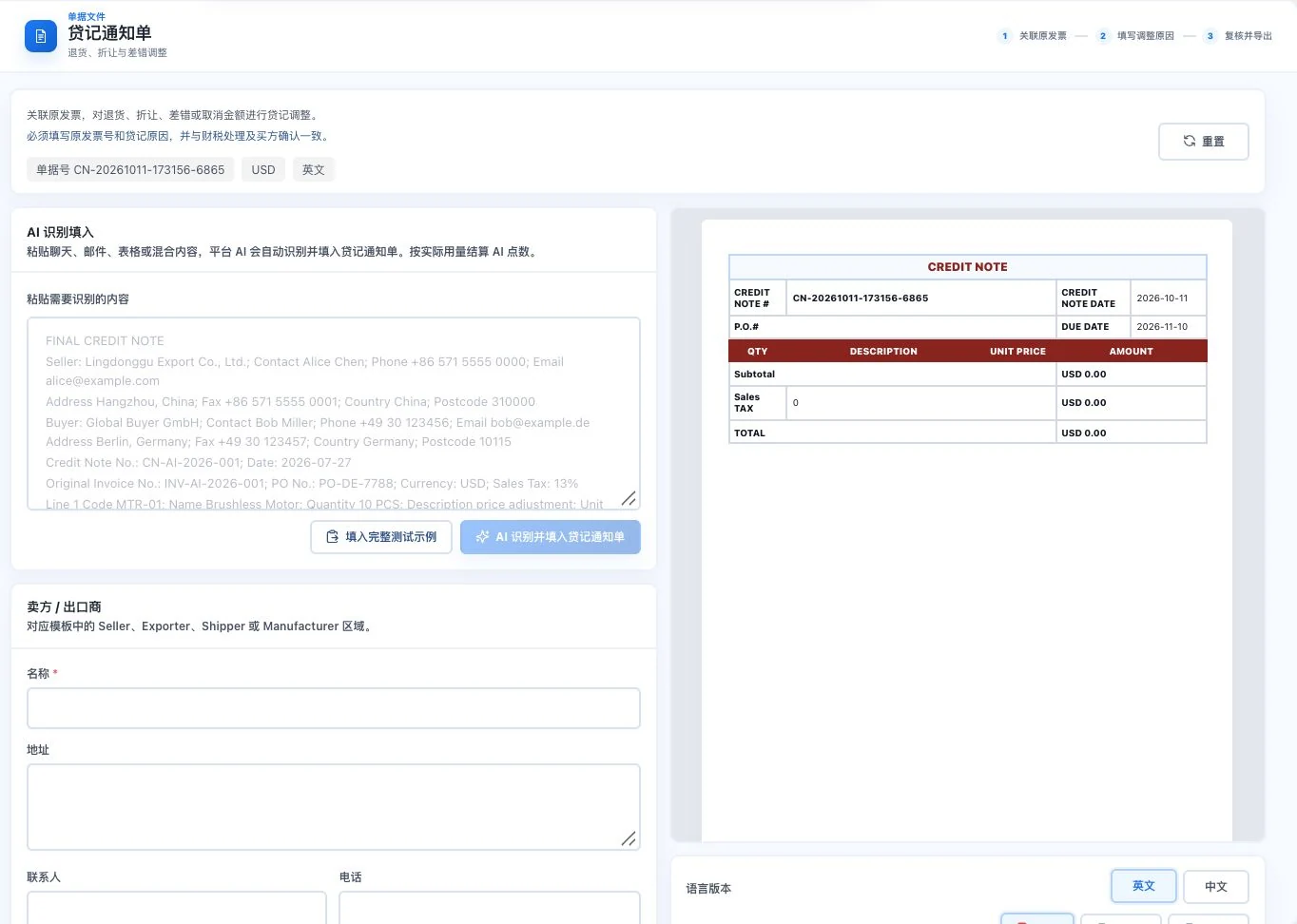
Original default blank form with amount 0. No AI call, export, or transaction adjustment confirmation occurred. Relevant parties must verify actual allowances and financial or tax treatment.
LDG-055
Keep a traceable business explanation of confirmed payments.
Organize confirmed payment records and payment references. This does not replace bank receipts or statutory tax invoices.
Check the confirmed payment receipt facts.
Enter the relevant transaction, amount, and payment reference.
Review, then prepare the sales-receipt record.
A business receipt does not replace a bank receipt or statutory tax invoice.
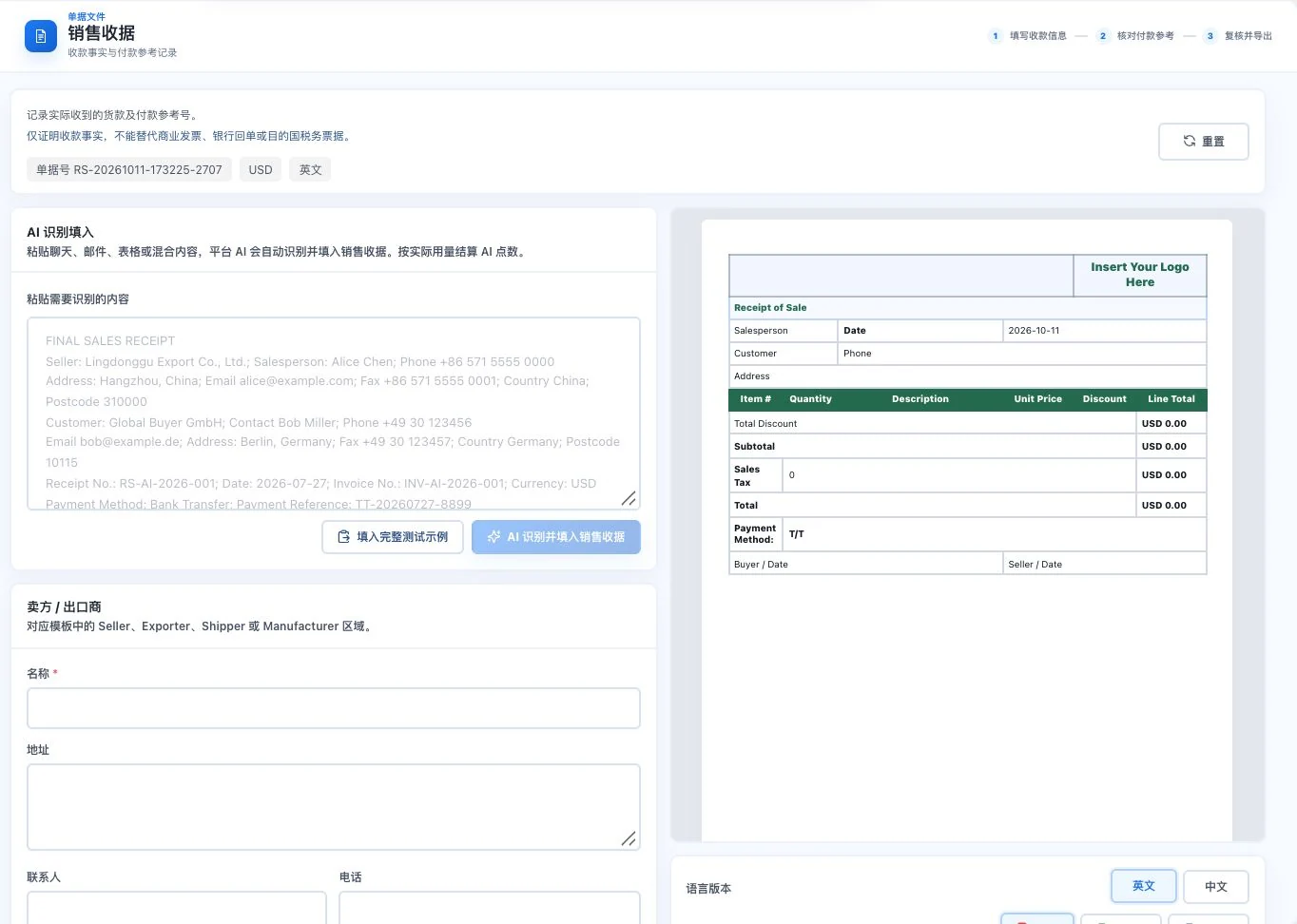
Default blank form and receipt template. No AI call, export, or payment confirmation occurred. The screen does not prove funds arrived and cannot replace a bank receipt or statutory tax invoice.
LDG-056
Input on the left, document on the right, so information stays visible during preparation.
Quickly enter basic transaction information and preview invoices and packing lists for printing. Output scope is explained separately from professional document templates.
Choose a commercial invoice, pro forma invoice, or packing list.
Enter basic transaction and cargo data to view the live preview.
Review the print layout, then continue through browser printing.
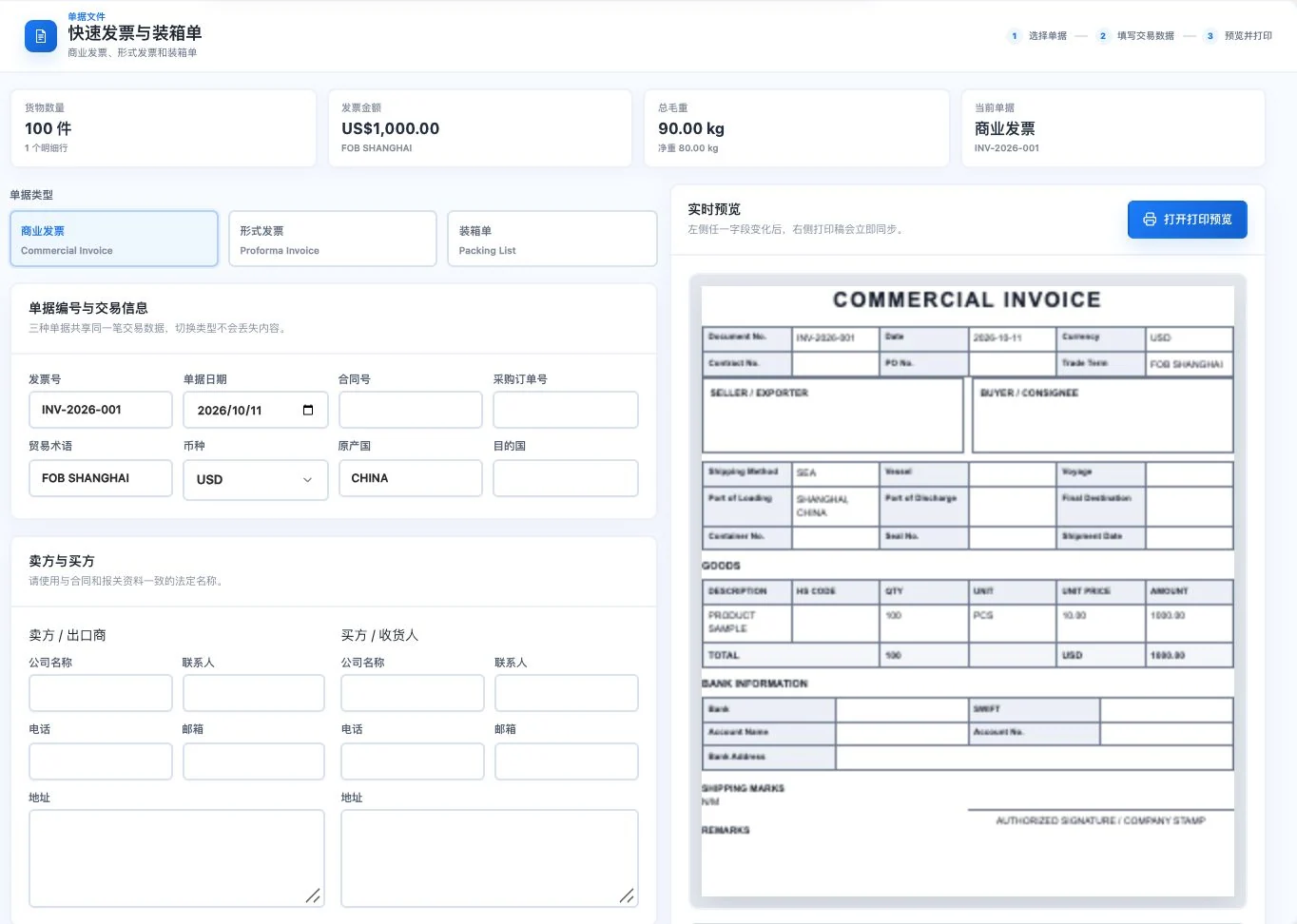
Uses original PRODUCT SAMPLE demo items, quantities, and amounts; transaction parties are blank. Commercial-invoice preview only, with no printing or export. This is not an actual transaction or tax invoice.
This is a quick-document entry point. Its output scope and complete professional templates are explained separately.
LDG-057
Prepare scan-style presentation and watermark effects from the original document.
Apply scan effects and watermarks to existing images or PDFs. No text recognition or legal seal authentication is provided.
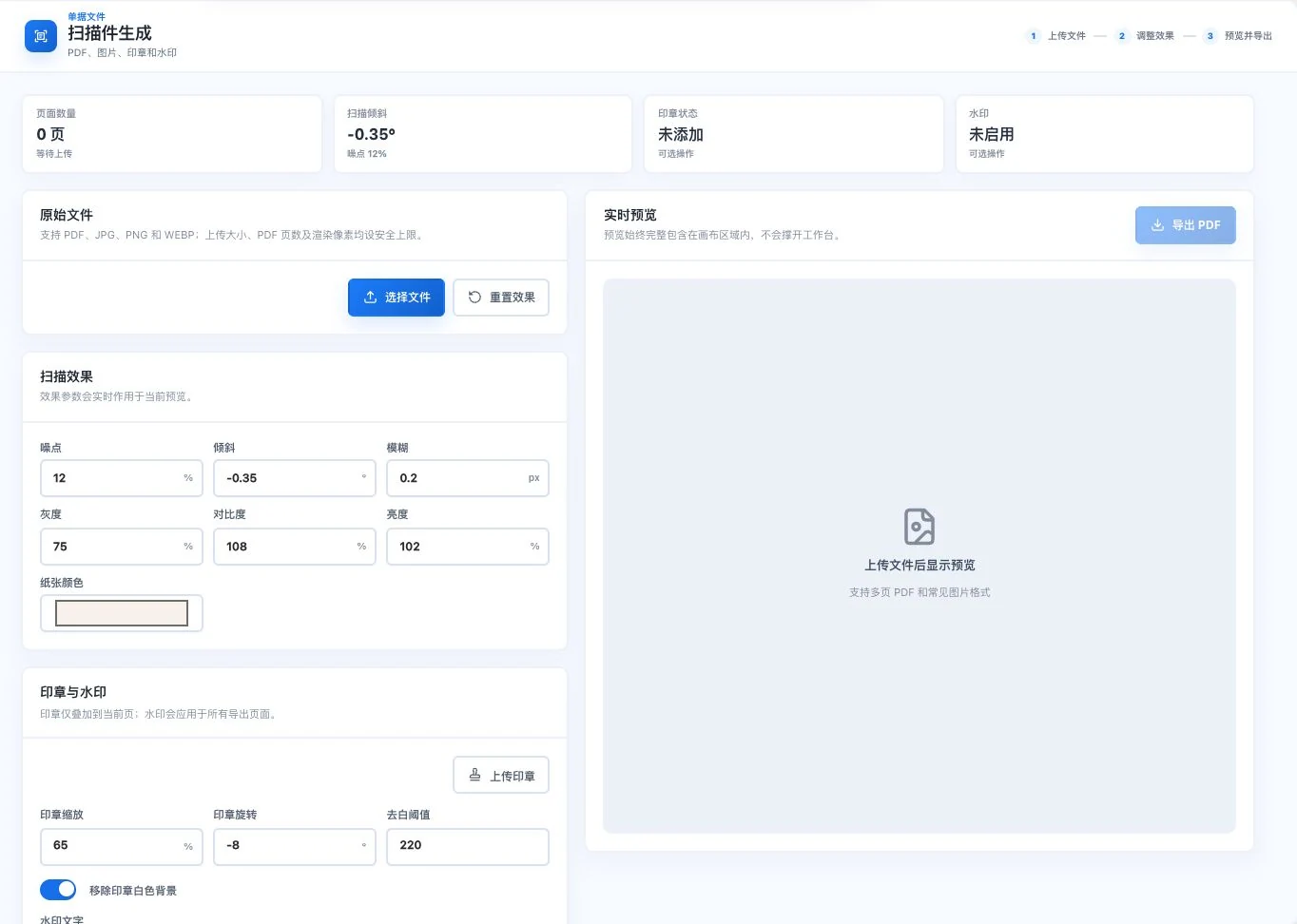
Currently 0 pages. No original file or seal was uploaded, and no effects or exports generated. This is an image/PDF effects tool, not text recognition or legal-signature certification.
Choose an existing image or PDF.
Adjust scan effects, colors, tilt, watermark, and other parameters.
View the preview and confirm source and intended use before exporting.
No OCR is provided. This does not establish the legal validity of a seal, signature, or document.
Understand before use
Cost estimates and customer quotations are separate features. Check professional documents in the actual account before exporting. Bills of lading, customs drafts and similar documents require specialist confirmation. A commercial invoice is not a tax invoice.
This catalogue explains existing features and their conditions. Availability depends on the release, account permissions, service configuration and completed validation. Some items are internal-only or still await operational validation.
Other work to explore too
Dimensions, weight and placement. Together.
Explore this product