State position and clauses first.
Upload a readable contract and set the region, position, and priority clauses.
See the actual stepsContract library and risk location in original text
Link risk suggestions to specific original text for clear human discussion.
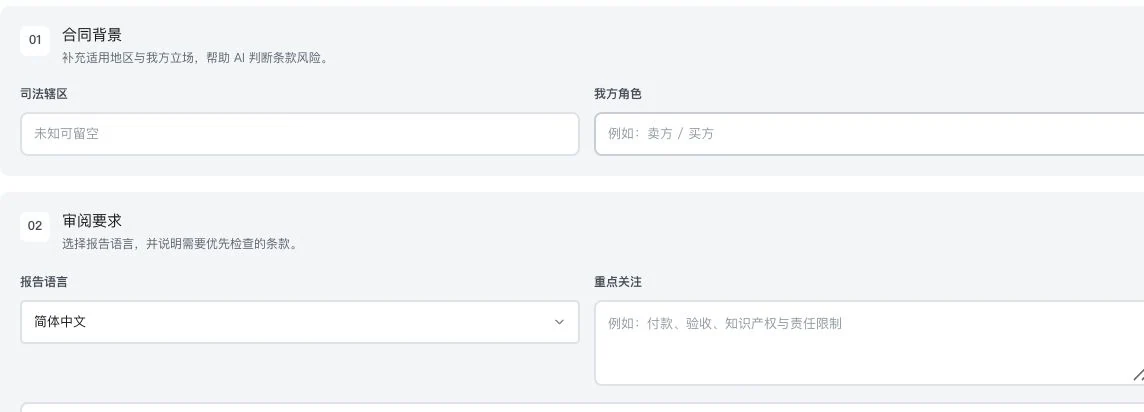
Private filenames, body text, and results were cropped out. Only original settings are shown. No contract upload or analysis occurred. This is not a risk report, revision result, or legal advice.
See this feature's highlights.
Upload a readable contract and set the region, position, and priority clauses.
See the actual stepsView risk filters and corresponding original-text highlights.
See the actual stepsCheck facts in context before deciding what requires review.
See how to checkLink risk suggestions to specific original text for clear human discussion.
How the feature works. Actual results depend on information, permissions, and service requirements.
When to use it
When reading contract risk suggestions, always connect the assessment to the original text and actual business context.
readable text, jurisdiction, position and priority clauses.
the original contract context and actual transaction facts.
Complete steps
Upload, search and manage readable contracts. Set jurisdiction, position and key clauses, filter risks and return to original highlights. Long text can be batched; scans need OCR first. Analysis does not replace legal advice.
Upload a readable contract and set the region, position, and priority clauses.
View risk filters and corresponding original-text highlights.
Check facts in context before deciding what requires review.
Understand the tool and human handling separately
Link risk suggestions to specific original text for clear human discussion.
View risk filters and corresponding original-text highlights.
This compares feature handling scopes. Scenarios explain the sequence, not measured efficiency or completed customer cases.
Explain the feature through real work
Suppose a suggestion flags uncertainty in a delivery clause.
Hypothetical scenario · Feature explanation, not a customer case or completed AI resultConnect the work from step to step
Send issues requiring action for human review and save factual evidence and proposed changes.
Return to Contract review and verification for the complete workflowUnderstand before use
Requires readable text and an available model. Scanned images need OCR first. Suggestions do not replace legal advice.
Product facts and FAQsBack to the product feature directoryMore details in this product
Keep review feedback, handling status, and before-and-after changes in one workflow.
Explore this feature on its own