A risk prompt. Return to the original wording.
Read definitions, conditions and context together, checking the actual transaction background.
Learn moreAI contract review · Human verification
Start with readable text and connect risk suggestions, human comments and paragraph revisions to the original.
See the highlights firstThe seller must deliver the goods within 60 days of receiving prepayment.
The seller must deliver the goods within 30 days of receiving prepayment.
This fictional clause shows a before-and-after comparison with an illustrative human edit. It is not an actual contract, model result or recommended delivery period.
Compare to see clearly
The seller must deliver the goods within 60 days of receiving prepayment.
The seller must deliver the goods within 30 days of receiving prepayment.
This fictional clause shows a before-and-after comparison with an illustrative human edit. It is not an actual contract, model result or recommended delivery period.
A paragraph-comparison example, not a private contract, AI review result or legal advice.
| The task | You provide | The software helps organize | You confirm |
|---|---|---|---|
| View suggestions | Readable contract text and review context | Risk suggestions linked to original locations | Facts, full context and applicable rules |
| Make changes | Human comments and requested changes | Comparable paragraphs before and after revision | Business agreements, versions and final signed wording |
| Check translations | Risk passages needing further understanding | Paragraph translations for verification assistance | Terms, numbers and legal meaning |
Designed for everyday work
Read definitions, conditions and context together, checking the actual transaction background.
Learn moreRecord individual handling and overall comments separately, retaining grounds for judgments and changes.
Learn moreTranslations assist understanding. People still check terms, amounts and legal meanings.
Learn moreKeep more than the revised sentence. Original wording, human comments and revised versions give the next review a reference. The clause changes. The evidence stays.
Explore this featureBefore · After
The count describes before-and-after comparison. The human-edited example here is not an AI result or legal advice. Specialist review is needed before signing.
Prepare the review context first
Jurisdiction, your role and priority clauses explain why this review matters.
Upload readable contract text and specify jurisdiction, position and priority clauses. Scanned images require text recognition first. Long text may be processed in batches under actual readability and service conditions.
Filter risk suggestions and locate highlights in the original. Definitions, conditions and other clauses may affect interpretation. Establish contract facts before recording matters to discuss or change. Suggestions do not replace legal advice.
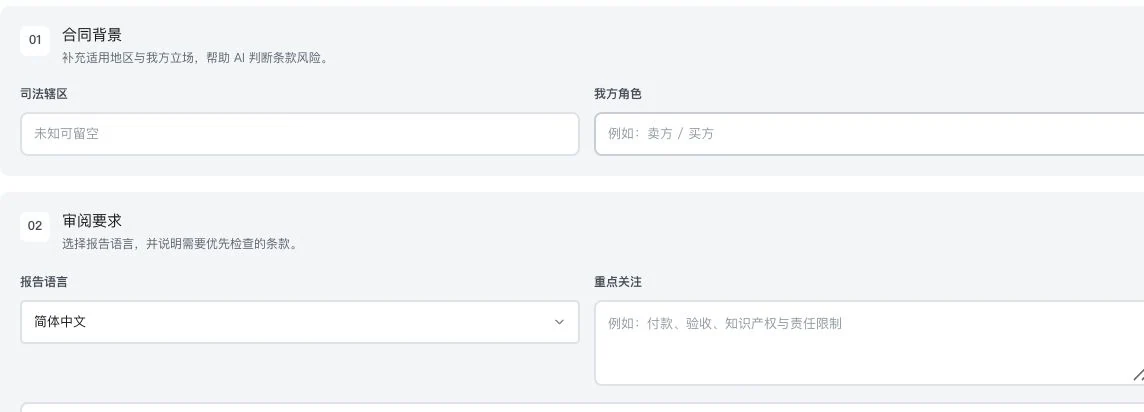
Private filenames, body text, and results were cropped out. Only original settings are shown. No contract upload or analysis occurred. This is not a risk report, revision result, or legal advice.
Confirm readable text and specify jurisdiction, your role and issues to consider.
View the clause context at each risk location, beyond an isolated prompt.
Record factual grounds, acceptable conditions and matters needing further advice.
Read only a risk summary without checking definitions and surrounding conditions in the original.
Link risk locations to contract paragraphs and keep the full context with human comments.
A review workflow illustration. No private contract or unverified AI review result is displayed.
Comments, revisions and translations
Record individual and overall comments separately. Continue comparing versions before and after changes.
Save human review progress and history. Prepare permitted revisions based on risks and requested changes. Check clauses, amounts, dates and business agreements before downloading annotations or revisions. Whole-contract revision is prohibited for long contracts processed in batches.
Risk reports and corresponding paragraphs can be translated for assistance. Keep the original rather than overwriting it with translation. Report translations are not whole-contract or certified translations; legal terms and meanings still need human or specialist review.
Record factual grounds and requested changes individually, retaining overall comments too.
View before-and-after changes and history. Confirm the permitted revision and download scope.
Use translation to understand risk passages, checking numbers, terms and legal meanings against the original.
Overwrite the original with revised wording without retaining reasons or history.
View human comments, review progress and versions separately, with original-verification access retained.
Revisions and translations require human review. Text validation is not legal approval or final signing confirmation.
Use case · After quotation approval, before signing
Return amounts, payment, delivery and packaging agreements to the original contract for verification.
For example, a customer approves a quotation and sends a contract with payment and delivery requirements. Prepare confirmed quotations, specifications and agreements first. Specify your role, jurisdiction and review priorities. Return risk suggestions to specific clauses, then inspect definitions, conditions and surrounding connections.
Write discussion points as human comments and check them with business partners or specialists. Compare revisions, reviewing amounts, dates and delivery conditions individually. Translated risk passages assist understanding while the original remains; neither translations nor model conclusions replace final signing judgment.
Private filenames, body text, and results were cropped out. Only original settings are shown. No contract upload or analysis occurred. This is not a risk report, revision result, or legal advice.
Confirm quotations, specifications, payment and delivery agreements, and prepare readable contract text.
Compare risk locations and full context, recording factual grounds and outstanding items individually.
Compare permitted revisions, review amounts and dates, and obtain confirmation from relevant business staff and specialists.
Read quotations, email agreements and contracts separately without checking consistency clause by clause.
Around the same transaction, return risks to original text and keep comments and versions as separate verification evidence.
A review scenario written by people. It does not imply automatic reading of quotations or emails. Context must be supplied manually; this is not legal advice or signing approval.
See these highlights
Useful capabilities are found in each specific task.
01 / Explore more details
Specify jurisdiction, your role and priorities separately.
Private filenames, body text, and results were cropped out. Only original settings are shown. No contract upload or analysis occurred. This is not a risk report, revision result, or legal advice.
Features in concrete numbers
The sequence shown here: read the original, check suggestions and record human comments.
Features in concrete numbers
Human checks are required before and after revision. Revised text here illustrates the display method only.
02 / Explore more details
Compare original and revised wording, with human comments explaining the change.
Delivery termsOriginal agreement
Delivery termsRevision to confirm
Workflow illustration · Not an actual contract or model result03 / Explore more details
Translate risk passages for assistance and keep checking terms and numbers.
OriginalPassage translation
Assistance for understanding. A reference for checking.Workflow illustration · Not an actual contract or model resultFeatures in concrete numbers
Requires readable text and an available model. Scanned-image text is not recognized.
Numbers come from current feature definitions or real interfaces. Workflow numbers explain the presentation on this page; demonstration data is not a promise of efficiency or business results.View all features and conditions
Take a closer look
Locate relevant paragraphs and compare the full context. Record whether to use suggestions, how to change the text and who confirms it.
The parties will confirm the delivery schedule in writing.
Corresponding original passageCheck this transaction and confirm the written agreement on timing, location, and responsibilities.
Private filenames, body text, and results were cropped out. Only original settings are shown. No contract upload or analysis occurred. This is not a risk report, revision result, or legal advice.
Explore every feature
3 features, with body text directly visible. Read real interfaces alongside process notes, or open individual feature pages for more detailed inputs, outputs and examples.
LDG-068
Link risk suggestions to specific original text for clear human discussion.
Upload, search and manage readable contracts. Set jurisdiction, position and key clauses, filter risks and return to original highlights. Long text can be batched; scans need OCR first. Analysis does not replace legal advice.
Upload a readable contract and set the region, position, and priority clauses.
View risk filters and corresponding original-text highlights.
Check facts in context before deciding what requires review.
Requires readable text and an available model. Scanned images need OCR first. Suggestions do not replace legal advice.
Private filenames, body text, and results were cropped out. Only original settings are shown. No contract upload or analysis occurred. This is not a risk report, revision result, or legal advice.
LDG-069
Keep review feedback, handling status, and before-and-after changes in one workflow.
Record item-level and overall human comments, save progress and history, generate revisions from risks, and download annotated or revised PDF/Word files. Whole-contract revision is prohibited for long contracts processed in batches. Text validation is not legal approval.
Enter factual grounds, acceptable conditions, or revision requirements item by item.
Save handling progress and overall feedback, and review historical versions.
Prepare revisions and annotated outputs where permitted, then review manually.
Whole-document revision is prohibited for long contracts processed in batches. Text validation is not legal approval or signing confirmation.
Enter factual grounds, acceptable conditions, or revision requirements item by item.
Save handling progress and overall feedback, and review historical versions.
Prepare revisions and annotated outputs where permitted, then review manually.
This feature retains instructions and usage conditions but does not yet show actual business results.
LDG-070
Support understanding of risks while keeping original contract text available.
Translate existing risk reports and display translations by corresponding paragraph, retaining access to the original without overwriting it. This is not whole-contract or certified translation. A generated report and available model are required.
Open the generated risk report.
Prepare translations for the corresponding risk passages.
Compare meanings and terminology against the original, retaining access to it.
Open the generated risk report.
Prepare translations for the corresponding risk passages.
Compare meanings and terminology against the original, retaining access to it.
This feature retains instructions and usage conditions but does not yet show actual business results.
Requires an available report and model. This is neither whole-contract nor certified translation. Human review is required.
Understand before use
Requires readable text and an available AI service. Scanned-image text is not recognized. Suggestions, edits and translations need human review and do not replace legal advice or certified translation.
This catalogue explains existing features and their conditions. Availability depends on the release, account permissions, service configuration and completed validation. Some items are internal-only or still await operational validation.
Other work to explore too
Work has an owner. Usage has a record.
Explore this product