Accounts and companiesTransactions and ordersHelp and tickets
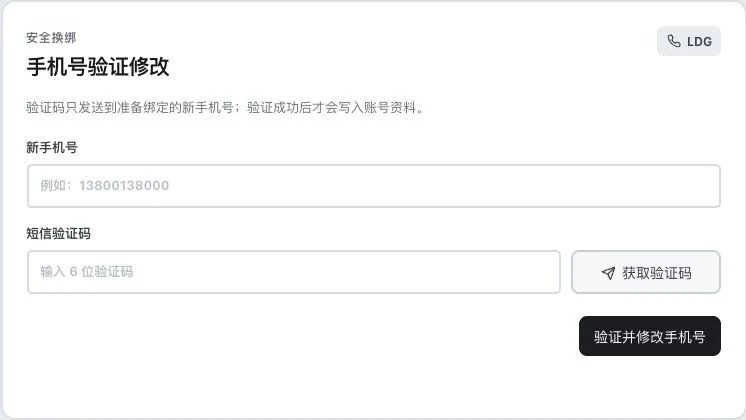
Account phone-number update entry · Real system screenshot
Original blank phone-update form. Light-colored numbers are field prompt examples. No verification code requested or entered, and no account change occurred. Successful SMS verification is not established.
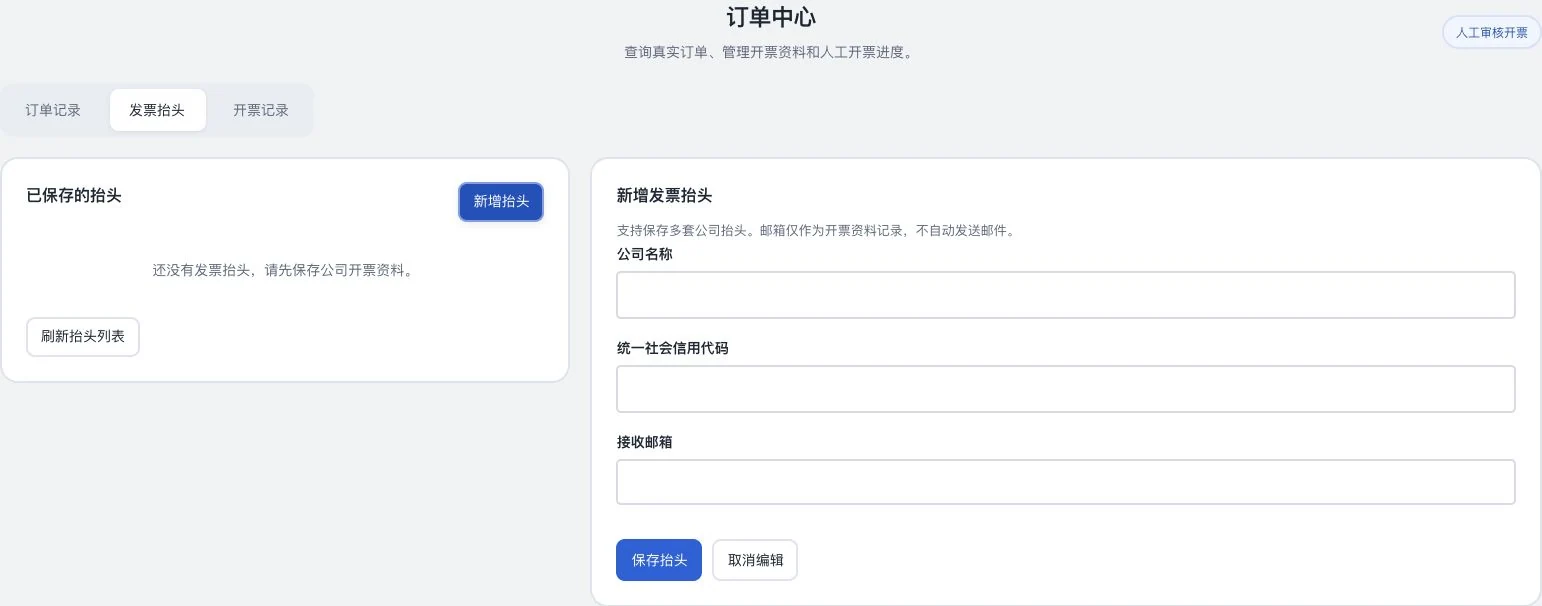
Order-center filter entry · Real system screenshot
Only order-center sections and filters are shown; actual order tables are cropped out. No order IDs, amounts, or payment details shown, and no order creation, payment, or invoice application occurred.
Company invoice-details form · Real system screenshot
Company name, Unified Social Credit Code, and email are blank. Nothing entered or saved, and no invoice application submitted. Email is retained only as billing information; this does not automatically send messages.
See these highlights
Accounts. Usage. Help. A clear entry for each.
Useful capabilities are found in each specific task.
01 / Explore more details
Prepare your identity first.
Submit company information as required and view actual review status.
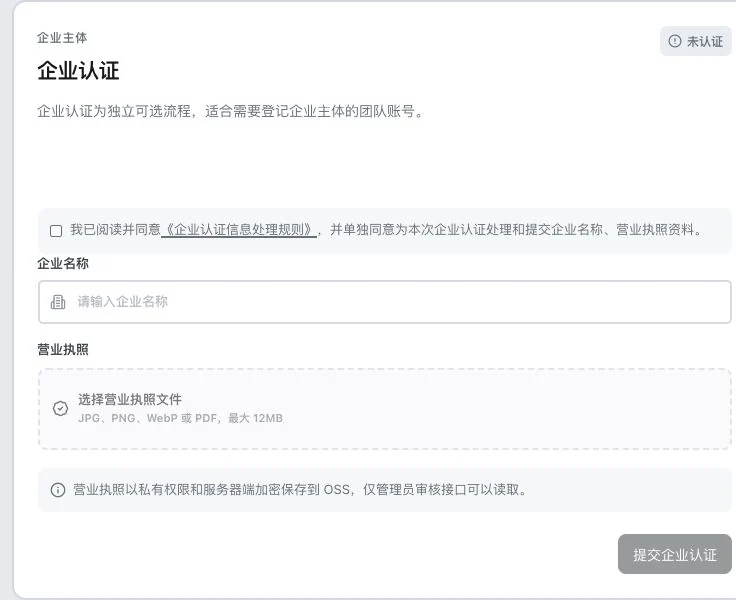
Business verification information entry · Actual interface detail
Company name is empty. No processing-rule agreement, license upload, or review submission occurred; status is unverified. The entry does not indicate verified business identity or guaranteed customer credit.
AI credits and lead credits. Dual-wallet migration and actual settlement still include items awaiting operational validation.
Features in concrete numbers
33areas
Order-related records
Orders, invoicing details and invoice records. This does not mean payments and refunds have passed operational validation.
02 / Explore more details
View usage records by field.
Time, type, change and explanation each have a place to check.
Point-transaction fields · Actual interface detail
Only original headers remain. No balance, usage details, or order records are shown. Visible fields do not establish settlement acceptance and are not a per-task token report.
Organize actual results, reproduction steps and screenshots in a ticket.
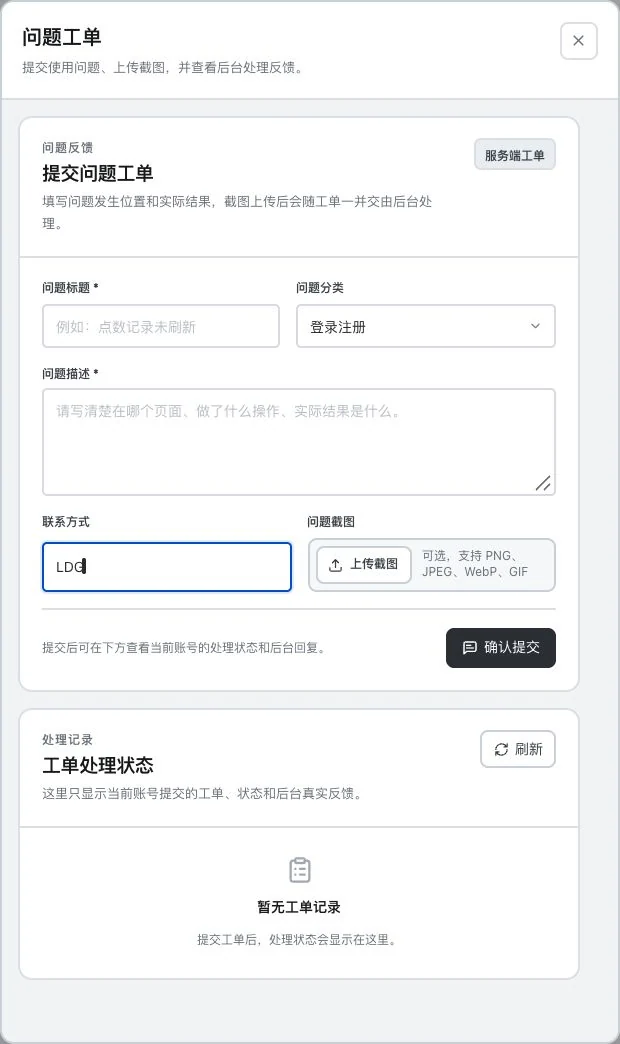
Issue-ticket input entry · Actual interface detail
Title, description, and screenshots are empty; contact is only the LDG demo mark. No upload or submission occurred and no ticket exists. A backend response or specific response time is not established.
V1–V7 are a page-rule catalogue, not entitlements already obtained by the current account.
Numbers come from current feature definitions or real interfaces. Workflow numbers explain the presentation on this page; demonstration data is not a promise of efficiency or business results.View all features and conditions
Designed for everyday work
An orderly workspace. A clear next step.
Accounts and companies. Prepare information clearly first.
Identity information and company submissions have separate entries. Continue checking actual statuses.
Check credit purposes, transactions, orders and invoices separately, with a trail for questions.
AI and lead balances and records have separate entries. AI transactions retain dates, consumption or returns, explanations and linked orders. Bring dates and task context when checking usage. Member pages show credit transactions; internal task-level Token reports have a separate management scope.
The order center separates orders, invoicing details and invoice records. Save your own details and proceed with requests, supplements or actually issued files under the relevant order status. Live merchant payments, refunds, settlement and manual invoicing fulfillment depend on operational validation.
Point-transaction fields · Real system screenshot
Only original headers remain. No balance, usage details, or order records are shown. Visible fields do not establish settlement acceptance and are not a per-task token report.
01
Distinguish the purposes
View AI and lead balances separately and confirm your entitlements under actual availability rules.
02
Trace the transaction
Locate specific records by time, type, explanation and order.
03
Match orders and requests
Link invoicing information to actual orders and continue under the current processing status.
Stop here
See only a balance change without knowing when it happened, its purpose or linked order.
Continue this way
Check category balances and transactions separately. Bring dates and task context when asking questions.
Dual-wallet release migration and actual settlement still have operational validation items. Completed payments or refunds are not promised.
Account information and help
A specific question.A clear starting point.
Bring the location, steps and actual result of a problem to the help entry.
Handle account information and company submissions in their respective entries. Login, phone verification and information review each have prerequisites. Team access depends on current roles. Company verification describes an information process, not customer credit assurance; growth levels do not mean every entitlement has been obtained.
When you need help, check preparation, steps and expected results in current instructions first. Describe the page, reproduction steps and actual screen in a ticket, then view actual statuses and replies. Response times depend on actual service.
Issue-ticket input entry · Real system screenshot
Title, description, and screenshots are empty; contact is only the LDG demo mark. No upload or submission occurred and no ticket exists. A backend response or specific response time is not established.
01
Check prerequisites first
Confirm the current account, permissions, page entry and required preparation.
02
Describe the actual problem
Explain the steps, time and actual result, with necessary screenshots.
03
Continue checking progress
Add information or continue based on replies, retaining the problem context.
Stop here
Say only "it does not work" without a location or reproduction steps.
Continue this way
Submit the page, time, steps and screenshots together, and continue around the same issue.
Help workflow example. Service status and responses depend on actual fulfillment; no unverified response deadlines are added.
Which transaction? Return to the right record.
View orders, invoicing details and invoice records separately. Match information and requests to specific orders and continue checking actual handling status. Clear records give conversations a basis.
Current entry-area count. Live payments, refunds, settlement and invoicing fulfillment depend on operational validation.
Compare to see clearly
What needs checking?Find the right record.
Examples of verification entries, not promises of payment, refunds, verification approval or human response deadlines.
What you provide, what the software helps organize and what needs confirmation next.
The task
You provide
The software helps organize
You confirm
Account information
Your identity and company information
Relevant entry forms and review statuses
Information accuracy and actual verification conditions
Usage records
Current account credits and orders
Category-specific record entries
Actual transactions, service rules and settlement conditions
Get help
Problem location, steps and actual result
Ticket and instruction entries
Submitted information and subsequent handling status
Take a closer look
Accounts. Records. Help.An entry for every task.
Check business information and usage records separately. Continue with account details, credit transactions, orders, invoices and instructions around your actual work.
Workspace illustration
Orders, invoice details, billing records. Each has a place.
OrdersInvoice detailsInvoice records
Order areaView your own status
Check types, statuses, and records separately.
Invoice detailsPrepare your invoicing information
Company name, identification information, and recipient details.
Invoice recordsContinue according to actual status
Applications, additional information, and document access.
01View your orders
02Prepare invoice details
03View the actual invoice status
The three areas are actual entry points in the order center. This blank illustration does not show actual orders, balances, or payment results.
AI and lead point categories · Real system screenshot
Only the two point-type entry points remain, without balances, actual transactions, or order IDs. No points spent or purchased and no specific entitlement confirmed. Check usage conditions in the actual account.
Order-center filter entry · Real system screenshot
Only order-center sections and filters are shown; actual order tables are cropped out. No order IDs, amounts, or payment details shown, and no order creation, payment, or invoice application occurred.
Company invoice-details form · Real system screenshot
Company name, Unified Social Credit Code, and email are blank. Nothing entered or saved, and no invoice application submitted. Email is retained only as billing information; this does not automatically send messages.
Explore every feature
Every tool. A specific purpose.
8 features, with body text directly visible. Read real interfaces alongside process notes, or open individual feature pages for more detailed inputs, outputs and examples.
01
Registration, login and account details
Implemented; configuration required
LDG-073
Your own account. Where the work begins.
Keep your identity and account information in a clear entry point.
Log in with a password or a linked, verified phone number, and edit account information through available entries. SMS login needs a ready provider and human-verification service. Submit a ticket for account issues; the current interface has no self-service password-recovery entry.
How to continue
01
Register through the current flow and choose password or SMS login.
02
Check and edit your own details in the account area.
03
For login issues, submit a help request describing the specific problem.
Use and review
SMS login depends on the provider and human verification. There is currently no self-service password recovery. Retired WeChat and QQ login methods are unavailable.
Account phone-number update entry · Real system screenshot
Original blank phone-update form. Light-colored numbers are field prompt examples. No verification code requested or entered, and no account change occurred. Successful SMS verification is not established.
Keep submissions and review progress available for reference.
Submit identity or company information under current permission requirements and view review status. Verification does not guarantee customer creditworthiness.
How to continue
01
Prepare identity or business information according to current permission requirements.
02
After submission, view review status and requests for more information.
03
Continue processing your information according to actual feedback.
Use and review
Verification only describes the relevant information process. It does not guarantee customer credit or other business outcomes.
Business verification information entry · Real system screenshot
Company name is empty. No processing-rule agreement, license upload, or review submission occurred; status is unverified. The entry does not indicate verified business identity or guaranteed customer credit.
Keep separate usage records for different purposes.
View balances and records for 2 credit types: AI and leads. The account overview also shows today's contacts, emails and tool usage. Dual wallets are a candidate delivery; migration, settlement and entitlements still need validation.
How to continue
01
View AI and lead point balances and usage records.
02
Review today’s contact, email, and tool usage overview for the account.
03
Check remaining entitlements against actual published rules.
AI and lead point categories · Real system screenshot
Only the two point-type entry points remain, without balances, actual transactions, or order IDs. No points spent or purchased and no specific entitlement confirmed. Check usage conditions in the actual account.
Use and review
Dual wallets are a proposed delivery. Official migration, settlement, and entitlements still require operational acceptance.
Charges and returns have records, providing specific references for usage issues.
View AI credit transactions in member usage records. Check dates, consumption or returns, explanations and linked orders. Task-level Token reports are not a general member page. Submit the task context to investigate usage issues.
Point-transaction fields · Real system screenshot
Only original headers remain. No balance, usage details, or order records are shown. Visible fields do not establish settlement acceptance and are not a per-task token report.
How to continue
01
View AI point transactions in the membership center.
02
Check charges or returns by time, account, type, and description; refer to the corresponding order ID when needed.
03
For a disputed use, submit a review request with its timing and task context.
Use and review
The standard member page shows point transactions. Per-task tokens and settlement status are internal-management information. Charges, returns, and exception handling follow actual rules and operational acceptance results.
Check order-related work by records and statuses separately.
The order center has 3 areas: orders, invoice details and invoicing records, showing your actual statuses. Live merchant payments, refunds and transaction-by-transaction reconciliation still await operational validation.
How to continue
01
Enter the orders, invoice-details, or invoice-records area.
02
View the orders you actually handle and their statuses.
03
When needed, check payment, refunds, or follow-up through the process.
Use and review
Actual merchant payments, refunds, and transaction-level reconciliation still require operational acceptance.
Order-center filter entry · Real system screenshot
Only order-center sections and filters are shown; actual order tables are cropped out. No order IDs, amounts, or payment details shown, and no order creation, payment, or invoice application occurred.
Clearly connect invoice information, orders, and application handling.
Save invoicing details, select your own orders and request invoices. View status, resubmit as required and download actually issued files. Operators issue tax invoices; this is not an automatic tax API and still awaits operational validation.
How to continue
01
Save your invoice details.
02
Select the relevant order and submit an invoice request.
03
Add information or resubmit according to status, and download actually issued documents.
Use and review
Tax invoices are issued by the operator, not an automatic tax API. Actual fulfillment still requires operational acceptance.
Company invoice-details form · Real system screenshot
Company name, Unified Social Credit Code, and email are blank. Nothing entered or saved, and no invoice application submitted. Email is retained only as billing information; this does not automatically send messages.
Keep account growth and entitlement conditions available for lookup.
View growth, check-ins, tasks, birthdays, coupons and referral records. The catalogue defines 7 levels, V1–V7. Actual claims and manual services depend on configuration and operational validation; undelivered benefits or returns are not promised.
How to continue
01
View growth, check-ins, tasks, and related records.
02
Check actual rules for levels, coupons, and referrals.
03
Claim or continue processing entitlements under configured conditions.
Growth-level rule directory · Real system screenshot
This is the V1–V7 rule directory, not the account’s current growth value. Discounts and entitlements depend on page configuration and pending operational acceptance. They cannot be treated as already received entitlements.
Use and review
V1–V7 are directory definitions. Actual claims and human services depend on configuration and operational acceptance. No return is promised.
Keep the problem description and handling process in one record.
Browse 76 instructions across 12 categories (source revision: 2026-09-17). Follow prerequisites, steps and results. Submit screenshots of issues and view actual handling statuses and replies. Unfulfilled response-time commitments are not made.
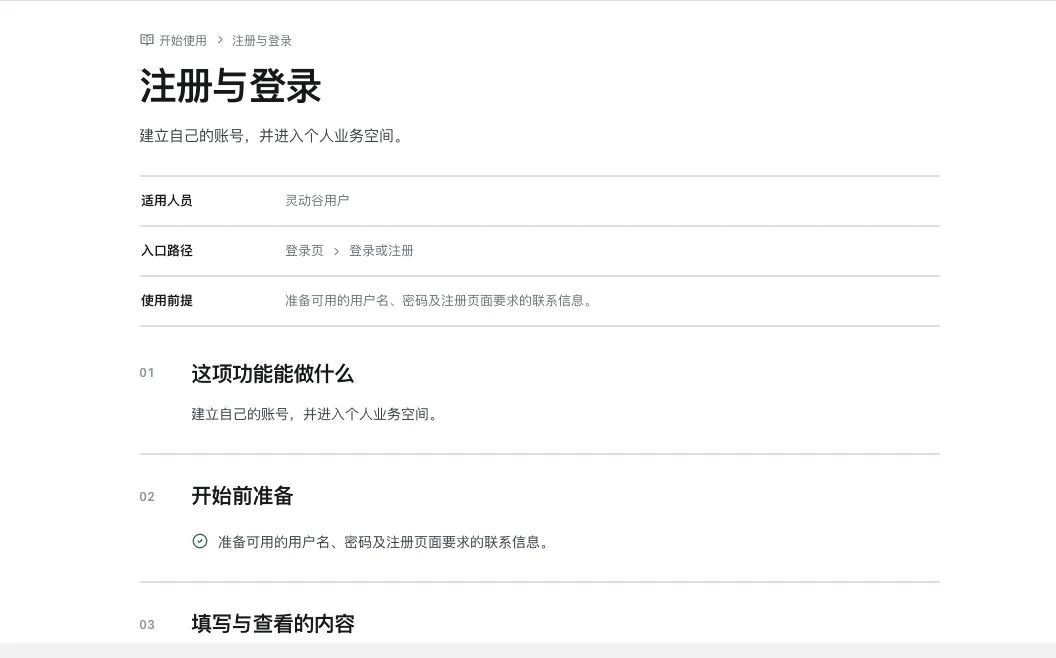
Registration and login instructions · Real system screenshot
Actual instruction body, not successful login or registration. The full instruction directory was not searched, and no registration, login, or account edit occurred.
Issue-ticket input entry · Real system screenshot
Title, description, and screenshots are empty; contact is only the LDG demo mark. No upload or submission occurred and no ticket exists. A backend response or specific response time is not established.
How to continue
01
Find prerequisites, steps, and outcomes in the categorized instructions.
02
Prepare a problem description and screenshots, then submit your own ticket.
03
View actual status and replies, and continue according to feedback.
Use and review
Instructions are revised over time. Ticket responses depend on actual service; no unfulfilled response deadline is promised.
Actual prices and entitlements are shown on current account pages. Dual wallets, payments, refunds and manual services include items awaiting operational validation and cannot be promised as delivered services.
Product facts and availability notes
This catalogue explains existing features and their conditions. Availability depends on the release, account permissions, service configuration and completed validation. Some items are internal-only or still await operational validation.