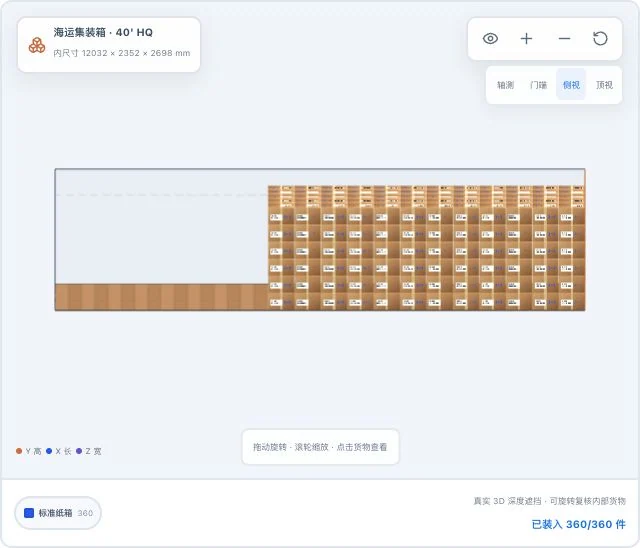
The same default demo cargo, with only the original 3D viewpoint changed. Simulated loaded quantities do not mean actual loading or safety acceptance is complete.
Real system interface
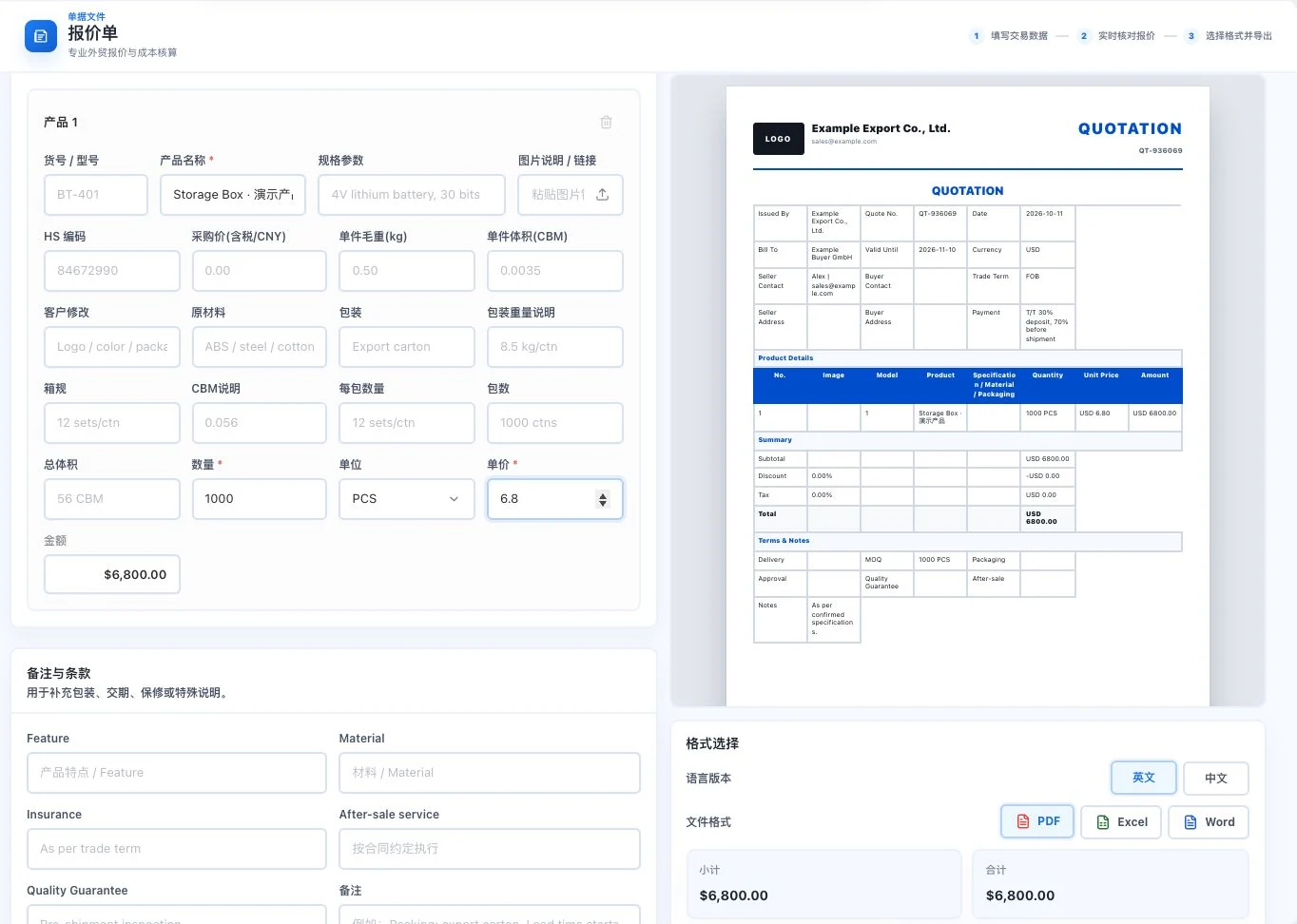
Example Export Co. and Example Buyer GmbH are demo inputs. Storage Box uses 1,000 units × USD 6.80. Preview only; no export or customer sending occurred.
Real system interface
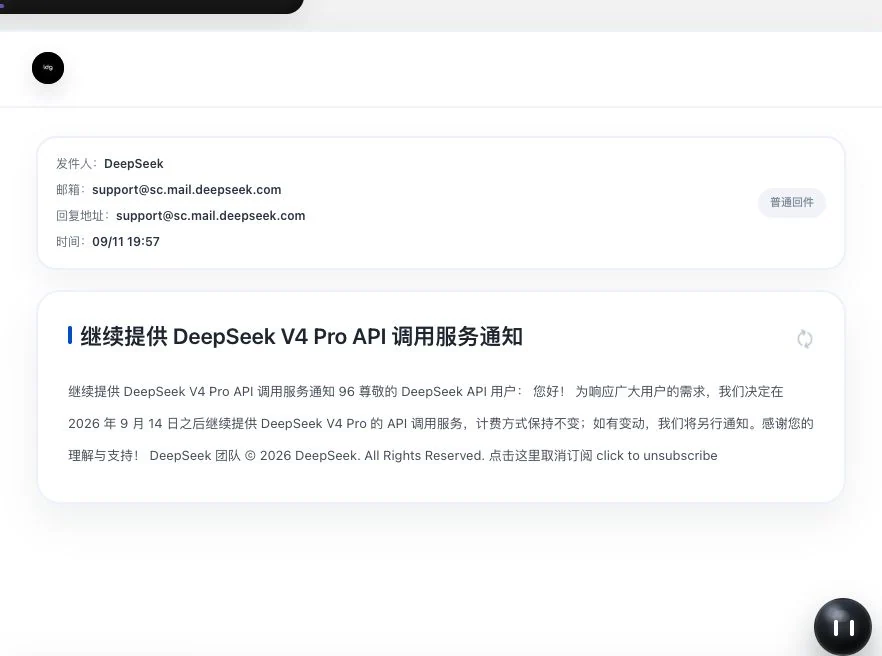
Real received screen of a public service notice. The body was still loading during capture. Only subject and summary are visible; full text or attachment reading success cannot be inferred.
Composite of real interfaces. Quotations and loading use demonstration inputs; email screens show subjects and summaries of public service notices.
The CRM and contract review you are looking for
Manage customers. Review contracts. Each has its own page.
From daily sales follow-up to transaction clause review, find the tools and specific features directly.
CRM · Customer relationship management
After finding a customer. Keep recording every step.
Six work pages manage customer profiles, communication, opportunities, tasks and reports. AI organizes suggestions first; you confirm information and next steps.
6 work pages5 reporting cycles4 report formats
AI trade tools · Contract review
Connect suggestions to the original. Compare changes clause by clause.
Set review context, locate original risk passages, record human comments, compare revisions and continue checking risk reports and passage translations.
Original-text locationComments and revisionsRisk-passage translation
To do the work well, make the priorities clear.
A starting point. And your judgment.
The first draft. AI helps you prepare.
Email, content and contract assistance starts with your business information. Editable drafts remain for you to check further.
Every product has its own presentation page. Explore real screens, operational details and usage conditions together.
88Product work areas
8181Individual feature pages
8585Complete audit entries
Page and directory counts describe how features are organized. Actual availability depends on version, permissions, service configuration and acceptance.
01Xunqi and CRM customer management
Open the market.Find the right customer.
From markets, companies and contacts to your customer records. Every stage of progress has a place to continue.
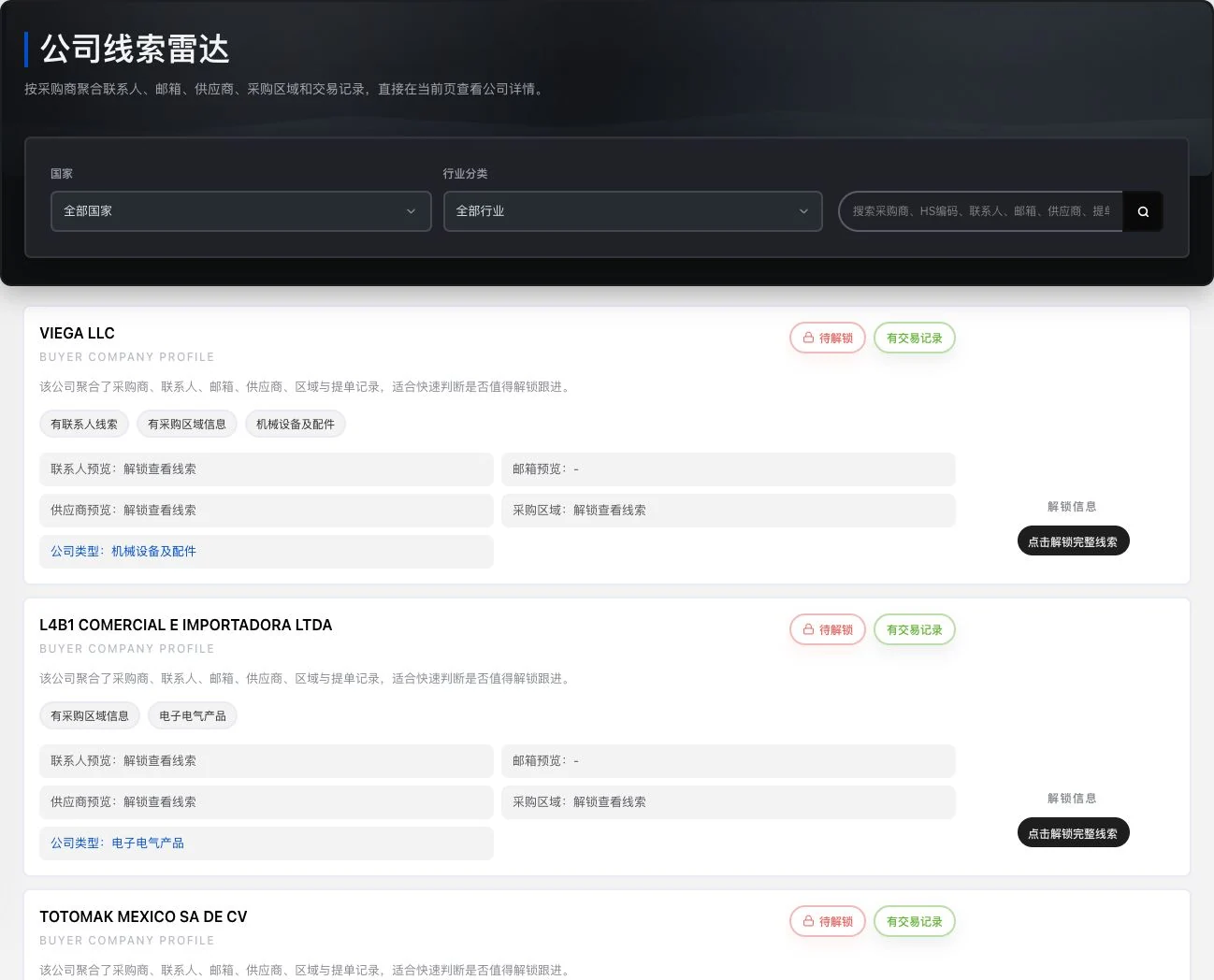
Current company preview. Contacts, emails, and trade details still require unlocking. No unlock occurred. Existing-record labels do not prove current buying needs, customer relationships, or closed sales.
66typesCustomer work queues
All active, needs attention, overdue, not contacted, no opportunity and no next step.
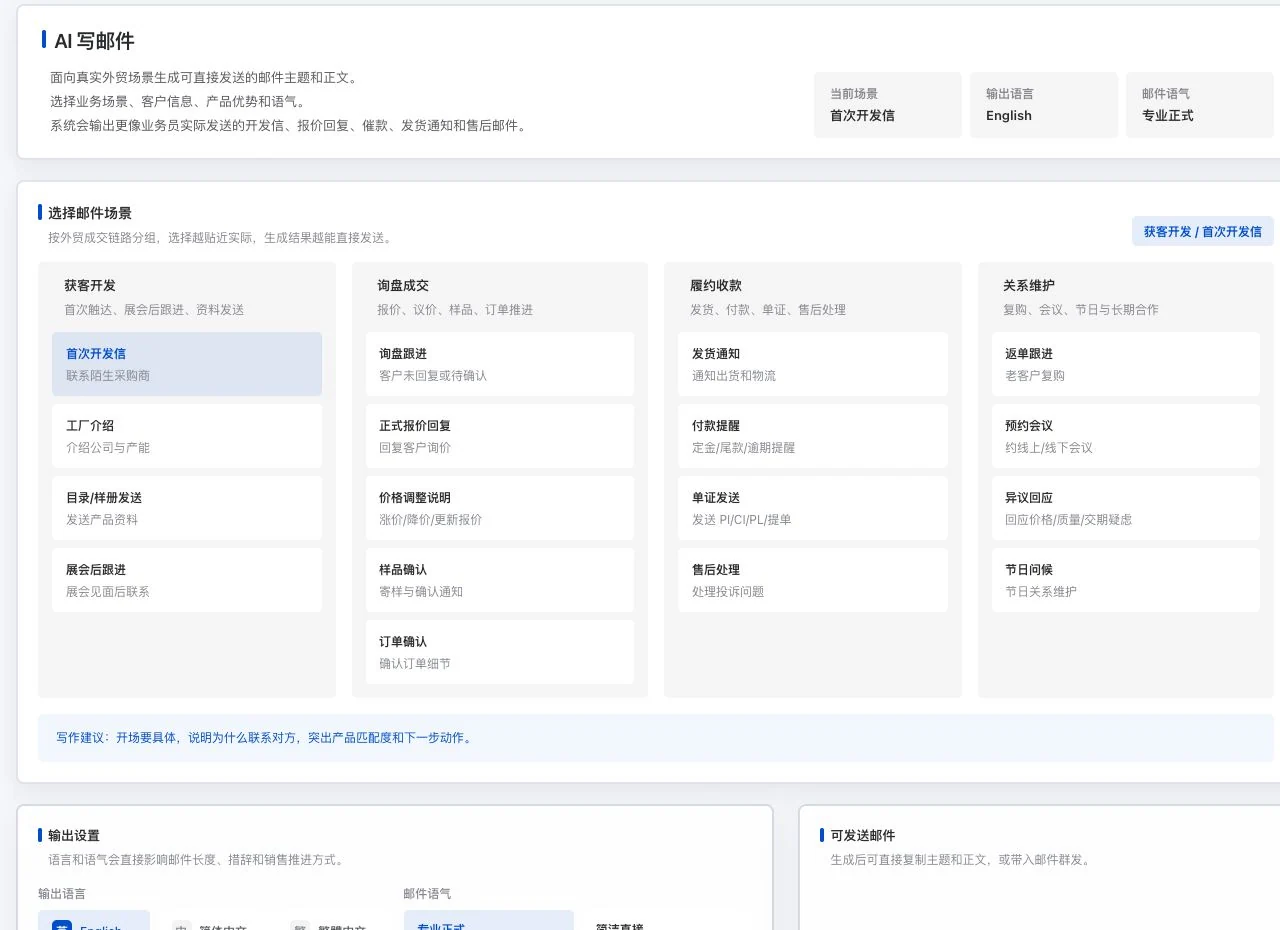
Original interface with initial outreach selected. No email has been generated. 17 is the current scenario count, not acceptance of model results or sending performance.
1717itemsEmail business scenarios
Number of options. Generation requires available models, accounts and services.
Example Export Co. and Example Buyer GmbH are demo inputs. Storage Box uses 1,000 units × USD 6.80. Preview only; no export or customer sending occurred.
33typesQuotation file formats
PDF, Excel and Word. Actual exports depend on account and service conditions.
The same default demo cargo, with only the original 3D viewpoint changed. Simulated loaded quantities do not mean actual loading or safety acceptance is complete.
33viewsThe same loading plan
Actual overall, side and door-end screenshots are available. On-site review is still required.
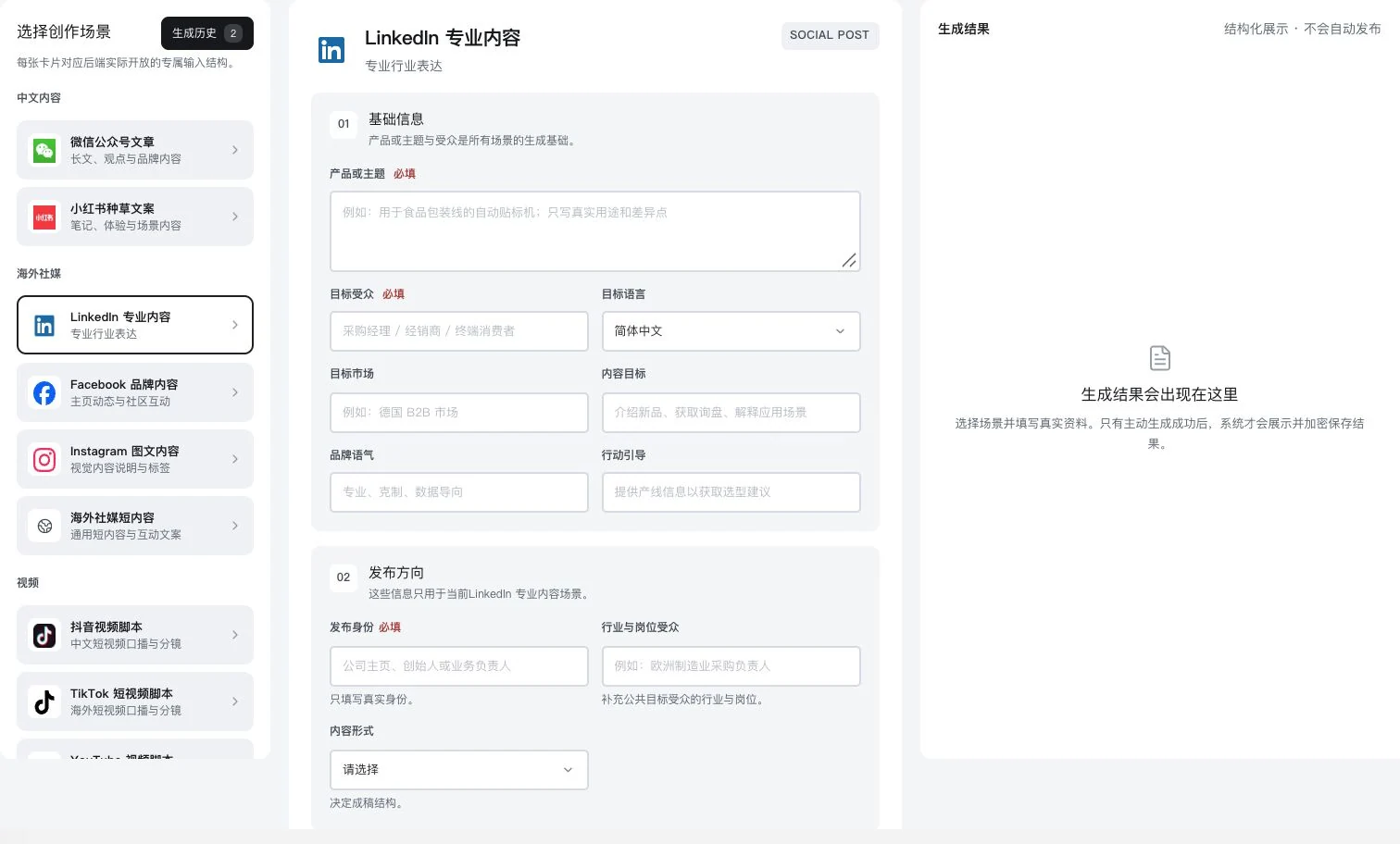
Original dedicated form with product and publishing direction blank; no result generated. No AI call, saving, publication, or LinkedIn account connection occurred.
1313typesContent creation scenarios
From articles and social posts to emails and videos. You review the final draft.
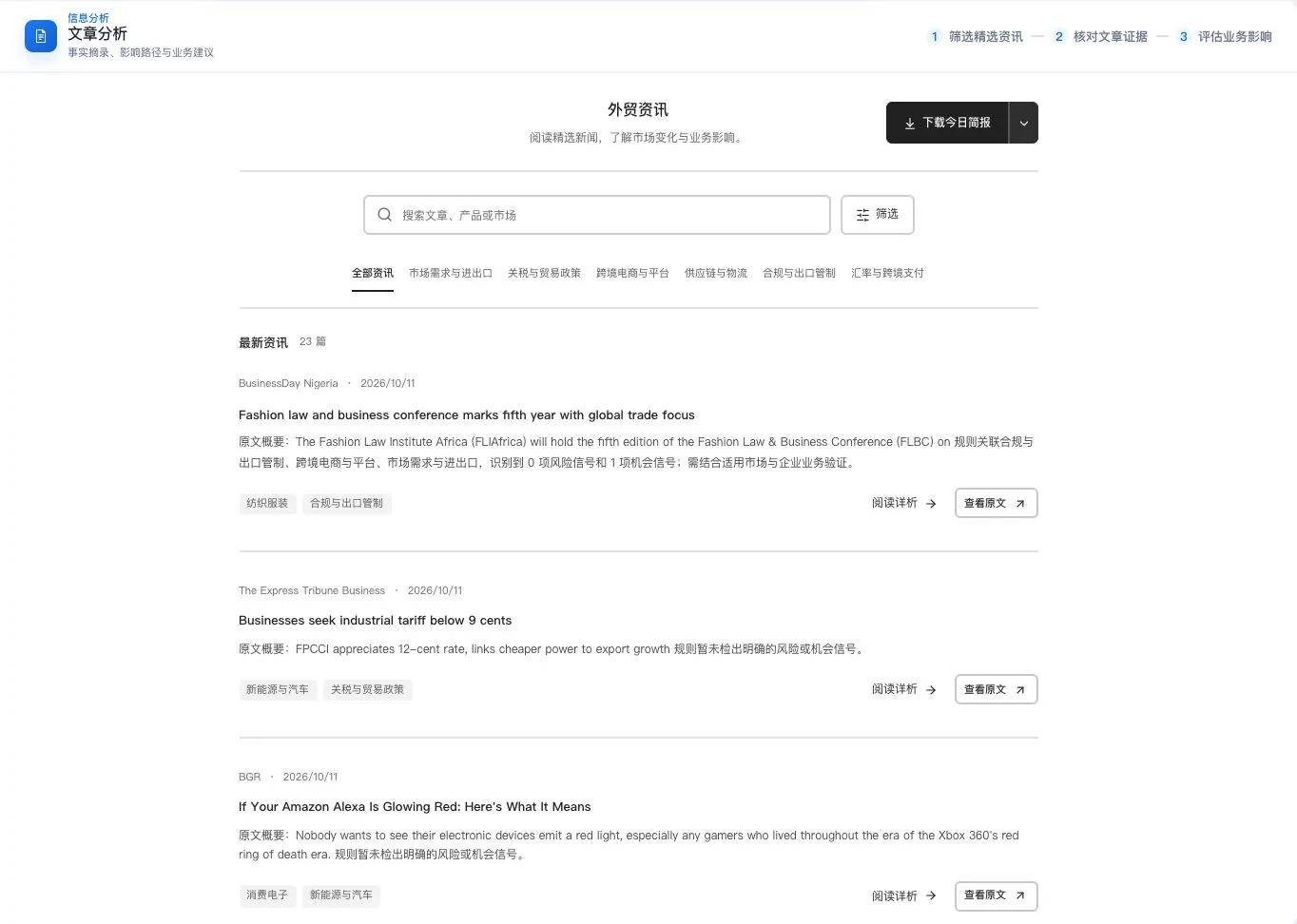
Real update list and sample summaries at capture. No originals were opened or new analysis generated. Entry counts and rule signals do not establish verified source facts or comprehensive industry coverage.
44itemsBusiness news perspectives
Overview, articles, countries and regions, products and trade topics. Not a complete market view.
Only order-center sections and filters are shown; actual order tables are cropped out. No order IDs, amounts, or payment details shown, and no order creation, payment, or invoice application occurred.
33areasOrder-related records
Orders, invoice headings and invoicing records, with separate availability conditions.
Calculated by multiplying current option counts. This describes settings, not ready-made templates, generated quality or outreach performance.
Complete features and conditions
Understand the scope. Then start your own work.
81 features have individual detail pages. The complete 85-item audit directory below includes 4 additional internal or supplementary descriptions.
85 directory descriptions
This catalogue explains existing features and their conditions. Availability depends on the release, account permissions, service configuration and completed validation. Some items are internal-only or still await operational validation.
Find and organize company information
Narrow the search. See the company clearly.
8 items · All visible
Find leads in contact, company, regional, exhibition, email and phone information. Also view WeChat groups and cargo listings. Data comes from the currently imported database; verify contact details, sources and freshness.
LDG-001Implemented; configuration required
Filter company information
Find companies by market, product and available fields, then view contacts, emails, supply-chain information and existing trade records. Data volume, regional coverage and freshness depend on the current database.
View contact roles, companies, regions and existing contact details to decide whom to check next. LinkedIn fields do not imply official partnership, purchasing authority or willingness to be contacted.
Select a country, narrow by city and category, and view websites, addresses and existing contact details. A selectable directory does not mean company records exist for every region.
Search imported information for Canton Fair and other exhibition companies, and view existing contact records under unlocking rules. This does not imply official exhibition authorization or current participation.
View existing information in email and WhatsApp-number panels. Emails can link to exhibition, contact and regional sources. Users verify phone reachability, sources and the basis for contact.
Find WeChat groups by industry and region and view sources and available QR codes. Also view cargo listings and company trade records. Check group information; historical records are not current inquiries.
Save companies and contacts for later, or download a template, import your own lead list and manage records. Your own lead-list import and customer-record preview import are separate features.
View individual or batch information under account rules and check lead-credit records. Dual-wallet release migration and actual entitlements still require validation.
6 work pages cover business overview, customer management, opportunities, sales reports, AI customer analysis and information import. Connect information, conversations and tasks. AI suggests updates; you check and confirm what to save.
LDG-009Implemented; configuration required
Customer business overview
View saved customers, opportunities, tasks, regional distribution and work patterns to plan the day. Charts use current records and do not infer unrecorded offline activity.
Save companies, contacts, emails, phone numbers, tags, owners and customer company details. Record 7 stages from new customer to sale. A WeChat ID field does not provide chat integration.
Review recorded or synchronized conversations and business actions chronologically. Customer details contain 4 areas: timeline, opportunities, next actions and customer information, helping the work continue.
Save the customer's words, then ask AI to suggest customer updates, opportunities and next steps. Edit suggestions individually and choose what to save. Manual conversation records do not send messages, and inquiries are not counted as sales.
Find work in 6 queues: all active, needs attention, overdue, not contacted, no opportunity and no next step. View individual customers or batch analysis tasks. Review AI suggestions; they do not establish buying intent.
Move through 4 active stages: need discovery, qualification, proposed quotation and negotiation. Keep events and confirm won, lost or archived outcomes. Quoted amounts are counted separately from sales.
Assign tasks, deadlines, priorities and owners, and record conclusions on completion. Preview customers matched by reminder rules, then manually run them to generate internal tasks. This does not mean external SMS is enabled.
Invite members, accept or decline invitations, revoke invitations or leave. Assign customers to owners. Current team roles control what salespeople and managers can see and do.
Paste information or select CSV, TSV or TXT files. Preview and edit first, then confirm import. Files are limited to 5 MB. Rules parse tables; AI recognition of unstructured information requires a ready service.
Compare differences between possible duplicates and confirm the target before merging linked records. Uncertain customer matches are not merged automatically.
Save your company, customer company and default transaction fields for later quotations and documents, reducing repeated entry. Confirm amounts, payment and shipping conditions for every new transaction.
Organize recorded activity across 5 periods: daily, weekly, monthly, quarterly and yearly. Export in 4 formats: PDF, Word, Excel or CSV. Check reporting definitions; reports do not replace a company audit.
Synchronize conversations from connected mailboxes or file selected emails under customers. WhatsApp synchronization needs separate entitlements. Channels must be authorized and ready; verify unmatched identities first.
3 work pages cover email management, outreach emails and email configuration. Configure your mailbox, prepare outreach, read replies and handle tasks. Actual messaging needs a mailbox, channel permissions and validated provider connections.
LDG-022Implemented; configuration required
Your own receiving and sending accounts
Configure, test, switch or delete your own email accounts. Receiving uses IMAP and sending uses SMTP. Actual provider permissions are required; a successful connection test does not authorize bulk sending.
Generate and edit outreach subjects and body text from product facts. Copy or transfer drafts into outreach, choose existing templates, add attachments and check recipient sources. Sender-identity templates differ from body templates; generating a draft does not send it.
View received, sent and saved emails. AI provides 5 types of assistance: summaries, labels, translation, reply drafts and highlight marking. Drafts can include sender identity and requirements; edit before sending. Models and mailboxes must be ready.
Record the basis for contact, then check recipients, body text, attachments, blocks and unsubscribes. Recheck after changing content. Passing checks does not guarantee delivery or inbox placement.
For operators to check the sources and processing basis of unfamiliar company lists. Users still confirm sending after review. This route is unavailable for lists of individuals or unknown entities.
Process queues using available channels, remaining quotas and sending intervals. View tasks, sent messages and exceptions. After receiving mail, replies can stop subsequent outreach. Actual channels still await operational validation.
View task history and progress, and pause, resume or cancel remaining sends. These controls apply to pending tasks; messages already handed to providers cannot be recalled.
Save unsubscribed, bounced and blocked addresses to avoid contacting people who opted out. Reimporting does not automatically remove restrictions. Check actual statuses separately for provider acceptance, delivery and replies.
5 work pages cover conversations, channel numbers, templates, history archives and login settings. Choose a connection route for your own account. Connections, messages and AI assistance depend on authorization, entitlements and ready channels.
LDG-030Awaiting operational validation
Connection routes and conditions
View 2 routes: Web and Alibaba Cloud ChatApp. Web uses unofficial automation. ChatApp requires your business and number and is subject to templates, the 24-hour window and channel fees.
Pair by QR code or phone number. Switch, restore or delete your own login accounts, and configure and test connections as required. Entitlements and running services are needed; network configuration cannot guarantee an unrestricted account.
View conversations, media and history in your own account. ChatApp supports variable templates and upstream reviews; Web has no official template center. HTTP callbacks need public reachability. Use receipts to check delivery.
Select messages yourself for translation, analysis or replies. Single-message translation uses the selected text. Replies can include up to 8 recent messages of up to 800 characters each. Analysis can synchronize CRM first, then request drafts for human confirmation. AI configuration and credits are required.
27 tools across 6 categories: information analysis, loading and packaging, quotations and funds, documents, risk and inspection, and market timing. View evidence, calculate conditions and prepare files. Calculations and outputs require actual information and human review.
LDG-034Implemented; configuration required
Business information overview
View impacts, risks and opportunities across 6 dimensions: orders, costs, delivery, market access, channels and payments. Defaults to the last 7 Beijing-time calendar days. Current news samples do not represent the entire market.
View summaries, factual excerpts, business impacts and verification actions. Retain sources, dates and original numerical statements, and open sources to check. Evidence gaps are explicitly noted when text is insufficient.
View recent reports, risks, opportunities and sources by market, distinguishing known information from items to verify. Report counts do not represent market size, demand or risk probability.
8 views cover categories, topics, product-market co-occurrence, numerical sources, events, actions, keywords and evidence gaps. Original links are retained; mention counts are not sales or search popularity.
Review 3D layouts, order, volume, weight and center-of-gravity references by cargo and container type. Export plans as CSV. Actual dimensions, load capacity and loading safety need review.
Compare carton layers, orientation, count, load capacity and height. View up to 8 valid candidates and export results. 8 is the candidate limit; actual physical stability is not validated.
Calculate carton counts and volume from carton specifications, dimensions and container or truck conditions, then view the loading preview. Check inputs against actual goods; results do not replace on-site loading confirmation.
Break down costs under different international delivery terms. View details and copy or export tables. This estimate does not directly generate a quotation PDF.
Estimate differences in tied-up funds using payment periods, rates and payment conditions. Results do not provide credit approval or guarantee payment.
Find product classification and tariff-source links, then check the applicable market and conditions. Complete worldwide tariff coverage is not promised.
Enter products, quantities, currency and transaction terms. Preview Chinese or English quotations and export PDF, Excel or Word. Internal costs stay out of customer files and do not overwrite customer unit prices. Export depends on account conditions.
Prepare discounts, returns or error adjustments related to an original commercial invoice. Both parties must still confirm transaction, financial and tax treatment.
Quickly enter basic transaction information and preview invoices and packing lists for printing. Output scope is explained separately from professional document templates.
Look up sample sizes and acceptance and rejection counts for normal single sampling. Actual inspection follows the quality agreement and applicable standards.
5 entry points cover content creation, search growth, Facebook advertising plans, content distribution and contract review. Turn product facts into drafts and create projects you can check. Models, usage configuration, data authorization and human review are required.
LDG-061Implemented; configuration required
13 content draft scenarios
The interface catalogue includes 13 scenarios such as WeChat Official Accounts, Xiaohongshu, overseas social media, email, video scripts, SEO, product listings and exhibition invitations. Enter product facts and references, then generate under backend availability. Not every listed scenario is callable.
View, copy, save drafts encrypted and reopen them. Growth projects can also export ZIP files. The distribution directory has 52 official links: 22 domestic and 30 overseas. Sign in and publish yourself; these are not 52 automatic publishing APIs.
Proceed through 7 workflow pages: information, site evidence, data, topics, production, quality and publication, and review. Keep keywords, per-article tasks, sources, reviews, versions and publication evidence. AI and data configuration are required. Indexing and rankings are not guaranteed.
8 workflow pages cover information, business goals, data, insights, strategy, creative, budget experiments and execution review. Compare order costs, audiences, assets and stop conditions. Without historical data, only estimates are made; advertising is not launched automatically.
Connect Meta, Search Console or SerpApi, verify permissions, and view synchronization, retries, cancellation and source records. Read only your authorized data. Platform approval, quotas and actual connectivity still require validation.
Import your own product CSV and view business results in a common currency. Separately observe actual keyword rankings and sources. This is not competitor sales data and does not guarantee search exposure. Connections and information need validation.
Standardize currency, time zone, conversion and attribution definitions. Analyze objects and dates in batches from a fixed snapshot. View tasks, stop or resume failed batches, and export JSON. Actual accounts, data and models still await operational validation.
Contract library and risk location in original text
Upload, search and manage readable contracts. Set jurisdiction, position and key clauses, filter risks and return to original highlights. Long text can be batched; scans need OCR first. Analysis does not replace legal advice.
Record item-level and overall human comments, save progress and history, generate revisions from risks, and download annotated or revised PDF/Word files. Whole-contract revision is prohibited for long contracts processed in batches. Text validation is not legal approval.
Translate existing risk reports and display translations by corresponding paragraph, retaining access to the original without overwriting it. This is not whole-contract or certified translation. A generated report and available model are required.
3 directories cover courses, articles and software resources. Learn from or obtain currently published material. Each entry specifies quantities, sources, permissions and access conditions.
LDG-071Implemented; configuration required
Courses, articles and software material
Find currently published material in 3 directories: courses, articles and software. View sources, versions or platforms and permitted access links. Counts change with actual publication. Listing a link does not establish ownership of all copyrights.
Read the current body text and confirm AI usage before generating summaries, key points and keywords. Insufficient text is flagged. Summaries depend on the current body and do not replace original fact checks or permission to use it.
View account information, usage and order status. Prices, entitlements, manual services and payment availability depend on actual configuration and operational validation.
LDG-073Implemented; configuration required
Registration, login and account details
Log in with a password or a linked, verified phone number, and edit account information through available entries. SMS login needs a ready provider and human-verification service. Submit a ticket for account issues; the current interface has no self-service password-recovery entry.
Submit identity or company information under current permission requirements and view review status. Verification does not guarantee customer creditworthiness.
View balances and records for 2 credit types: AI and leads. The account overview also shows today's contacts, emails and tool usage. Dual wallets are a candidate delivery; migration, settlement and entitlements still need validation.
View AI credit transactions in member usage records. Check dates, consumption or returns, explanations and linked orders. Task-level Token reports are not a general member page. Submit the task context to investigate usage issues.
The order center has 3 areas: orders, invoice details and invoicing records, showing your actual statuses. Live merchant payments, refunds and transaction-by-transaction reconciliation still await operational validation.
Save invoicing details, select your own orders and request invoices. View status, resubmit as required and download actually issued files. Operators issue tax invoices; this is not an automatic tax API and still awaits operational validation.
View growth, check-ins, tasks, birthdays, coupons and referral records. The catalogue defines 7 levels, V1–V7. Actual claims and manual services depend on configuration and operational validation; undelivered benefits or returns are not promised.
Browse 76 instructions across 12 categories (source revision: 2026-09-17). Follow prerequisites, steps and results. Submit screenshots of issues and view actual handling statuses and replies. Unfulfilled response-time commitments are not made.
The public-interest module is explained separately and is not a commercial benefit of buying software. Sharing public information and images requires checking sources, current status and permissions.
LDG-081Awaiting operational validation
Public-interest information with sources
Find public information by name, region or source ID, then check the original source. There are also 4 public-interest source links. Links do not imply institutional partnerships. Verify permissions and current status; photos are not for commercial advertising.
LDG-082Awaiting operational validation
Public-interest poster editing and PDF
Select permitted information, edit the current poster, restore source wording and lay out 1, 2 or 4 posters per page. Preview and download PDF with source IDs retained. Check the latest status and permission before printing or sharing.
Internal operations and access management
For operational maintenance, not customer package marketing.
2 items · All visible
The backend manages information, configuration and key events. These are internal management functions; controls in source code do not establish external security certification.
LDG-083Internal management
Operations backend
For operators to manage information, accounts, models and order configuration. It is not sold as a complete customer-facing finance or enterprise resource planning system.
LDG-084Internal management
Private files and key event records
Handle private files and credentials under account permissions and retain key events. When users actively use AI, selected information is sent to the actual model provider.
Conversation assistance in the browser
Understand the message. Check the reply.
1 items · All visible
The browser extension requires separate installation and authorization. Actual account compatibility and distribution status need validation. It is not marketed as an official WhatsApp extension.
LDG-085Awaiting operational validation
Web translation and reply checks
Translate selected messages, draft replies and check unintended Chinese-language sends in WhatsApp Web. Requires extension installation, authorization, page compatibility and actual account validation.