Write a better email
Your first draft can start with something.
Prepare outreach and reply drafts from customer context and product facts. Check prices, lead times, and recipients yourself.
Explore AI emailLingdonggu
AI helps you prepare. Keep customers and next steps moving.
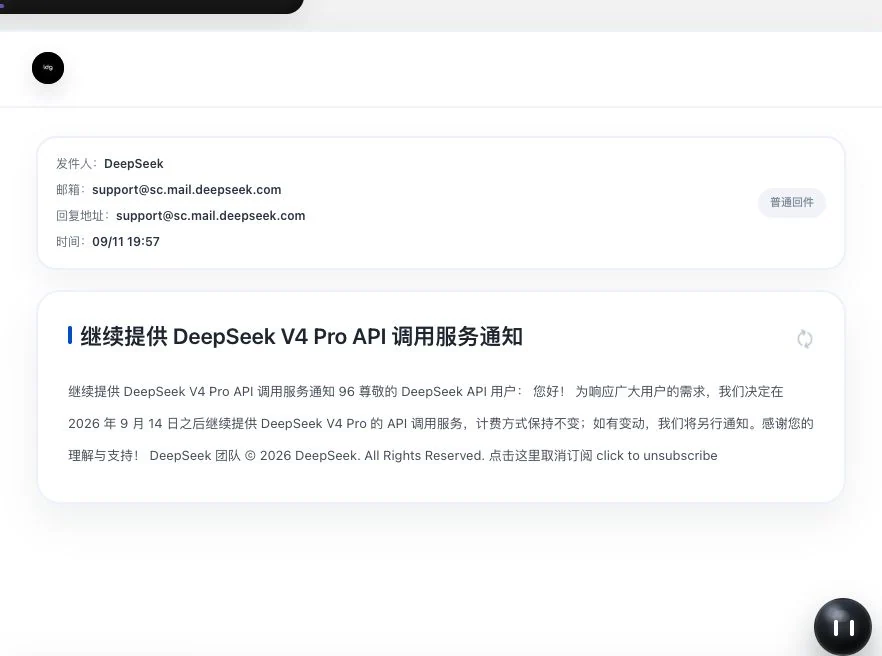
Real product screens · Calculations use sample inputs; email is publicly received correspondence
Meet Lingdonggu at a glance.
Customers, email, quotations, loading…
Find the right starting point for the work at hand.
Each feature has its own detail page.
Purpose, steps, and requirements, all in one place.
Company, contact, country, and industry.
Four types of information to start your outreach draft.
With the service running, public updates keep being organized.
Original text, business impact, and next steps in one place.
76 built-in guides across 12 categories.
From finding the entry point to following the steps.
124 hours describes a continuously running service scenario, not measured round-the-clock availability or a real-time monitoring commitment. Updates are collected on a six-hour schedule. AI organization requires internet access, reachable sources, actual model configuration, and available quota.
20 means built-in instructions require no separate guide purchase. It does not mean the software, membership, AI, or external services are free. Guides were revised on September 17, 2026.
Product snapshot: October 11, 2026. One selection refers to bringing unlocked customer information into email preparation. AI drafts, sending, and subsequent outreach require review and confirmation. Four supplementary areas sit outside the core features, bringing the full directory to 85 entries.
Lingdonggu AI
Draft outreach first. Organize customer information first. Check contract clauses first. Give your next step a clearer starting point.
Hello,
Could you share the specifications and available packaging options?
We would also like to confirm the sample process before deciding on an order.
Thank you.
Use the actions above the email to view a summary, translation or editable draft. You can also save the email or highlight the original.
All changes are simulated on this page. Reset whenever you like.
The six actions simulate a fictional email with preset content on this page. No AI requests, mail storage or sending occur. Draft edits remain when switching actions and are cleared by reset. Counts reflect current product options.
Write a better email
Prepare outreach and reply drafts from customer context and product facts. Check prices, lead times, and recipients yourself.
Explore AI emailOrganize a conversation
Organize communication into customer information, opportunities, and action suggestions. Review, edit, and confirm to give follow-up a starting point.
Explore AI customer organizationUnderstand contract clauses
Risk suggestions correspond to original contract sentences. Retain human feedback and compare revisions to see what needs confirmation.
Explore contract reviewAI, cloud services, and communication tools
From intelligent preparation to continued customer communication.
Models, development tools, and platforms each have a purpose.












Logo scrolling pauses when hovered or keyboard-focused. With reduced motion enabled, all brands appear in a static layout.
WeChat supports content entry points and customer information; QQ supports email connection. Codex is a development-tool reference, while Xiaomi MiMo is a model showcase with system integration currently unverified.AI use depends on the task and actual configuration. Relevant information is submitted to the service configured for that task. Logos do not indicate an official partnership.
Learn how to use and check AIXunqi · Lead discovery
Find companies and contacts through countries and cities.
Your next contact starts with understanding.
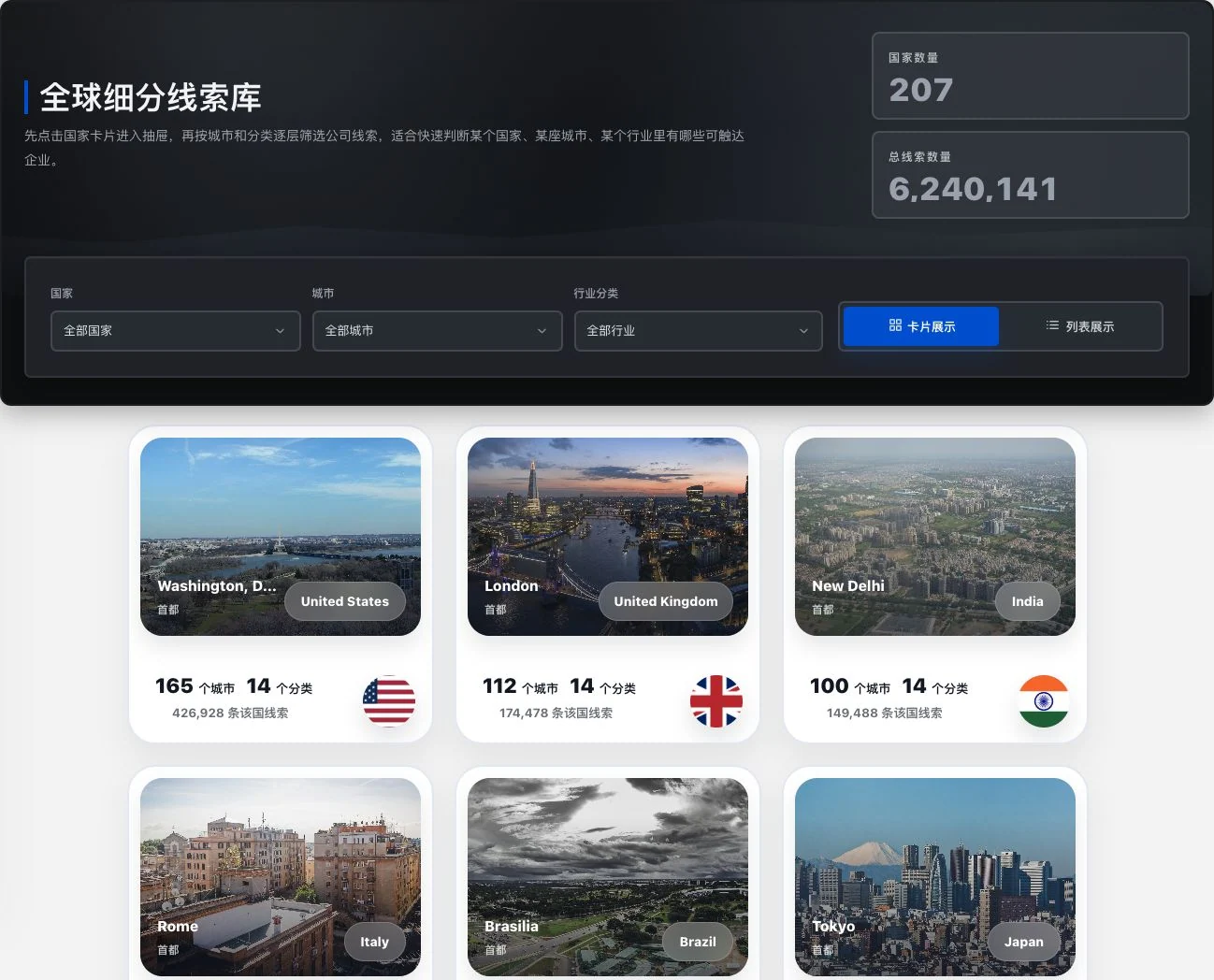
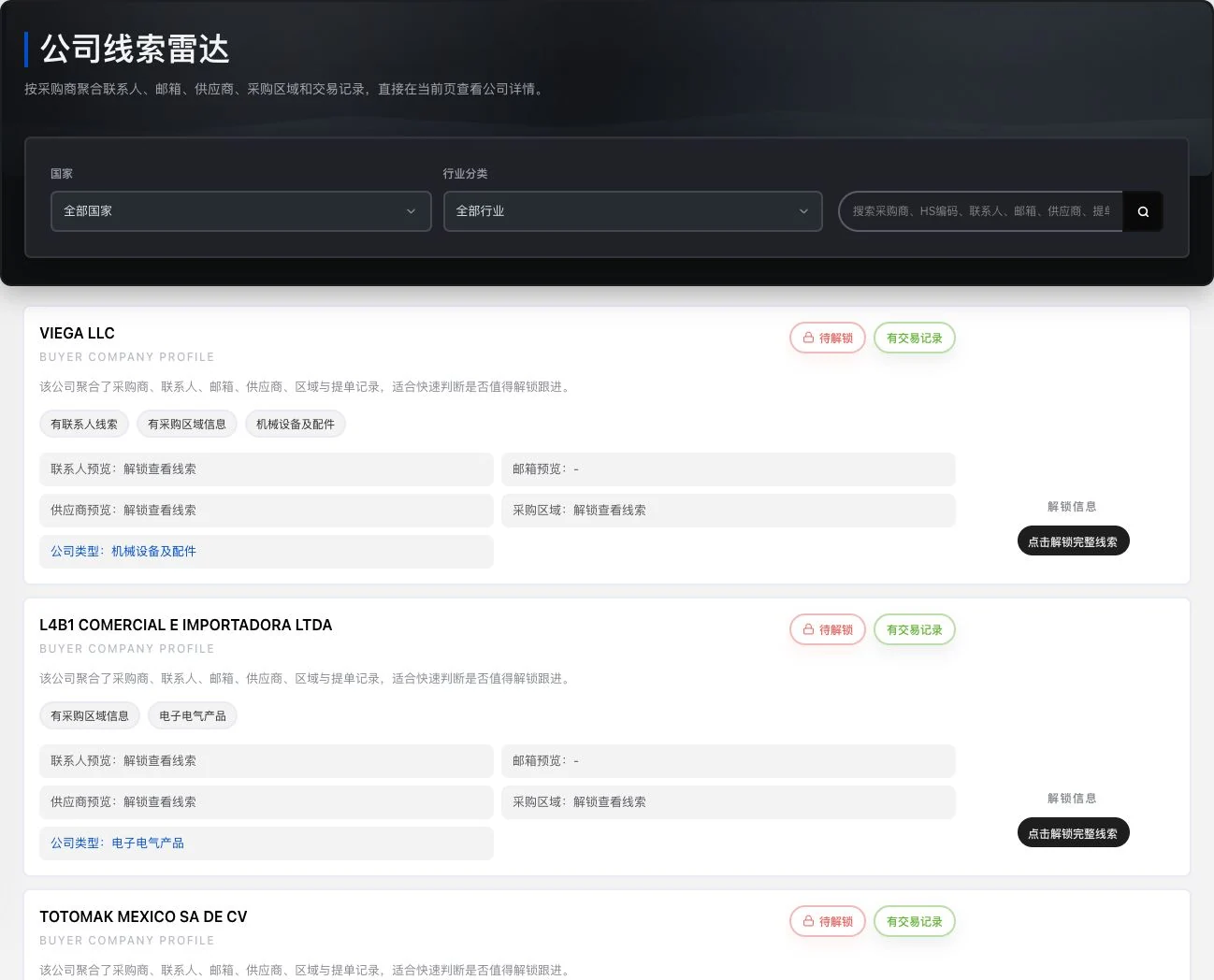
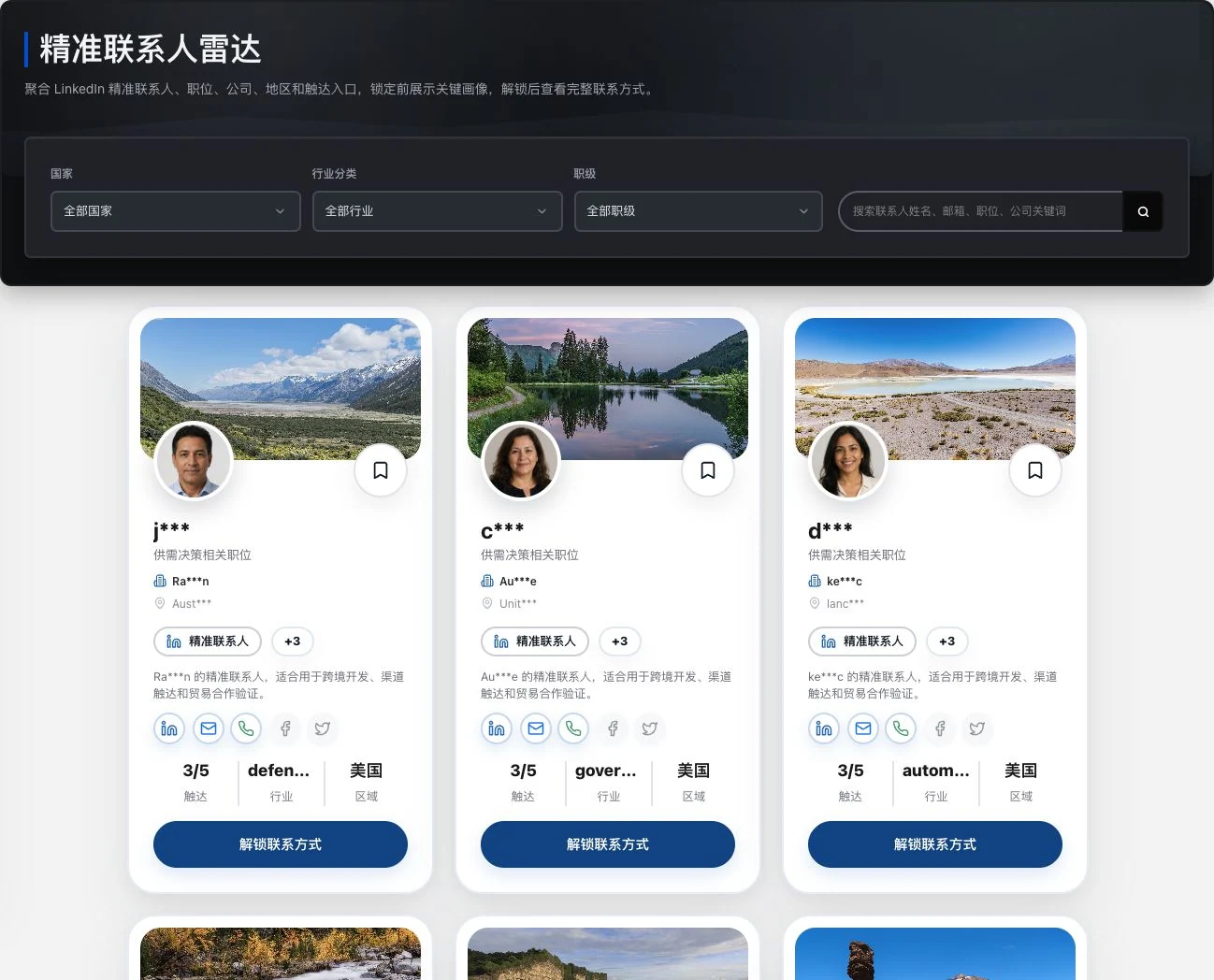
01 / 03 · Markets and cities
Choose a country, then continue by city and category.
See this feature1207 is the number of country directory entries.22,122 is the total across 13 pages of the unfiltered directory on October 12, 2026. It includes cities, regions, and unlabeled entries, and is not the official global number of cities.350,000+ new leads daily is data provided by the operator on October 12, 2026, without independent statistical verification. The reporting period and deduplication definition remain to be supplied. Screens are real crops captured on October 11, 2026. Verify information before contacting leads.
See it first. Explore it next.
Switch scenarios and see the real interface in action.
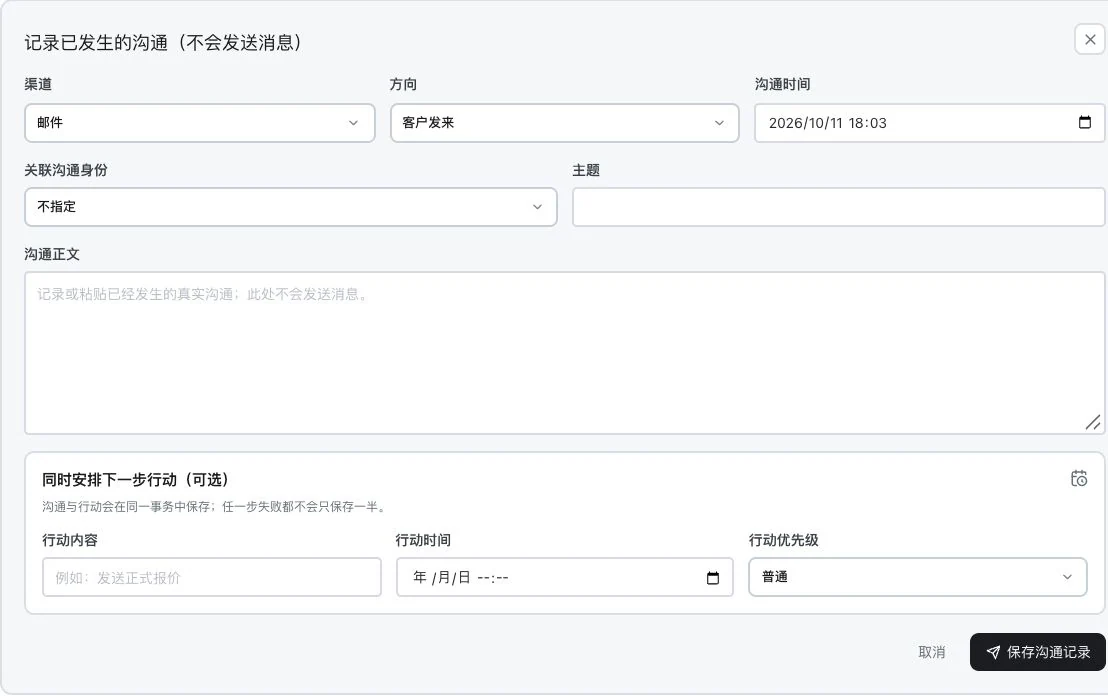
Keep contact methods, the customer’s words, and follow-up items together. Continue from existing records on your next follow-up.
Open product pageSubject, body, and actions are blank. No record saved or task created. This shows the original input entry only. It does not send messages and contains no AI analysis result.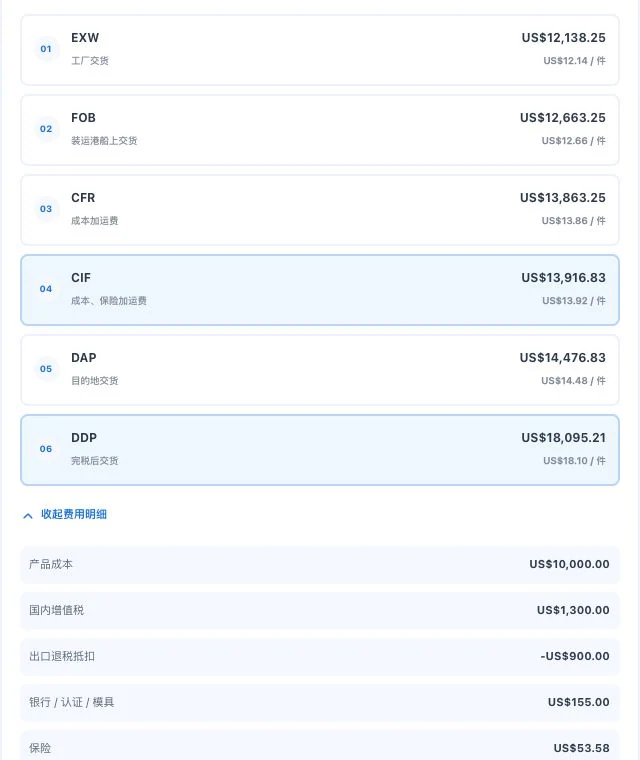
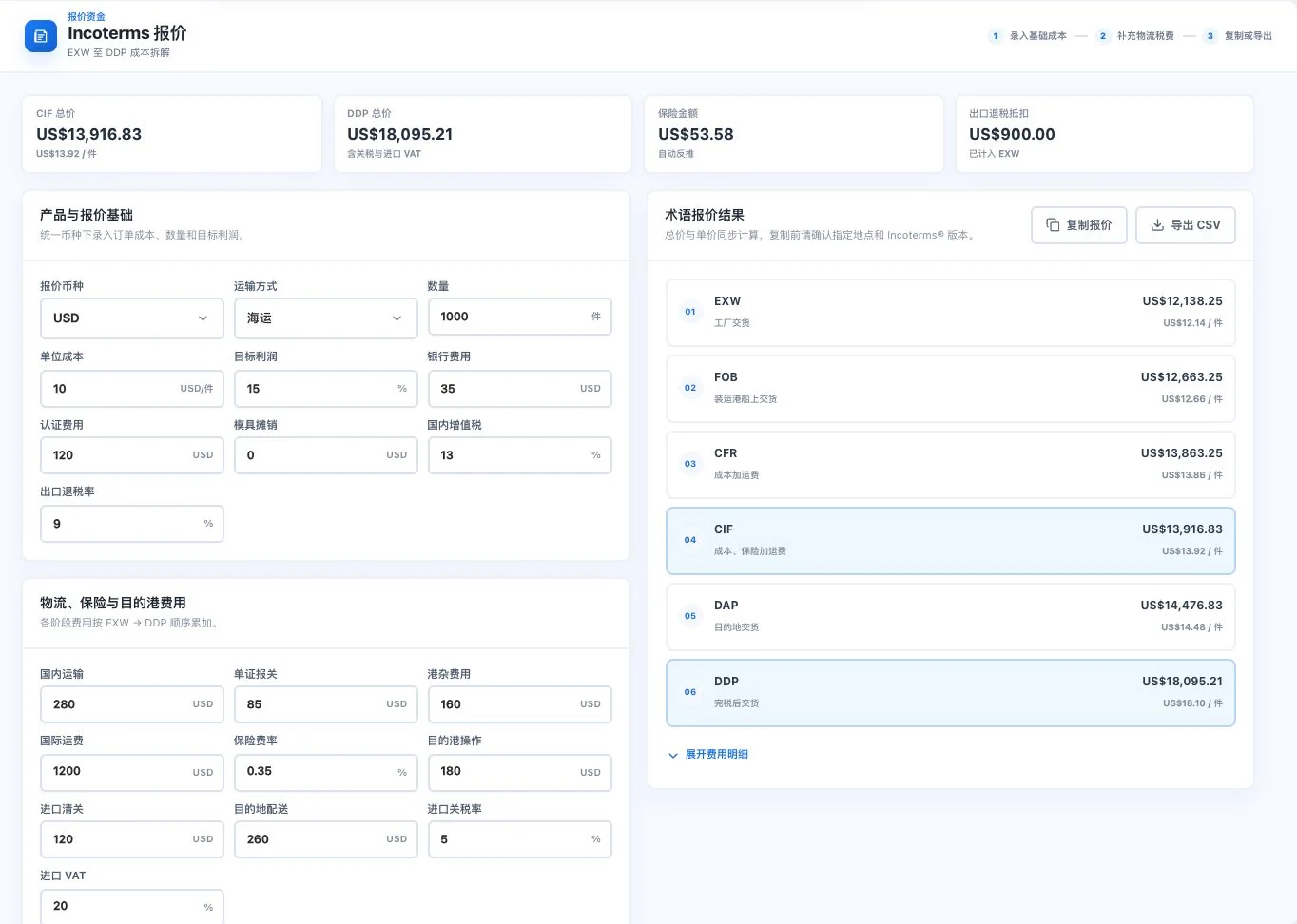
Review each cost from EXW to DDP. Check your actual inputs first, then decide how to quote this deal.
Open product pageCost-detail crop with original default demo inputs. Results use entered parameters; they are not confirmed taxes, actual transport quotes, or customer orders.Enter dimensions, weight, and restrictions clearly. Change your viewing angle to check the cargo and available space.
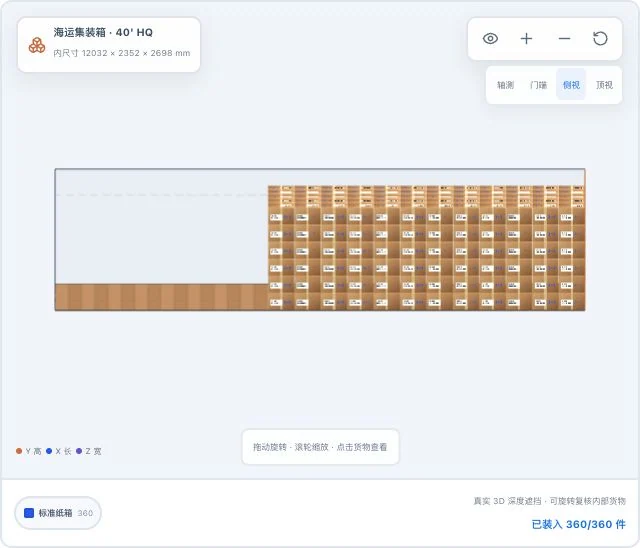
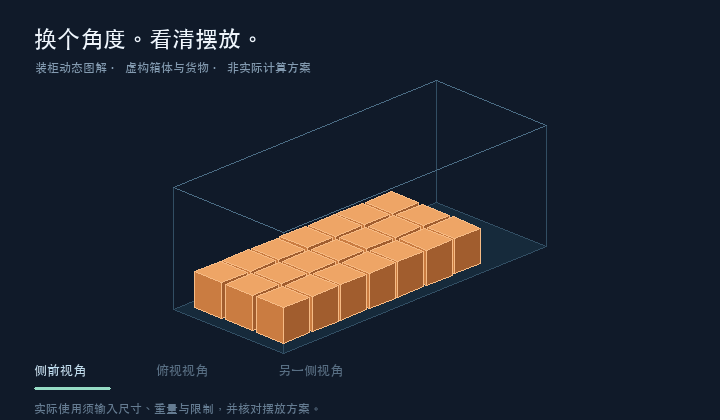
Open product pageThe same default demo cargo, with only the original 3D viewpoint changed. Simulated loaded quantities do not mean actual loading or safety acceptance is complete.Work together. Keep going.
From finding customers to writing emails and every follow-up.
Keep information and next steps connected throughout the same workflow.
Save your attention for customers. Leave repetition to the tools.
Reuse information, continue drafts, and organize records.
Keep more of your attention for the customer’s next response.
Bring tools into your everyday work.
From finding a customer to the next follow-up.
Less repeat preparation. More forward progress.
Check the company, region, and information source
Company information·Contact·Original source
When prepared separatelyCompany names, contacts, and sources are recorded separately and searched again next time.
Continue in LingdongguFilter by market, verify companies and contacts, and save a list for continued research.
See the specific featureWhen prepared separatelyRe-enter customer context and prepare your first contact from zero.
Continue in LingdongguOne selection brings in four types of customer information. Add product facts and let AI help you draft.
See the specific featureWhen prepared separatelyCopy subject and body between the editor and email tool, then check each item.
Continue in LingdongguBring the confirmed draft into the email workspace and continue checking the list, body, and sending requirements.
See the specific featureWhen prepared separatelyCommunication stays in chat, requiring you to recall it when organizing requirements and reports.
Continue in LingdongguOriginal words stay in the customer timeline. AI suggests information and actions; save them after checking.
See the specific featureWhen prepared separatelyFind the customer’s progress, ask who owns the work, then decide what to do next.
Continue in LingdongguKeep the timeline, owner, and next step in the profile, and follow up from recorded progress.
See the specific featureOriginal workflow illustrations with fictional customer and communication information. Five refers to work types, not replacing five people. Customer information must be used according to permissions. AI drafts, sending, and CRM writes require human confirmation.
Less duplicate input
Company, contact, country, and industry. Select a customer to bring all four into outreach email preparation.
Your next outreach email needs these four types of information.
Add product facts next and prepare an editable outreach email draft.
Select a customer to demonstrate bringing in four types of context together.Connect your preparation
Quantity, unit price, and transaction terms come together in one customer quotation. Compare the live document preview with less back-and-forth preparation and more careful verification.
See how a quotation is prepared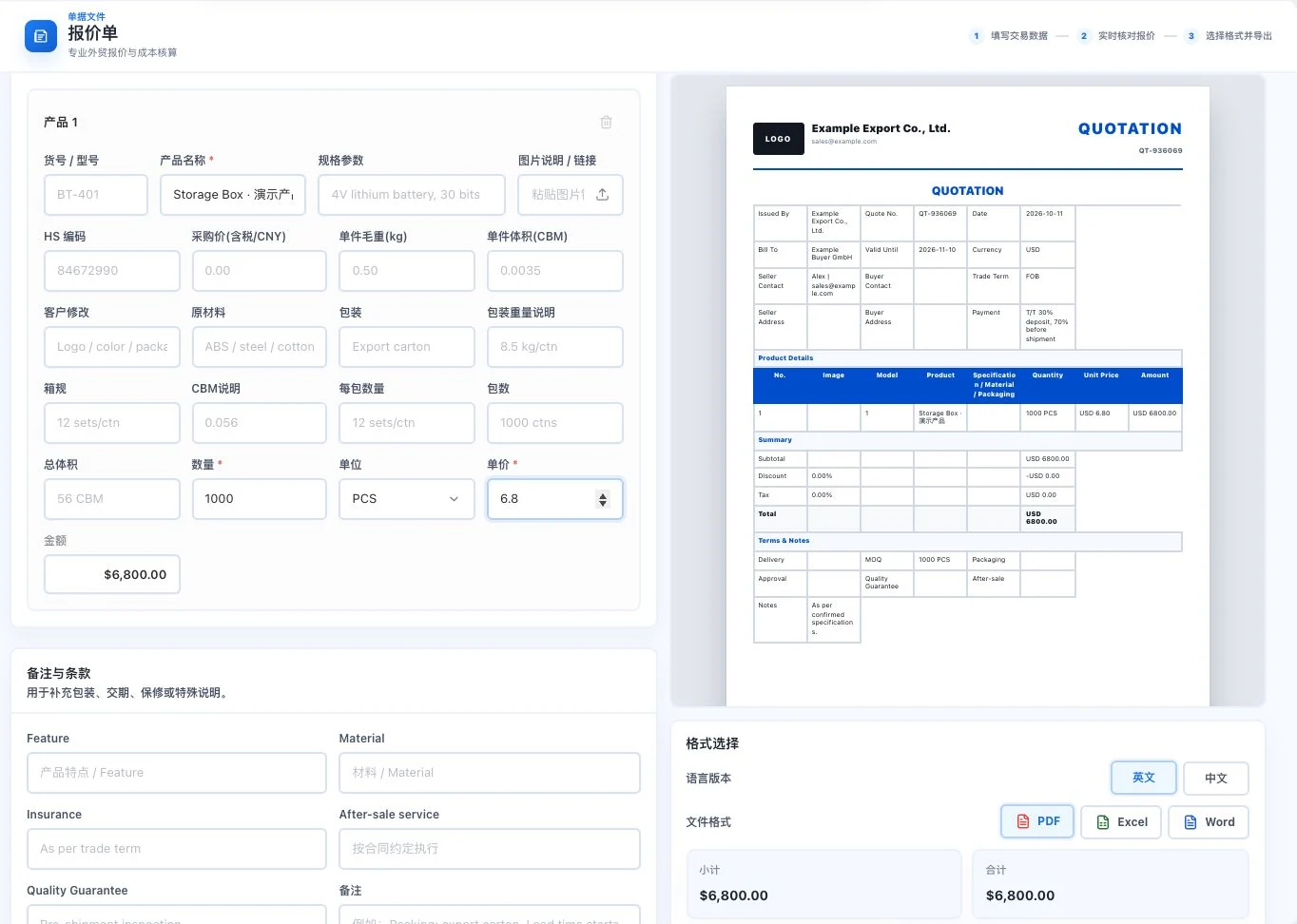
Swipe sideways to view input and preview details.
Less repeated data entry
Keep confirmed information, conversations, opportunities and tasks in CRM. Continue from existing records next time.
See how CRM connects the workLess drafting from scratch
Outreach emails, social copy and contract-risk suggestions begin as drafts you can check, with business staff making the final judgment.
Explore content and AI assistanceLess repeated consolidation
Organize recorded activity by day, week, month, quarter or year. Prepare reports from the same work records.
Explore sales reportsLess repeated consolidation
Keep recording customer communication, opportunity changes, and to-dos as you work. When reporting, select the period and dates to organize existing business records.
Review the customer’s words and add communication context.
Verify stage changes and explain the basis for your judgment.
See the owner, tasks, and timing clearly.
Reports are generated from existing system records using the selected criteria. Unrecorded business, drafts, and unconverted pricing inquiries are not counted as closed sales.
Start with one familiar task.
Find entry points for customers, email, quotations, and contracts. See the scenario first, then continue step by step.See how to startEmail and Linbo
Six actions at hand. Centered on one conversation.
Find the right words for outreach, fulfillment, and customer care.
17 scenarios × 18 languages × 10 tones
Calculated from currently available options to describe the range of settings. This is not a count of generated templates or a claim about output quality.Hello,
Could you share the specifications and available packaging options?
We would also like to confirm the sample process before deciding on an order.
Thank you.
Summaries, labels, translations and editable drafts appear in the email. Choose favorites or highlights again to toggle them off.
Choose a Linbo action to change this email.
This page uses a fictional email and prepared demo results. Edit your draft and keep it while switching actions; reset clears it. No AI request or real email is sent.
Try the Linbo actions and see summaries, labels, translations and drafts inside the email. Edit, switch and reset this fictional page demo. Actual AI features depend on the email, available models and account requirements.
WhatsApp · Bring conversations together
Connect your own account to view conversations and media.
Understand requests, prepare drafts, and confirm the next step yourself.
WhatsApp Web supports QR-code or phone-number linking through unofficial automation. The business API uses Alibaba Cloud ChatApp and requires your own business, number, and service configuration.
Explore WhatsApp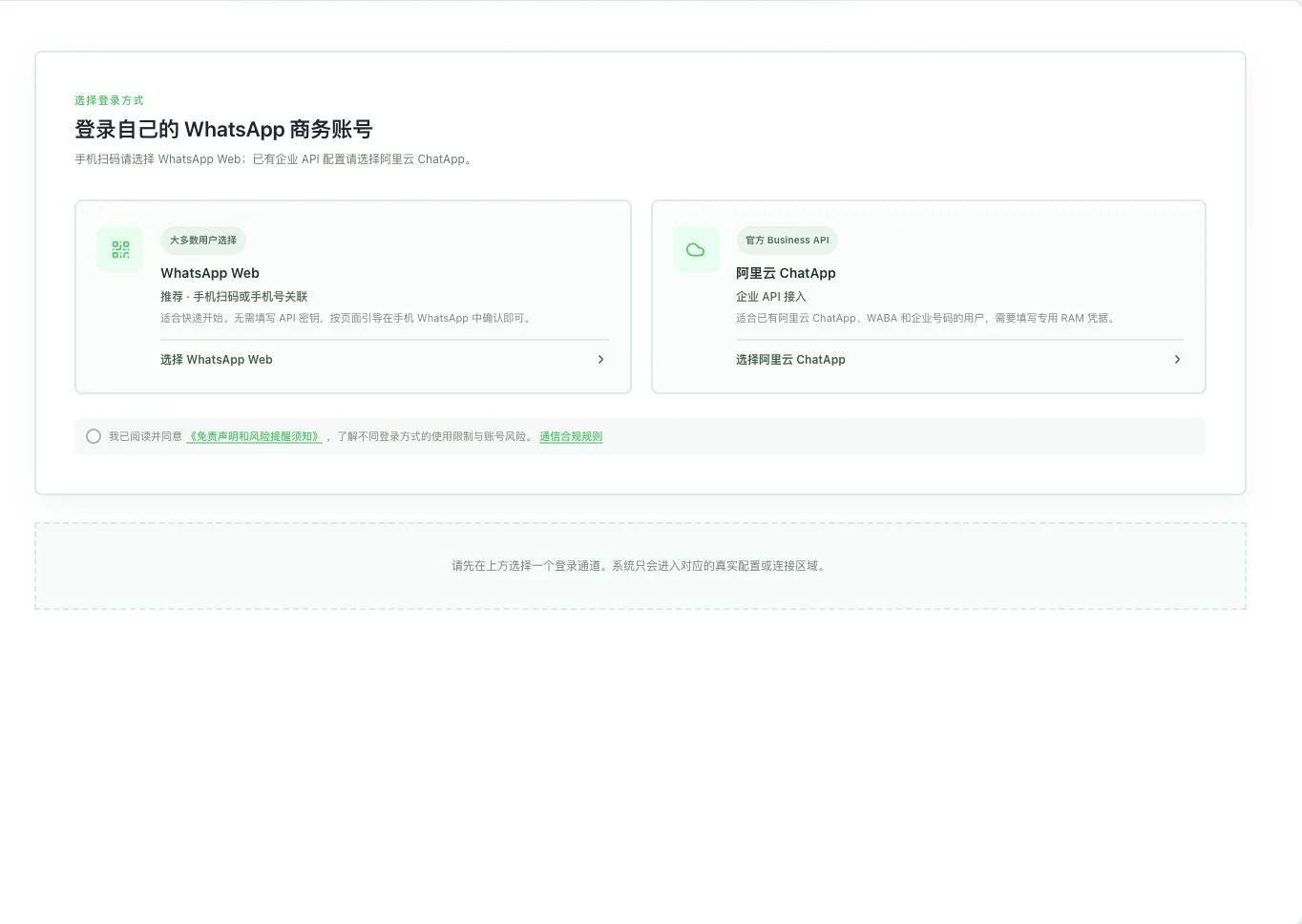
One message. Four stages.
Click Linbo to translate, analyze, edit a draft, and try a simulated send.
Hi Emma, happy to help with your bottle enquiry.
10:28Hi, could you quote 1,000 stainless steel bottles? Delivery to Hamburg. Please confirm the production lead time.
10:29Keep the customer's original words. Choose an action above to see the result here.
Fictional inquiry and local examples. Editing, checking, and simulated sending happen only on this page.
1,000 stainless steel cups, bound for Hamburg. Product, quantity, and destination together. You still confirm the production lead time.
1,000 stainless steel bottles · Delivery to Hamburg
Capacity, packaging, and trade terms are not yet specified. Clarify these questions before preparing a quotation.
Keep original words, media, and history in your own conversations. First understand the requirements the customer has clearly stated.
View featuresSelect messages yourself and request translation or analysis separately. Check numbers, specifications, and dates against the original.
View featuresPrepare the next response around the current conversation. You read and edit the draft; generation does not mean it has been sent.
View featuresReview the recipient, language, and business commitments. Browser reply checks also require installation, authorization, and page compatibility.
View featuresActual use requires authorization of your own account, channel and AI configuration, plus applicable entitlements and points. Web uses unofficial automation. ChatApp is subject to templates, the 24-hour window, and channel fees. Single-message translation processes the selected message. Reply suggestions may include context from up to eight recent messages, with up to 800 characters each. Analysis may synchronize CRM first, then prepare a draft requiring human confirmation. Browser reply checks require separate installation and authorization.
Change your angle. See the arrangement clearly.
From a front-side view to overhead and the other side.
Turn spatial relationships into a clearer picture.
Quotations and documents
From cost calculations to documents your customer can understand.
1,000 units × 6.80 US dollars
Quantity and unit price clearly listed in the customer document.
See the comparison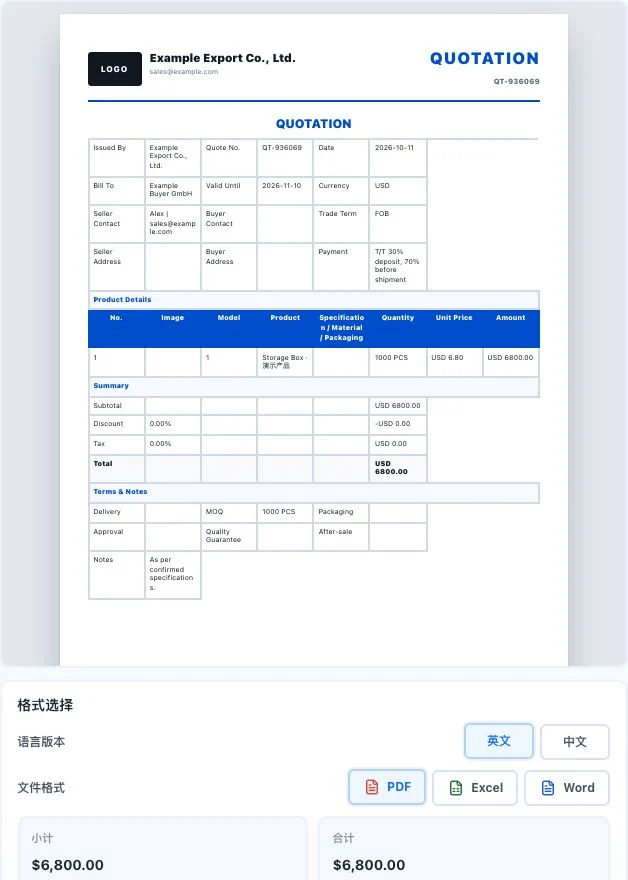
Start with one task.
Xunqi and CRM customer management
Information, communication, opportunities, tasks, and sales reports.
Email · WhatsApp · Linbo
AI drafts, conversation organization, and checks before sending.
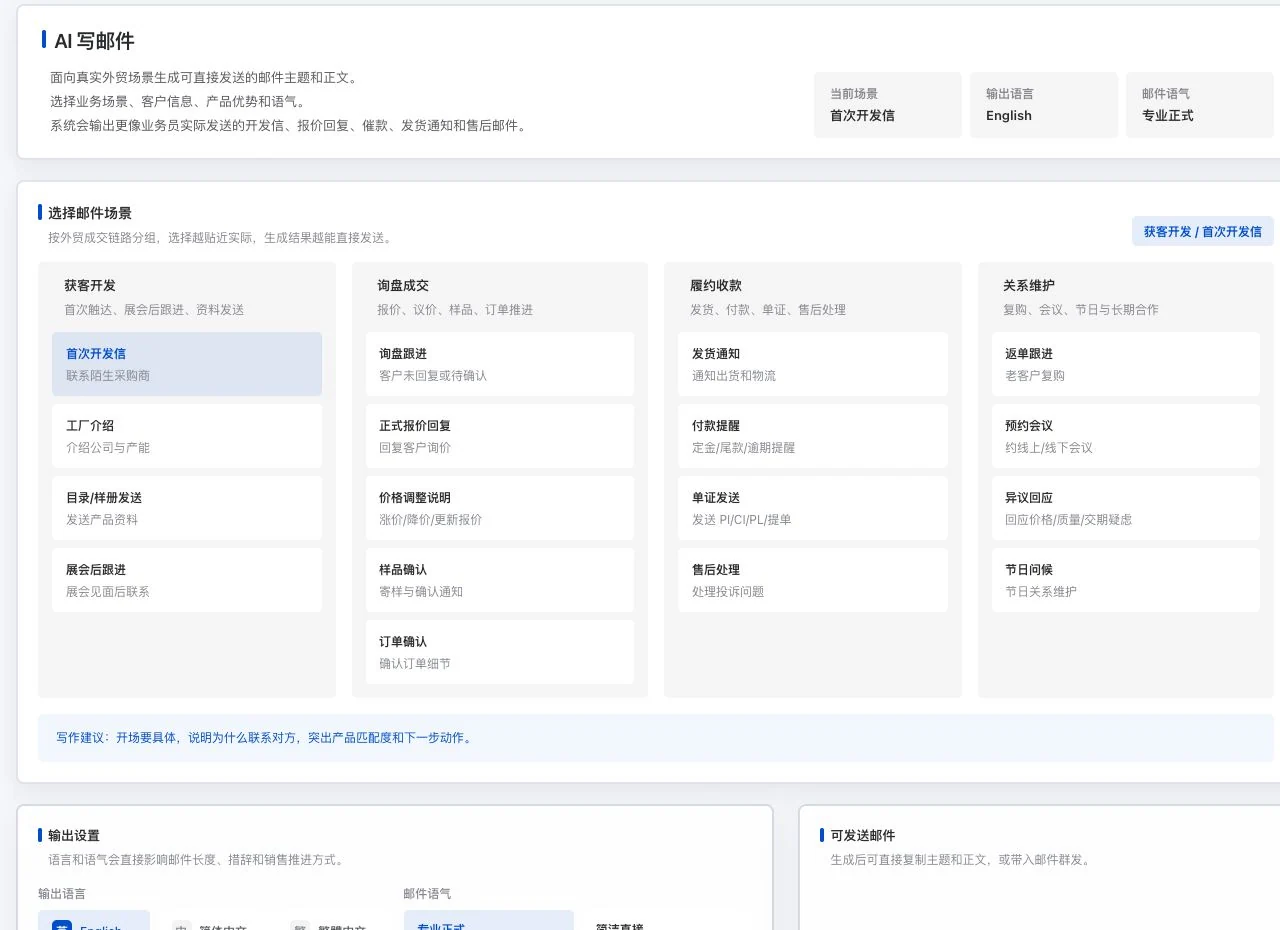
Quotations and trade documents
Prepare costs, quotations, and nine document types in their own ways.
Loading, packaging, and inspection
Explore a 3D plan. See the details from another angle.
Content and promotion
Articles, social posts, emails, and video scripts.
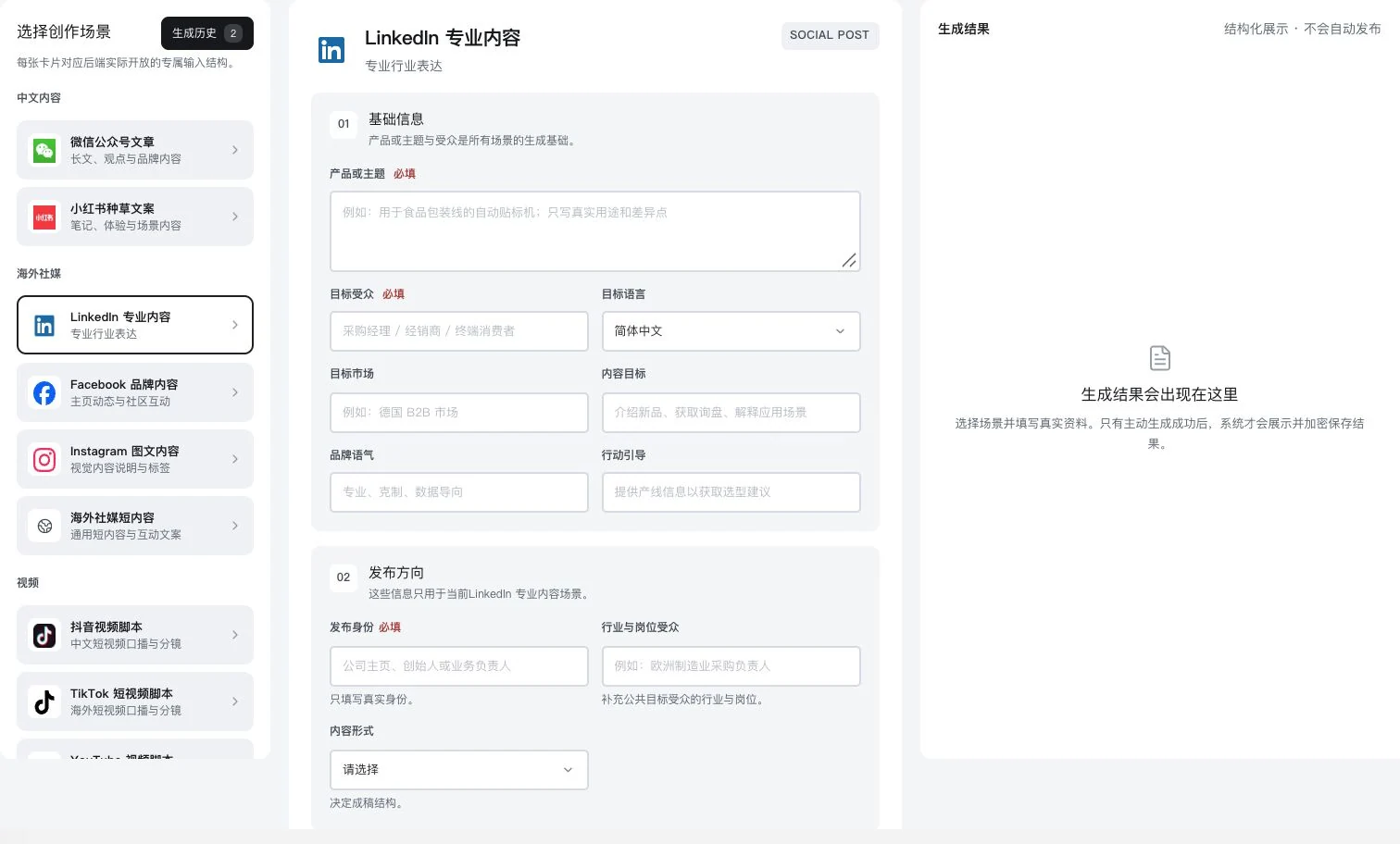
13 refers to draft scenarios. Outputs still require review and publication.
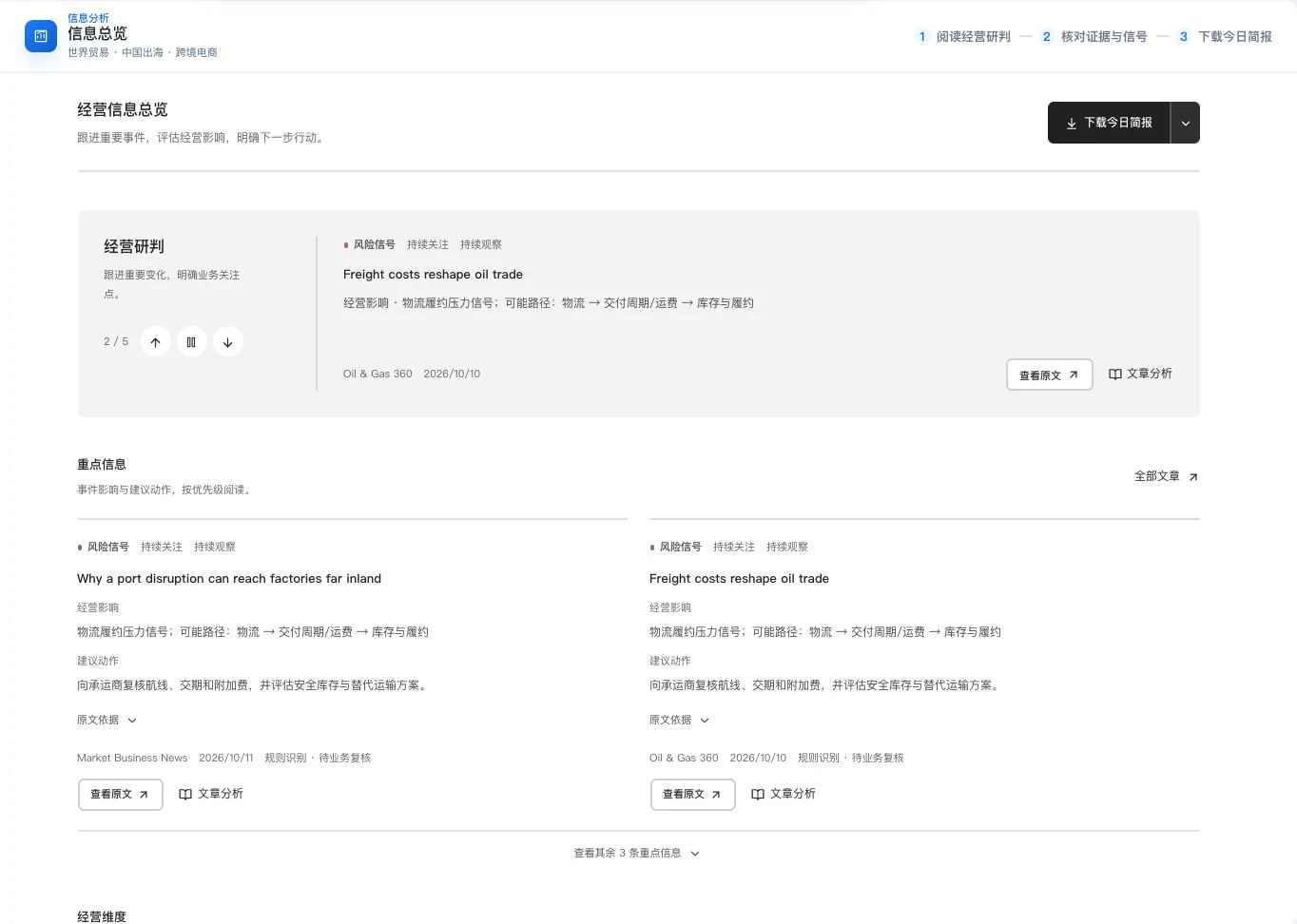
Trade insights and learning
Sources, dates, and original text give your next step a basis.
AI contract review and verification
Compare risks, human feedback, and revisions paragraph by paragraph.
After order confirmation
within a reasonable time deliver.
Specify the number of days and starting point,
then confirm how delays are handled.
Accounts and teams
See members, permissions, usage, and services clearly.


About Lingdonggu
Start with the small tasks export teams handle repeatedly.
Give information a place. Give the next step a starting point.
Trade reading
From a verification checklist to preparing a quotation.
Keep practical experience close at hand.
Lingdonggu · Public welfare
Find public family-search information. Check the original records.
Take content authorized for sharing
and prepare a clear poster.

Find information
Search by name, region, or source record ID,
then check the current status in the original record.
Prepare a poster
Edit the current poster and preview its layout,
retain the source ID, then download a PDF.
Participation guidance
Send verifiable leads to the original publisher
so help reaches the right channel.
Check sharing permissions for information and photos, and the latest status, with the original source first. Source navigation does not imply an institutional partnership.
Feature counts and options come from the current product directory and interface definitions. Examples, real screens, and requirements are explained on the relevant product pages. These numbers do not represent efficiency, conversion rates, or accepted supplier-service integration.
Read original articles on this site. Public trade updates retain their sources, dates, and links to original text.Product facts and FAQs
Complete feature directory and supplementary areas
Content and promotion
One piece of content.
Many different stages.
Find different platforms from one publishing entry point.
Adapt drafts to each platform’s voice for a better fit.
Scrolling pauses when the logo area is hovered or keyboard-focused. With reduced motion enabled, all platforms appear in a static layout.
Prepare the content first.
Explore content publishingShows platform entry points from the system publishing page. Review drafts separately and confirm publication on the relevant platform. Actual use requires platform accounts and appropriate permissions.Then confirm publication on each platform.