Company and contact identity.
Record company, contact, contact details, tags and owner.
See the actual stepsCustomer records and contact identities
Keep company, contact identity and owner together so a handover is easier to understand.
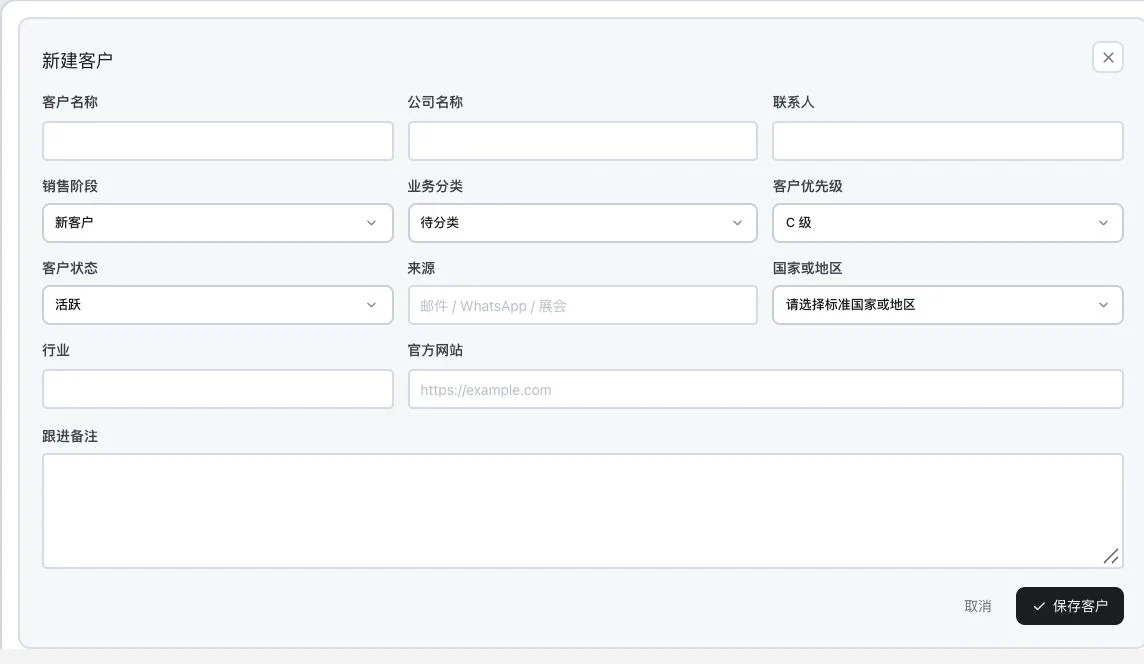
Original blank product form. No customer has been entered or saved. Fields and entry points are shown; no customer creation is implied.
See this feature's highlights.
Record company, contact, contact details, tags and owner.
See the actual stepsAdd customer company information and adjust stages to real progress.
See the actual stepsContinue reviewing communication, opportunities and next steps from the same profile.
See how to checkCustomer identity: genuine company, contact, email, phone and related information.
See application scenariosWhen a first contact becomes ongoing follow-up, keep the company, contact and owner in a customer profile others can continue using.
See application scenariosContinue recording communication, opportunities and actions in the same profile. Adjust the 7 customer stages to the actual situation.
See application scenariosKeep company, contact identity and owner together so a handover is easier to understand.
Source: customer-profile stage directory. Users maintain stages according to actual progress; stages do not imply automatic sales.
When to use it
When a first contact becomes ongoing follow-up, keep the company, contact and owner in a customer profile others can continue using.
genuine company, contact, email, phone and related information.
tags, owner, company details and actual stage.
Complete steps
Save companies, contacts, emails, phone numbers, tags, owners and customer company details. Record 7 stages from new customer to sale. A WeChat ID field does not provide chat integration.
Record company, contact, contact details, tags and owner.
Add customer company information and adjust stages to real progress.
Continue reviewing communication, opportunities and next steps from the same profile.
Understand the tool and human handling separately
Keep company, contact identity and owner together so a handover is easier to understand.
Add customer company information and adjust stages to real progress.
This compares feature handling scopes. Scenarios explain the sequence, not measured efficiency or completed customer cases.
Explain the feature through real work
Suppose a colleague needs to take over a customer you have already contacted.
Hypothetical scenario · Feature explanation, not a customer case or completed AI resultConnect the work from step to step
Continue recording communication, opportunities and actions in the same profile. Adjust the 7 customer stages to the actual situation.
Return to Xunqi and CRM customer management for the complete workflowUnderstand before use
Users verify customer identity, contact details and stage. The WeChat ID field is not a WeChat chat integration.
Product facts and FAQsBack to the product feature directoryMore details in this product
Connect individual records to the same customer to recover the context of the previous conversation.
Explore this feature on its own