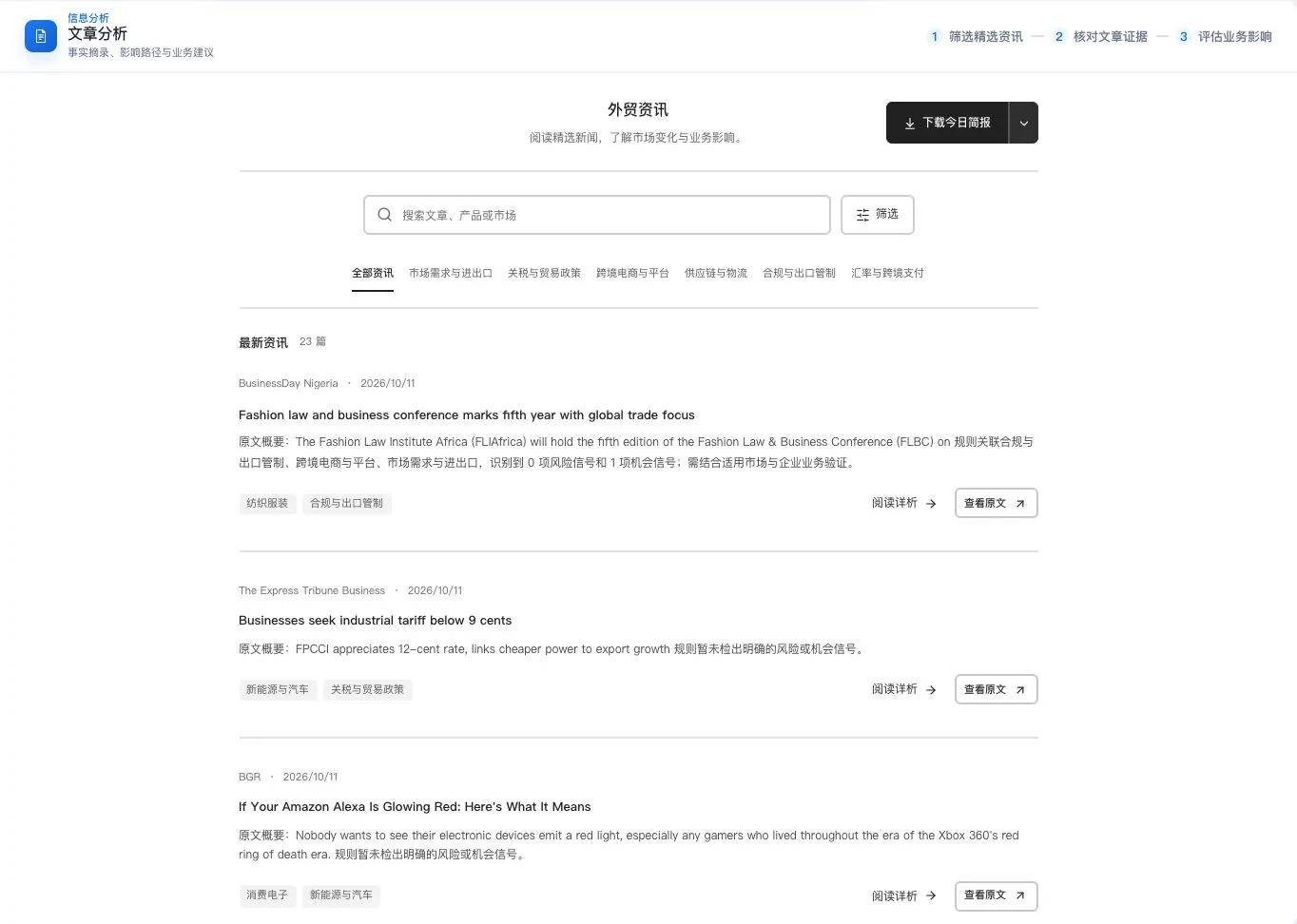
Article list and sources · Actual interface detail
Real update list and sample summaries at capture. No originals were opened or new analysis generated. Entry counts and rule signals do not establish verified source facts or comprehensive industry coverage.
From news to business judgment
See a number.Trace it to the original words.
Summaries, factual excerpts, dates and sources leave reference points for later decisions.
Business information covers impacts, risks and opportunities across 6 dimensions: orders, costs, delivery, access, channels and payments. Articles retain summaries, factual excerpts, business implications and verification actions. Trace important numbers to their original sentences and sources.
Countries, regions and trade topics each have their own observation scope. Co-occurrences of markets, products, keywords and events help guide research, but report counts are not market size and mentions are not sales or search popularity. Keep evidence gaps visible when information is insufficient.
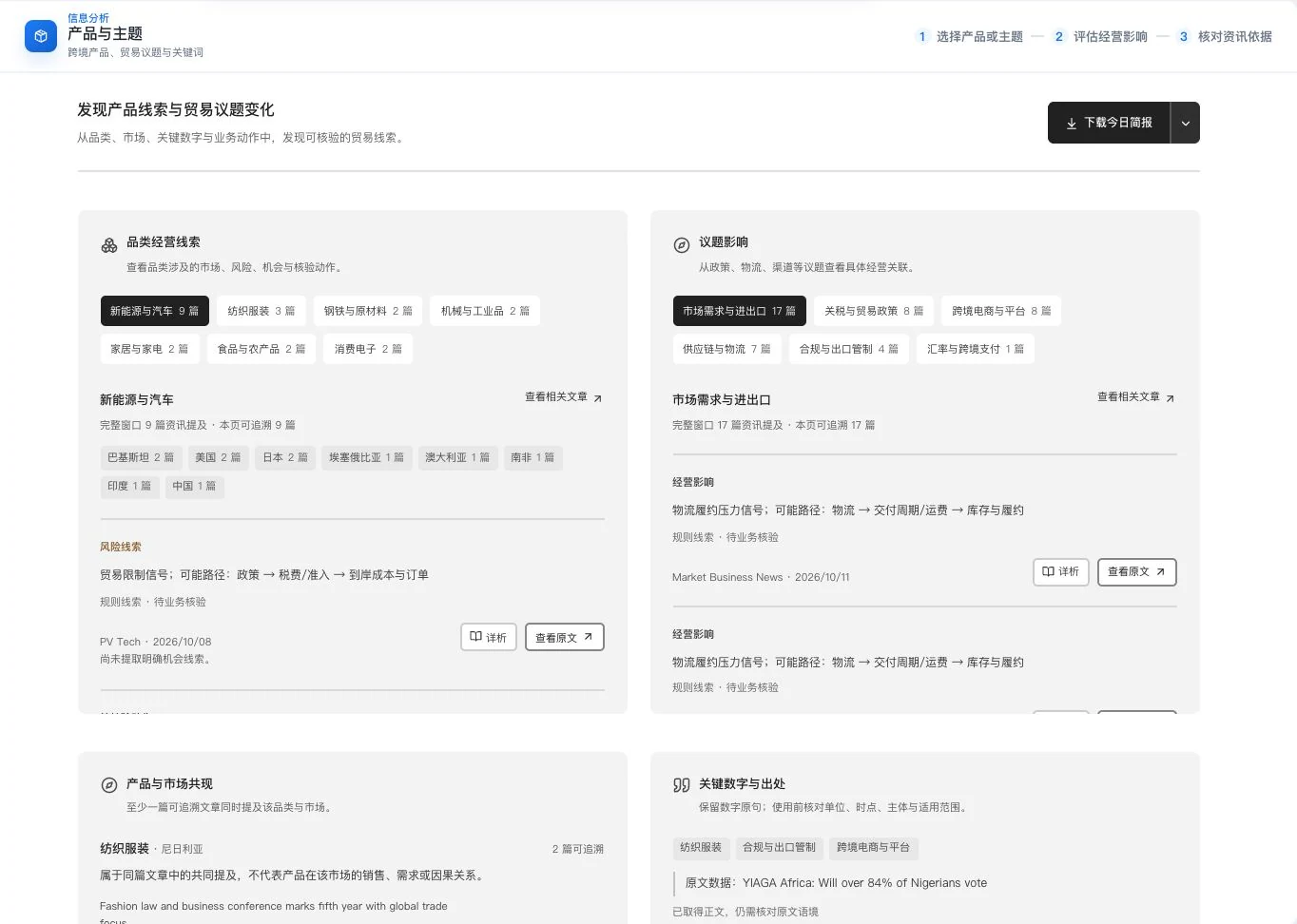
Product and trade topics · Real system screenshot
Rule-based leads and original links from the current sample. Complete articles still require checking. Co-occurrence and mentions are not sales, search popularity, or causal proof. No new analysis call occurred.
01
Check when and who first
Distinguish publication dates, event dates and effective dates. Confirm the publishing source.
02
Then check relevance to your work
Check the market, product, trade conditions and scope rather than deciding from a headline alone.
03
Continue verification with the original
Compare numerical statements and evidence gaps to decide what needs follow-up.
Stop here
Act on a headline without confirming numerical sources and applicability.
Continue this way
Summaries link to original sources. Check numbers, dates and business implications separately before planning further research.
An example of how to read. The default last-7-calendar-day window in Beijing time is not complete real-time market coverage.
Learning and market timing
Questions from reading.Learn more. Plan the next step.
Find courses, articles and software resources around your business questions.
Find currently published material in three directories: courses, articles and software. Check sources, versions, applicable platforms and access conditions before using permitted entries. Counts change with publication, and resource links do not establish ownership of all copyrights.
Published articles can be summarized into highlights and keywords when text is sufficient and a model is available. Check outputs against the current text. Use target-market holidays and marketing dates to plan content and follow-up, confirming dates from local announcements.
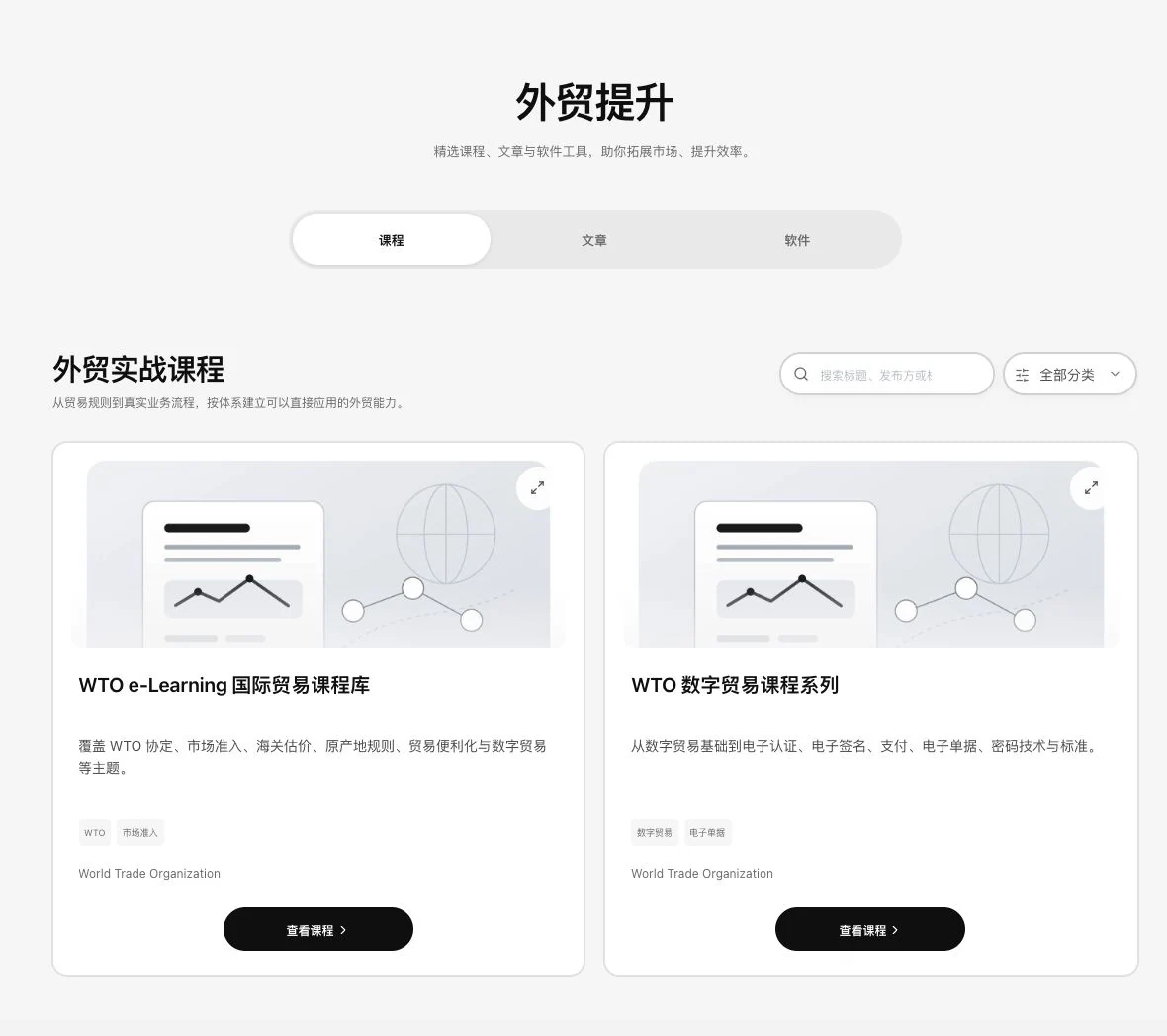
Trade-course directory · Real system screenshot
Real public course directory and source links. No course was opened or learning certification obtained. Content, access, and use follow the publishing institution’s requirements.
01
Choose the current question
Choose courses, articles or software resources for your business need, and check sources and versions.
02
Read fully before summarizing
With sufficient text, confirm AI usage, organize the summary and return to the original to check.
03
Arrange the next action
Check dates and local conditions against the market calendar before arranging actual work.
Stop here
Save learning resources without bringing them back to your current business question.
Continue this way
Confirm sources and versions, connect reading highlights to the question, and use market dates to plan next actions.
Learning and planning examples. Confirm permissions, dates and AI conditions for each actual entry.
See these highlights
Read the news. Read the evidence too.
Useful capabilities are found in each specific task.
01 / Explore more details
A path back to the original.
Keep dates and sources with article entries.
Article list and sources · Actual interface detail
Real update list and sample summaries at capture. No originals were opened or new analysis generated. Entry counts and rule signals do not establish verified source facts or comprehensive industry coverage.
The last 7 calendar days in Beijing time, not a fixed rolling 168-hour window.
02 / Explore more details
View markets. View topics too.
Filter countries, regions and product topics around your own business.
Product and trade topics · Actual interface detail
Rule-based leads and original links from the current sample. Complete articles still require checking. Co-occurrence and mentions are not sales, search popularity, or causal proof. No new analysis call occurred.
Courses, articles and tool resources each link to their sources.
Trade-course directory · Actual interface detail
Real public course directory and source links. No course was opened or learning certification obtained. Content, access, and use follow the publishing institution’s requirements.
Overview, articles, countries and regions, products and trade topics.
Features in concrete numbers
33types
Learning resource directories
Courses, articles and software resources. Access and use follow each source's conditions.
Numbers come from current feature definitions or real interfaces. Workflow numbers explain the presentation on this page; demonstration data is not a promise of efficiency or business results.View all features and conditions
Designed for everyday work
Look one layer deeper, then decide what's next.
A news item. A path to the original.
Retain publication dates, factual excerpts and sources. Check important numbers against original wording.
Not every story is relevant to your work. Find dates and publishers first, check markets, products and effective conditions, then decide whether to follow up.
Information-source illustration
Read an update. Know where it comes from.
Trade reading · Fictional headline
A shipping update. Check its context first.
Source: example information sourceDate: original publication date
View original
Source
Date
Original
01Read the update
02Check the date and source
03Open the original to read more
Fictional headlines explain three elements: source, date, and original text. No current market data is used, and no market conclusion is implied.
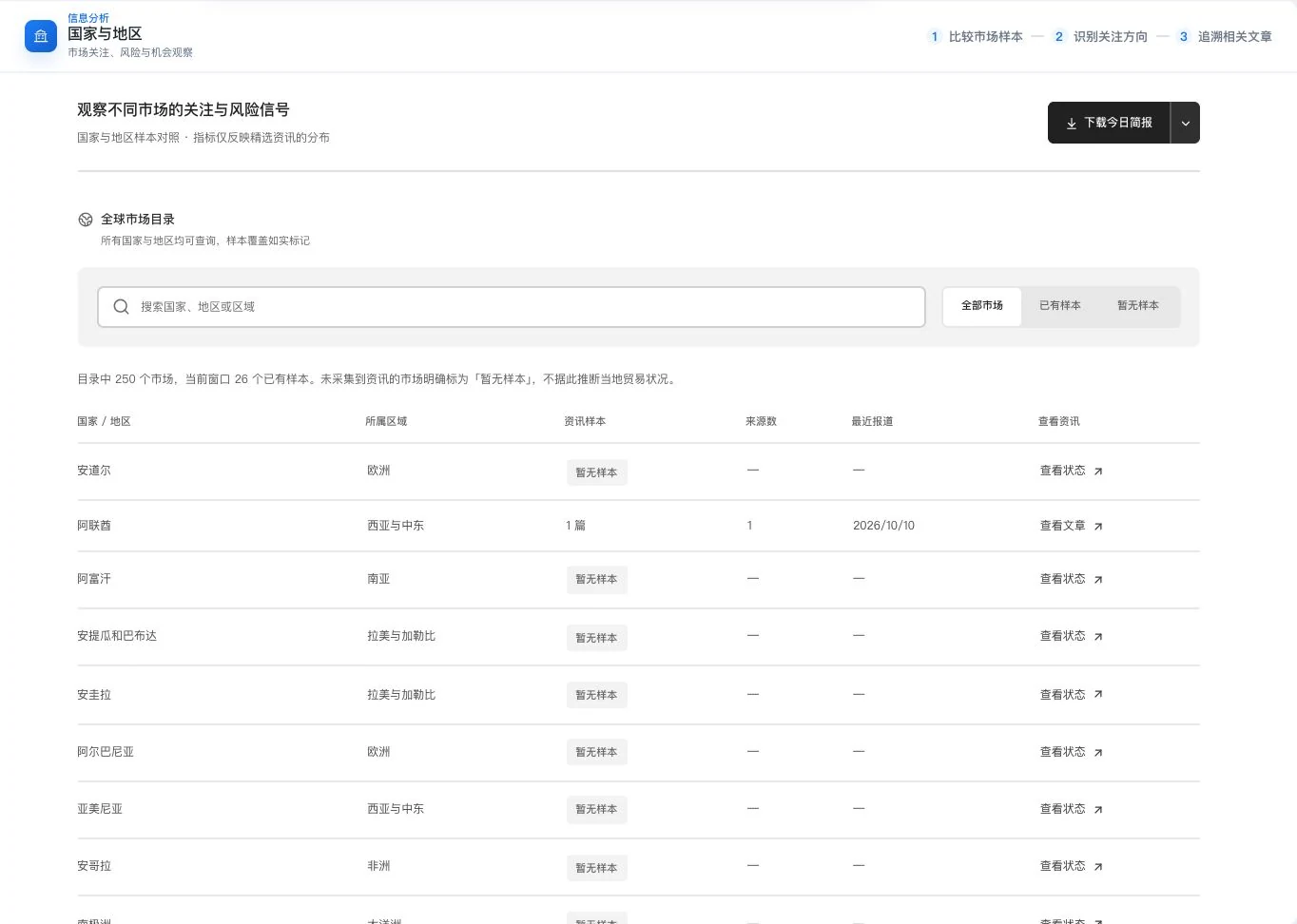
Country and regional sample directory · Actual interface detail
Real directory and current information-sample coverage. No sample does not mean no local trade; article counts do not measure market size, demand, or risk probability.
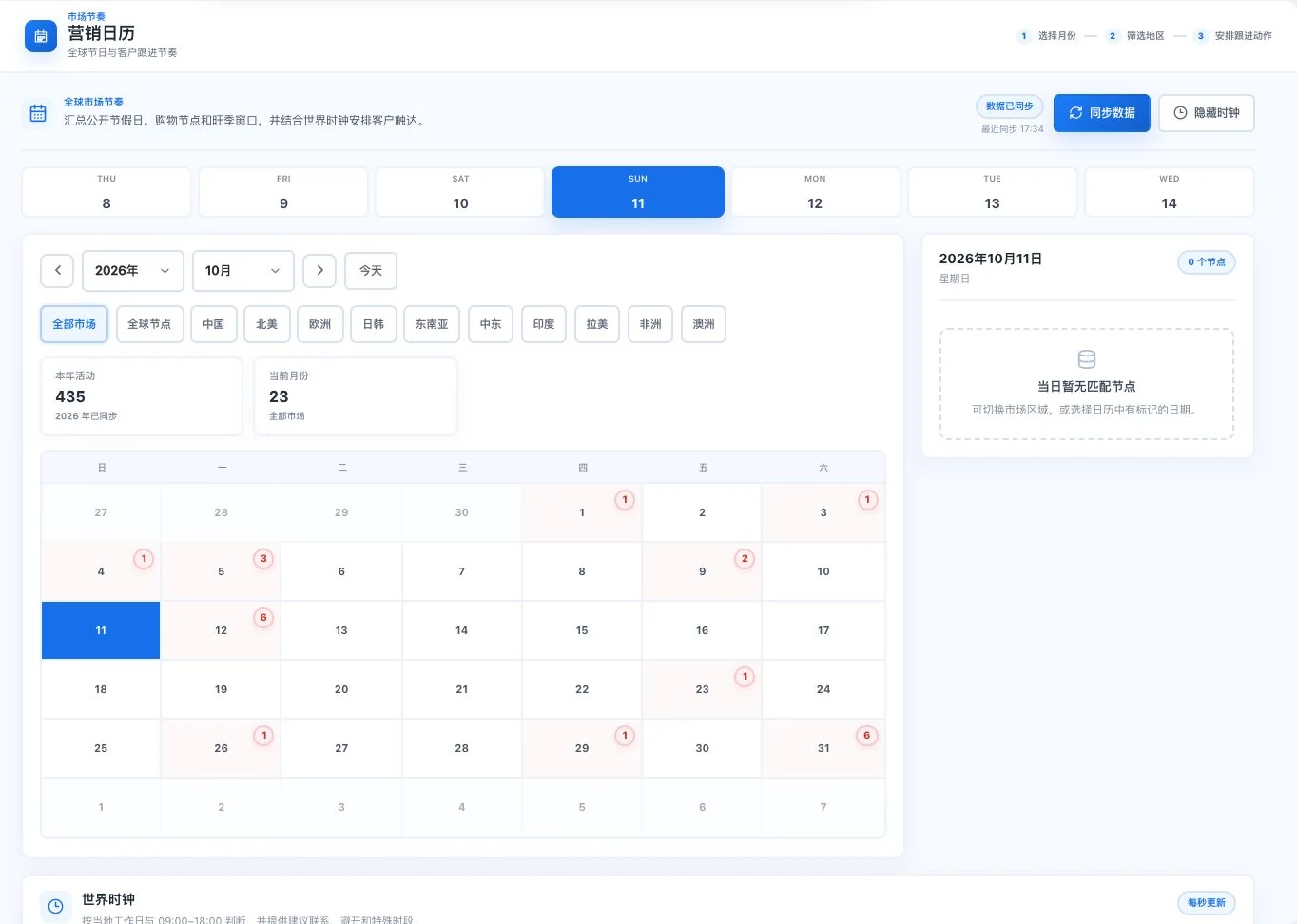
Market holidays and follow-up calendar · Actual interface detail
Synchronized calendar at capture, with no matching event for the selected date. Counts change with data. No follow-up task was created; verify holidays and events against local announcements.
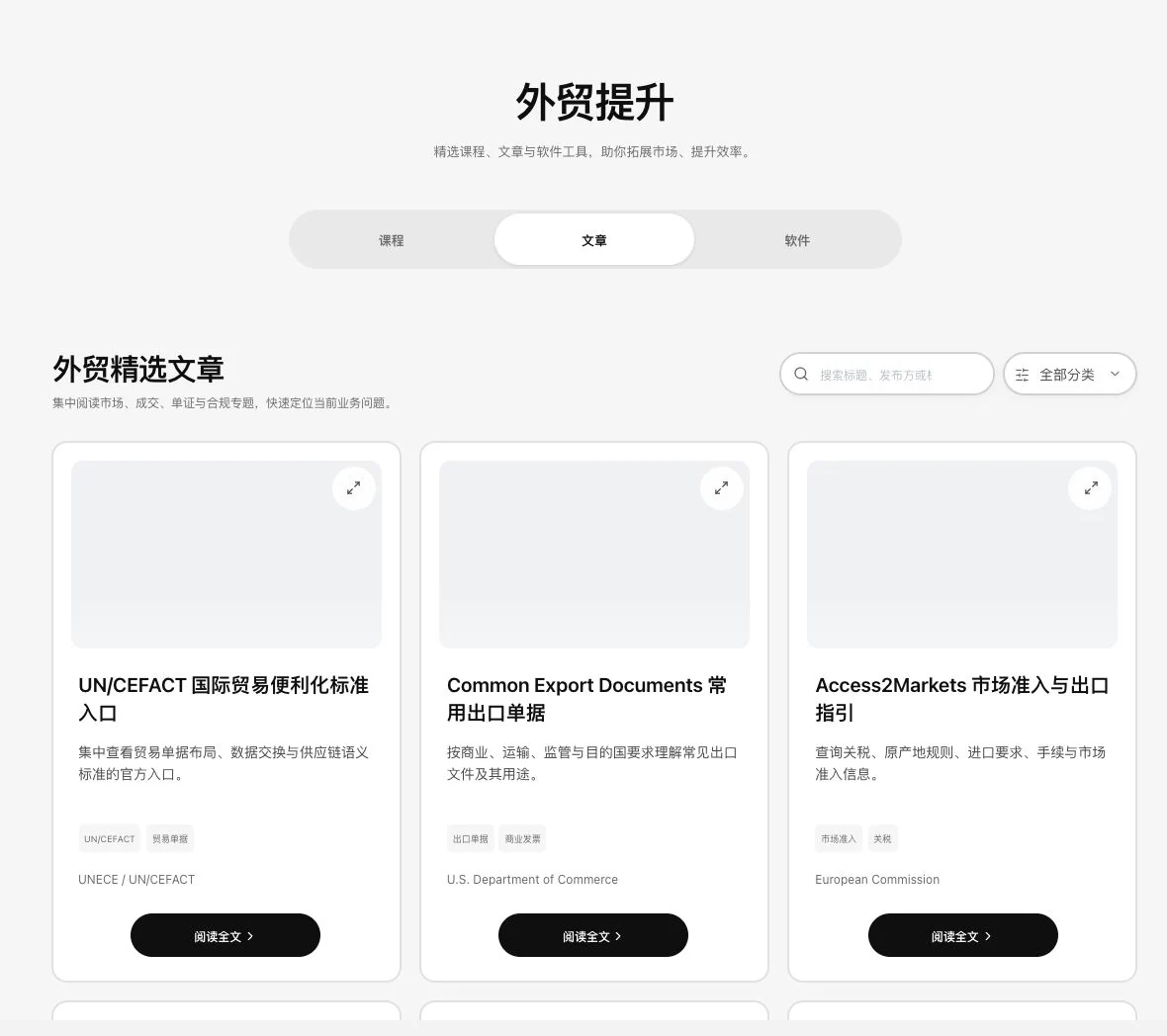
Trade-learning article directory · Real system screenshot
Only published public articles and their source directory are shown. No body text opened or AI summary requested. Listing does not establish ownership of all content copyrights or source partnerships.
Compare to see clearly
The news itself.The part that matters to you.
Reading-step examples. News samples do not represent complete markets or real-time coverage.
What you provide, what the software helps organize and what needs confirmation next.
The task
You provide
The software helps organize
You confirm
Read the news
Title, publication date and publisher
A link to continue reading the original
Publication and event dates
Check applicability
Markets, products and trade topics
Information leads for your business direction
Applicable regions, product codes and conditions
Build understanding
Questions arising in your current work
Courses, articles and tool-resource directories
Source credentials, versions and permissions
Find topics. Find markets. Find where to read next.
Continue from different angles: overview, articles, countries and regions, products and trade topics. Bring news back to your order, cost and delivery questions. Every lead retains a starting point for verification.
Different reading directions. The same business questions
The perspective count comes from the current information workspace. News samples do not represent real-time or complete market coverage.
Explore every feature
Every tool. A specific purpose.
7 features, with body text directly visible. Read real interfaces alongside process notes, or open individual feature pages for more detailed inputs, outputs and examples.
01
Business information overview
Implemented; configuration required
LDG-034
One piece of news. Put it in business context.
Connect news reading to the business issues you are handling.
View impacts, risks and opportunities across 6 dimensions: orders, costs, delivery, market access, channels and payments. Defaults to the last 7 Beijing-time calendar days. Current news samples do not represent the entire market.
How to continue
01
Review recent news samples in the information overview.
02
Consider effects on orders, costs, delivery, market access, channels and payments.
03
Return to the evidence and identify what needs checking or continued attention.
Use and review
The default scope is the previous 7 Beijing-time calendar days. News samples do not represent the whole market or verified business results.
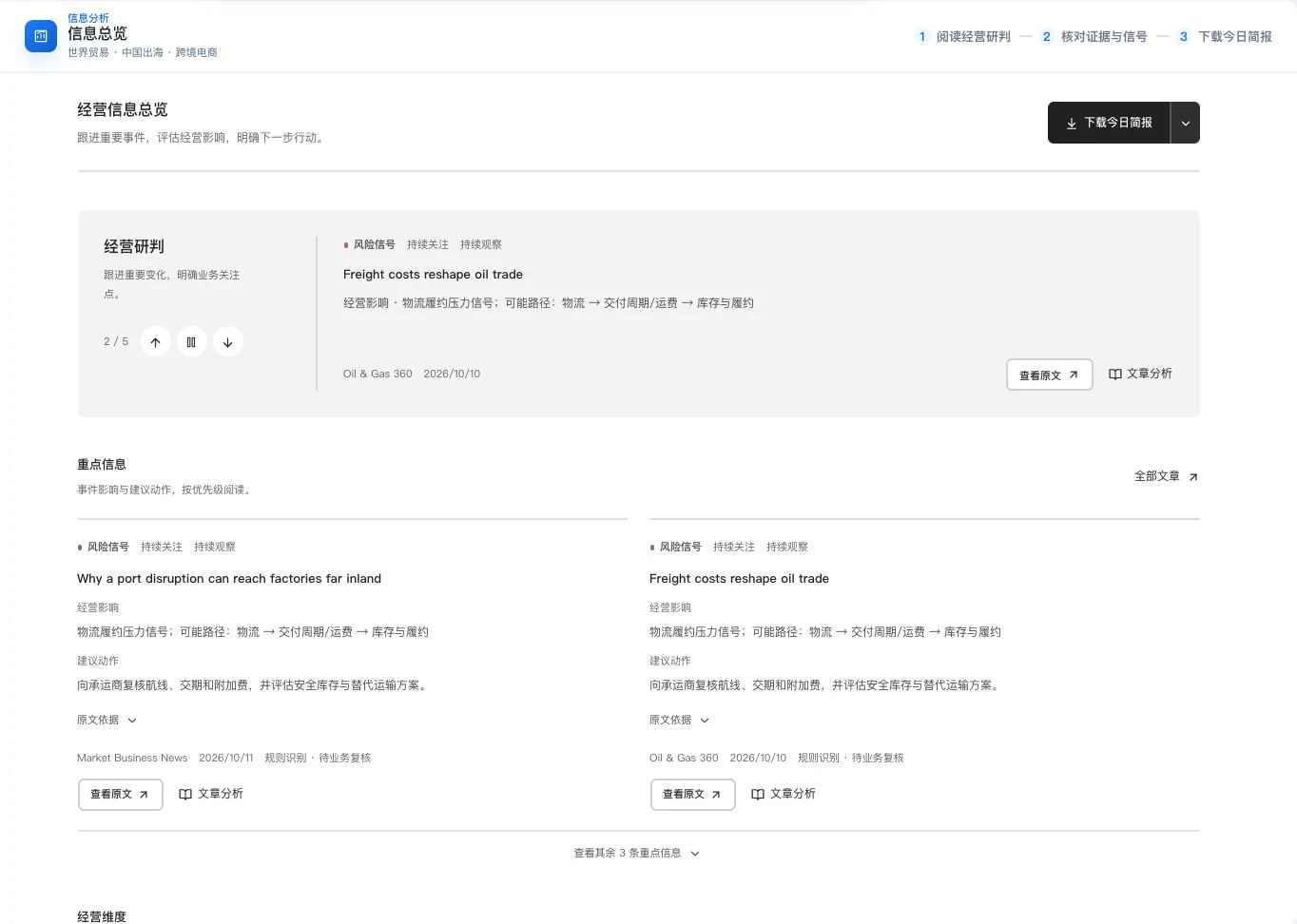
Business information overview · Real system screenshot
Saved updates and rule-detection screen at capture. Business suggestions are marked for verification. No new AI call or briefing download occurred. The sample does not represent the complete market or actual business performance.
Keep a route to the supporting evidence whenever you read an explanation.
View summaries, factual excerpts, business impacts and verification actions. Retain sources, dates and original numerical statements, and open sources to check. Evidence gaps are explicitly noted when text is insufficient.
How to continue
01
Read summaries, factual excerpts and original number sentences.
02
Review business implications and suggested verification actions.
03
Use source and original-text links to check dates and full conditions.
Use and review
Insufficient article text leaves evidence gaps. Summaries and suggestions do not replace original announcements.
Article list and sources · Real system screenshot
Real update list and sample summaries at capture. No originals were opened or new analysis generated. Entry counts and rule signals do not establish verified source facts or comprehensive industry coverage.
Organize information by target market for the next market discussion.
View recent reports, risks, opportunities and sources by market, distinguishing known information from items to verify. Report counts do not represent market size, demand or risk probability.
How to continue
01
Choose a country or region to view current reports.
02
Distinguish risks, opportunities and questions to verify.
03
Open related original sources and check the applicable markets and dates.
Country and regional sample directory · Real system screenshot
Real directory and current information-sample coverage. No sample does not mean no local trade; article counts do not measure market size, demand, or risk probability.
Use and review
Article counts do not measure market size, demand, or risk probability.
Reorganize scattered updates by business topic to explore their impact on products.
8 views cover categories, topics, product-market co-occurrence, numerical sources, events, actions, keywords and evidence gaps. Original links are retained; mention counts are not sales or search popularity.
Product and trade topics · Real system screenshot
Rule-based leads and original links from the current sample. Complete articles still require checking. Co-occurrence and mentions are not sales, search popularity, or causal proof. No new analysis call occurred.
How to continue
01
Choose a category, trade issue, or keyword.
02
View product-market co-occurrence, figures, events, and actions.
03
Return to original sources and check gaps and applicability.
Use and review
Mention counts are not sales or search popularity. Views use the current information sample.
Plan market communication in step with local schedules.
View marketing dates by target market and plan content and follow-up. Check event dates against local announcements.
How to continue
01
Choose the month and target market.
02
View current holidays, marketing dates, and action suggestions.
03
Check local announcements before scheduling content or follow-up.
Use and review
Dates and event conditions can change. Check actual plans against the latest local announcements.
Market holidays and follow-up calendar · Real system screenshot
Synchronized calendar at capture, with no matching event for the selected date. Counts change with data. No follow-up task was created; verify holidays and events against local announcements.
Organize learning and practical resources by task.
Find currently published material in 3 directories: courses, articles and software. View sources, versions or platforms and permitted access links. Counts change with actual publication. Listing a link does not establish ownership of all copyrights.
How to continue
01
Choose the current course, article, or software-resource directory.
02
View sources, versions, platforms, and access requirements.
03
Continue reading or obtaining materials through permitted entry points.
Use and review
Counts change with publication. Directory links do not imply ownership of all copyrights. Use follows each item’s license.
Trade-course directory · Real system screenshot
Real public course directory and source links. No course was opened or learning certification obtained. Content, access, and use follow the publishing institution’s requirements.
Trade-learning article directory · Real system screenshot
Only published public articles and their source directory are shown. No body text opened or AI summary requested. Listing does not establish ownership of all content copyrights or source partnerships.
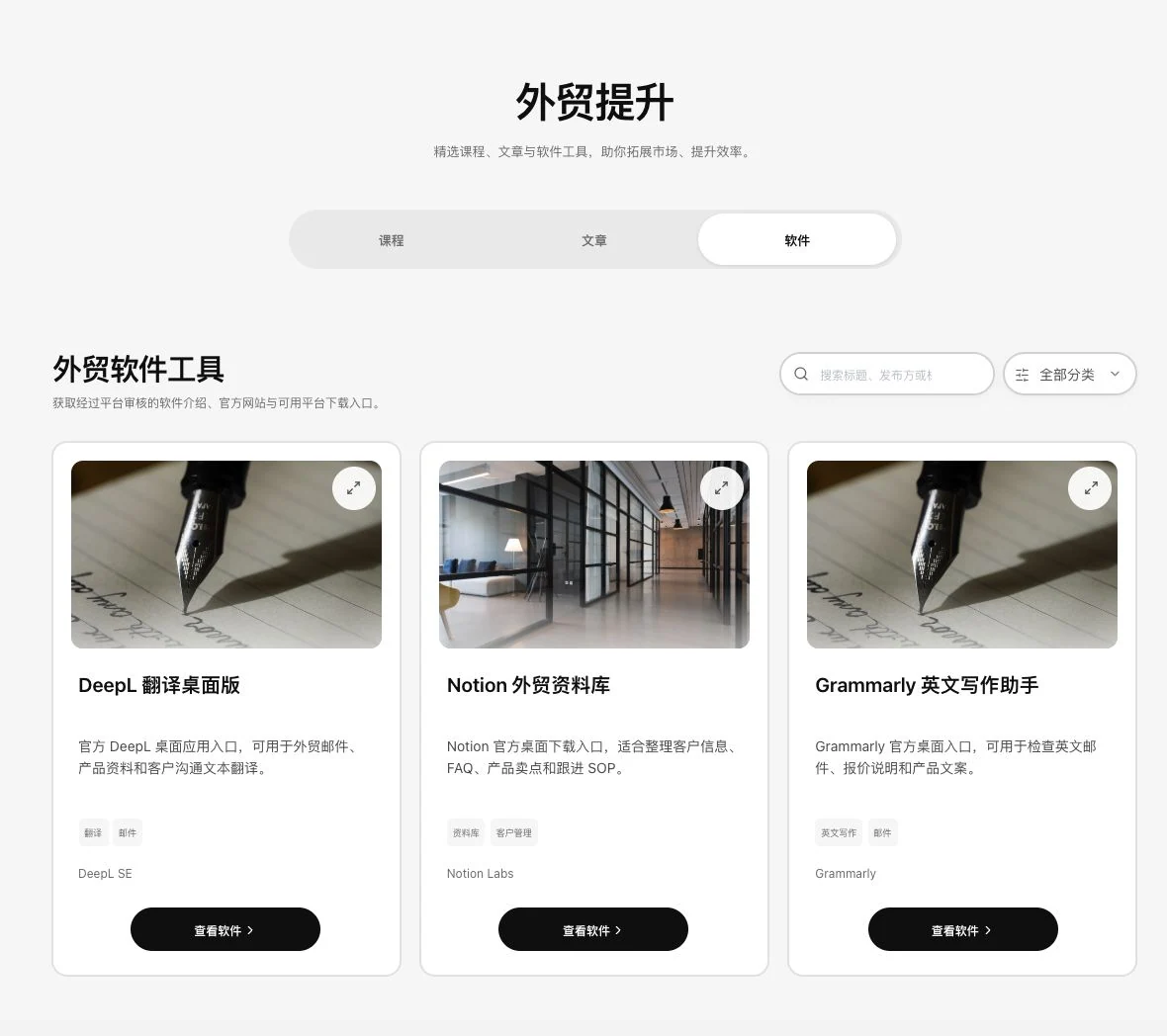
Trade-software resource directory · Real system screenshot
Original public software directory. No third-party software downloaded, installed, or signed into. Check features, versions, and permissions against the relevant official pages.
After a full read, keep organized content for future reference.
Read the current body text and confirm AI usage before generating summaries, key points and keywords. Insufficient text is flagged. Summaries depend on the current body and do not replace original fact checks or permission to use it.
How to continue
01
Open a currently published article and read its body.
02
Confirm AI usage before requesting a summary, key points, and keywords.
03
Check facts against the body and decide what to research further.
Workflow illustration · Not a system screenshot
01
Open a currently published article and read its body.
02
Confirm AI usage before requesting a summary, key points, and keywords.
03
Check facts against the body and decide what to research further.
This feature retains instructions and usage conditions but does not yet show actual business results.
Use and review
Insufficient body text triggers a notice. Summaries use the actual text and do not replace fact checks or usage permissions.
News samples do not represent the full market. The workspace defaults to the last 7 calendar days in Beijing time. Check announcements and business conditions against their original sources; use learning material under its source terms and your permissions.
Product facts and availability notes
This catalogue explains existing features and their conditions. Availability depends on the release, account permissions, service configuration and completed validation. Some items are internal-only or still await operational validation.