Enter costs and margin separately.
Enter quantity, costs, margin, and basic conditions.
See the actual stepsDelivery-term cost calculation
Understand how costs enter different delivery terms before preparing a customer quotation.
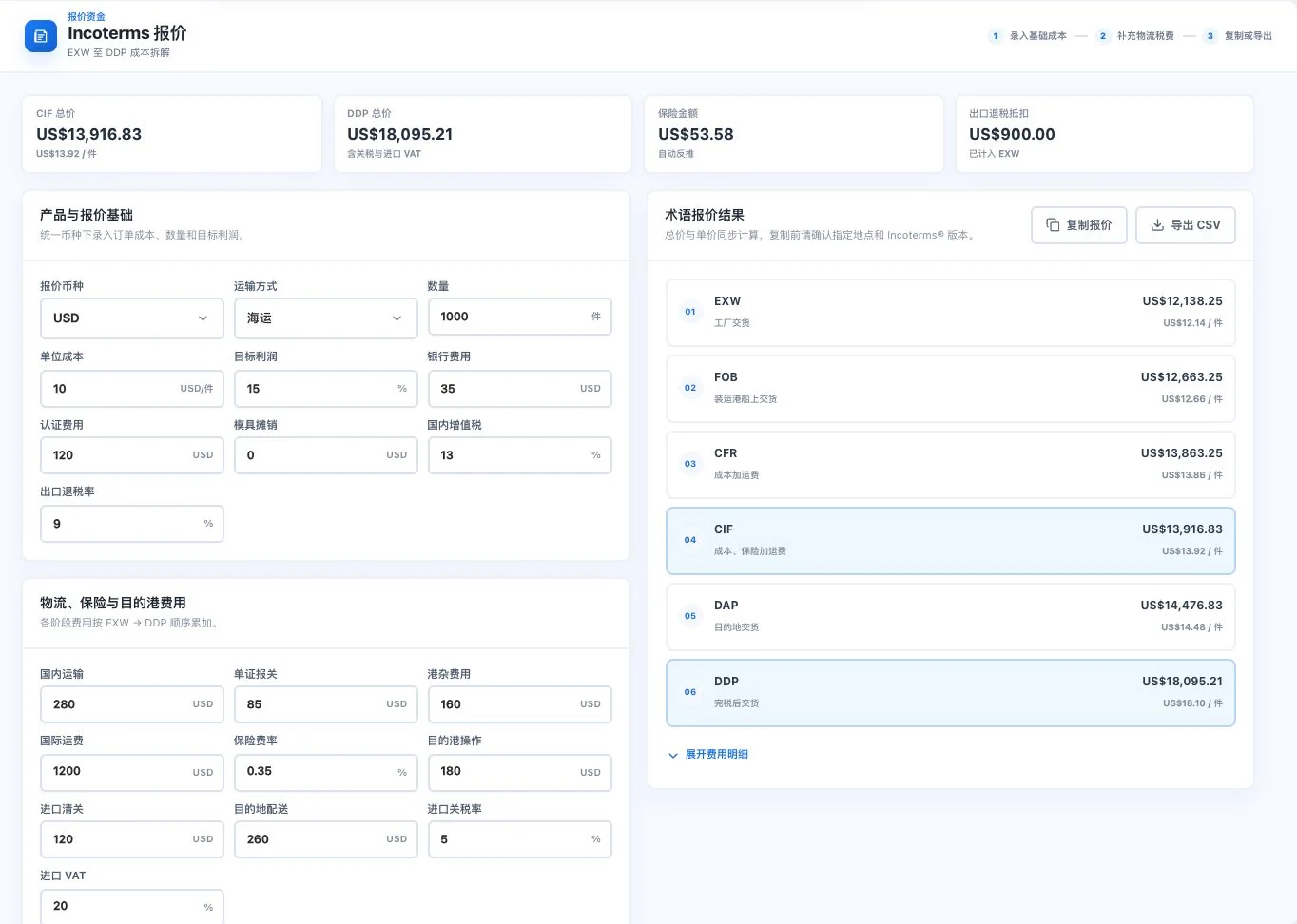
Quantity, costs, rates, and freight are original default demo inputs. Amounts are input-driven calculations. No copy or export occurred. These are not customer quotations, actual logistics prices, or confirmed taxes.
Understand how costs enter different delivery terms before preparing a customer quotation.
Source: EXW, FCA, FOB, CFR, CIF, and DDP cost calculations. Check rates and actual business conditions.
See this feature's highlights.
Enter quantity, costs, margin, and basic conditions.
See the actual stepsAdd logistics, insurance, and stage-specific taxes to compare six delivery terms.
See the actual stepsExpand the details for review, then copy or export the calculation sheet.
See how to checkBase inputs: quantity, cost, profit and current transaction terms.
See application scenariosBefore quoting a customer, calculate internal costs to understand how different delivery terms form the total.
See application scenariosAfter internal calculation, separately confirm customer prices, transaction terms and customer documents in the quotation feature.
See application scenariosUnderstand the tool and human handling separately
Understand how costs enter different delivery terms before preparing a customer quotation.
Add logistics, insurance, and stage-specific taxes to compare six delivery terms.
This compares feature handling scopes. Scenarios explain the sequence, not measured efficiency or completed customer cases.
Explain the feature through real work
Suppose the same products are being considered under FOB and CIF.
Hypothetical scenario · Feature explanation, not a customer case or completed AI resultExplore the real interface further
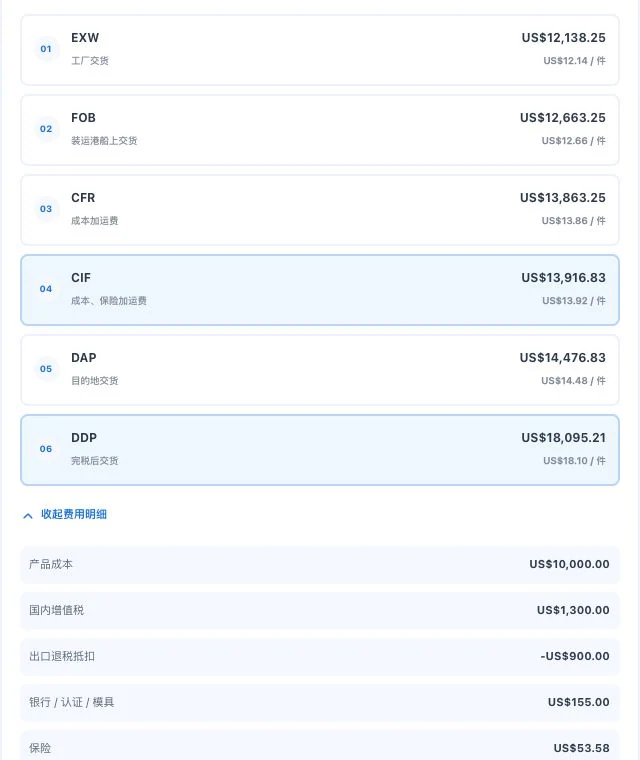
Cost-detail crop with original default demo inputs. Results use entered parameters; they are not confirmed taxes, actual transport quotes, or customer orders.
When to use it
Before quoting a customer, calculate internal costs to understand how different delivery terms form the total.
quantity, cost, profit and current transaction terms.
freight, insurance, taxes and corresponding stage assumptions.
Complete steps
Break down costs under different international delivery terms. View details and copy or export tables. This estimate does not directly generate a quotation PDF.
Enter quantity, costs, margin, and basic conditions.
Add logistics, insurance, and stage-specific taxes to compare six delivery terms.
Expand the details for review, then copy or export the calculation sheet.
Connect the work from step to step
After internal calculation, separately confirm customer prices, transaction terms and customer documents in the quotation feature.
Return to Quotations and trade documents for the complete workflowUnderstand before use
Users confirm taxes, freight, and conditions. Cost calculations do not directly generate customer quotation PDFs.
Product facts and FAQsBack to the product feature directoryMore details in this product
Prepare comparable calculations for different collection arrangements.
Explore this feature on its own