Confirm lot size and inspection level first.
Enter the actual lot size and select the inspection level and AQL.
See the actual stepsSampling inspection reference
Prepare clear parameters and corresponding references for sampling discussions.
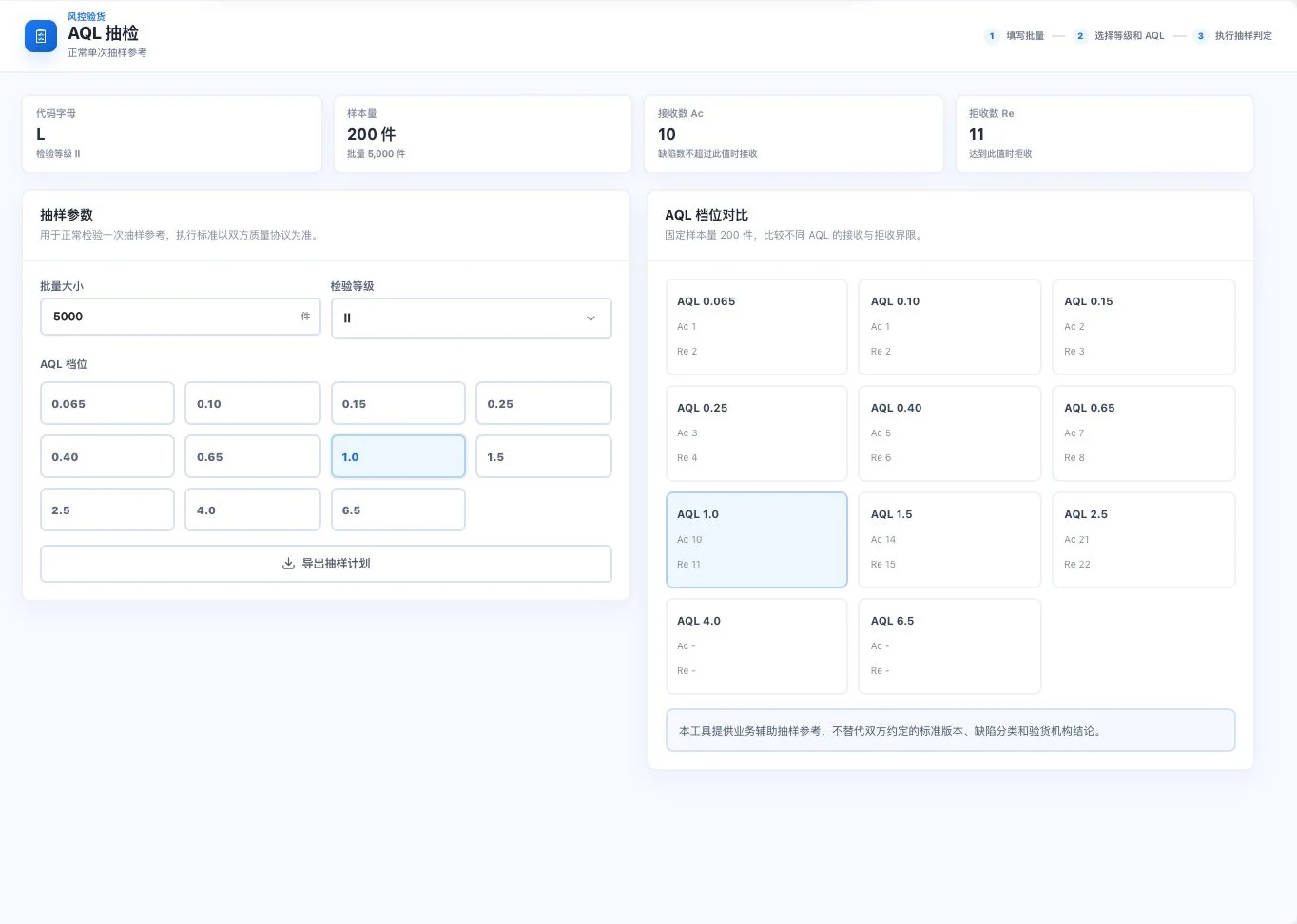
5,000 units, level II, and AQL 1.0 are original default demo conditions. No inspection or export occurred. Actual sampling follows the parties’ quality agreement and applicable standards.
See this feature's highlights.
Enter the actual lot size and select the inspection level and AQL.
See the actual stepsView the code letter, sample size, and acceptance or rejection limits.
See the actual stepsPrepare inspection against the quality agreement and applicable standard.
See how to checkPrepare clear parameters and corresponding references for sampling discussions.
How the feature works. Actual results depend on information, permissions, and service requirements.
When to use it
When discussing sampling requirements for a shipment, specify lot size, inspection level, AQL and acceptance and rejection limits together.
lot size, inspection level and AQL level.
the quality agreement, standard version and defect classification.
Complete steps
Look up sample sizes and acceptance and rejection counts for normal single sampling. Actual inspection follows the quality agreement and applicable standards.
Enter the actual lot size and select the inspection level and AQL.
View the code letter, sample size, and acceptance or rejection limits.
Prepare inspection against the quality agreement and applicable standard.
Understand the tool and human handling separately
Prepare clear parameters and corresponding references for sampling discussions.
View the code letter, sample size, and acceptance or rejection limits.
This compares feature handling scopes. Scenarios explain the sequence, not measured efficiency or completed customer cases.
Explain the feature through real work
Suppose two lots have different quantities under the same quality agreement.
Hypothetical scenario · Feature explanation, not a customer case or completed AI resultConnect the work from step to step
Actual quality inspectors execute the agreement. The sampling reference itself is not an inspection conclusion.
Return to 3D loading and packaging for the complete workflowUnderstand before use
A reference for normal single sampling only. Confirm the standard version, defect classification, and inspection conclusion.
Product facts and FAQsBack to the product feature directoryMore details in this product
Give loading discussions a concrete picture while comparing the conditions that affect loading.
Explore this feature on its own