Pending work in the queue.
Verify available channels, quota and sending interval.
See the actual stepsSending queues and exceptions
Keep reviewing task states, exceptions and follow-on handling in one place.
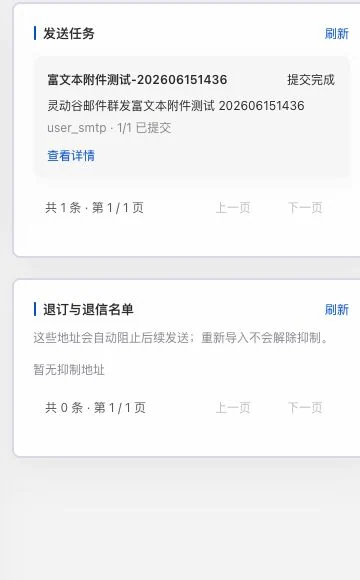
An old rich-text attachment test task shows submission complete; unsubscribe and bounce lists are empty. This does not prove current queue delivery or customer receipt. No queue controls were executed.
Keep reviewing task states, exceptions and follow-on handling in one place.
How the feature works. Actual results depend on information, permissions, and service requirements.
See this feature's highlights.
Verify available channels, quota and sending interval.
See the actual stepsReview pending, sent and exception states in the queue.
See the actual stepsOnce receiving is running, stop further outreach according to actual replies.
See how to checkTask conditions: available channels, remaining quota and sending interval.
See application scenariosWhen a task is prepared, inspect actual progress and exceptions rather than treating submission as delivery.
See application scenariosPause remaining tasks when necessary, then review exceptions. The live sending channel still requires operational acceptance.
See application scenariosUnderstand the tool and human handling separately
Keep reviewing task states, exceptions and follow-on handling in one place.
Review pending, sent and exception states in the queue.
This compares feature handling scopes. Scenarios explain the sequence, not measured efficiency or completed customer cases.
Explain the feature through real work
Suppose some queued emails have been handed to the provider.
Hypothetical scenario · Feature explanation, not a customer case or completed AI resultWhen to use it
When a task is prepared, inspect actual progress and exceptions rather than treating submission as delivery.
available channels, remaining quota and sending interval.
pending, sent and exception states, plus actual incoming email activity.
Complete steps
Process queues using available channels, remaining quotas and sending intervals. View tasks, sent messages and exceptions. After receiving mail, replies can stop subsequent outreach. Actual channels still await operational validation.
Verify available channels, quota and sending interval.
Review pending, sent and exception states in the queue.
Once receiving is running, stop further outreach according to actual replies.
Connect the work from step to step
Pause remaining tasks when necessary, then review exceptions. The live sending channel still requires operational acceptance.
Return to Email and WhatsApp · Linbo for the complete workflowUnderstand before use
The live sending channel still requires operational acceptance. Provider acceptance, delivery and customer replies are different states.
Product facts and FAQsBack to the product feature directoryMore details in this product
Leave room to adjust remaining sending tasks.
Explore this feature on its own