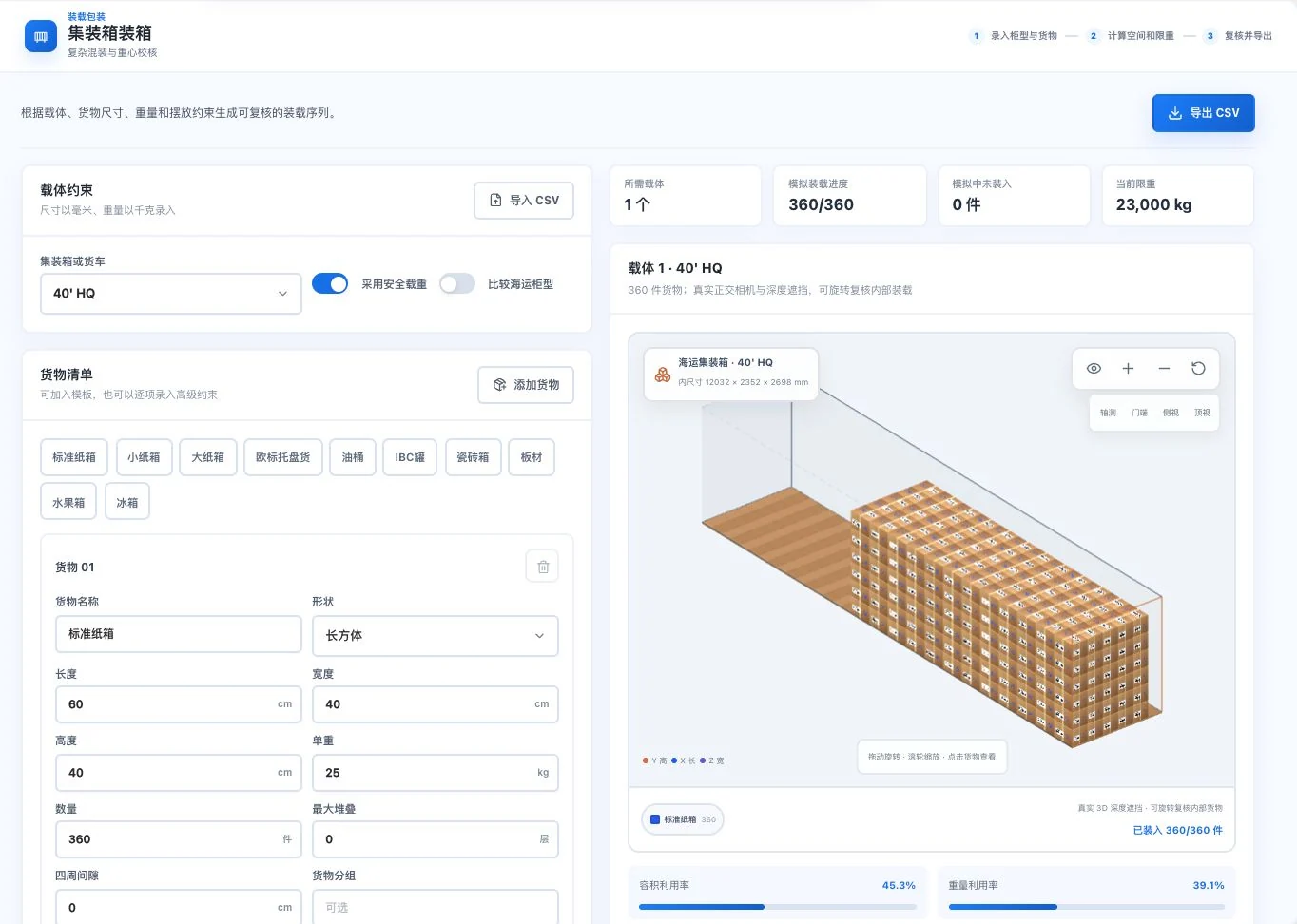
40' HQ, standard-carton dimensions, and 360 units are original default demo conditions. The screen is an input-driven simulation. No CSV export occurred; actual load capacity and safety require review.
Take a closer look
Overall. Side. Door end.One plan, three views.
Carton counts are only the start. View stacking height from the side and arrangement from the door, then check loads and actual packaging conditions.
3D container-loading illustration
Change your angle. See the arrangement clearly.
3D illustrationLength · Width · Height · Weight
01Enter cargo dimensions
02View the arrangement and remaining space
03Check against actual conditions
Container and cargo arrangements are website illustrations, not calculated results. Actual plans require cargo dimensions, weight, and restrictions, followed by verification and confirmation.
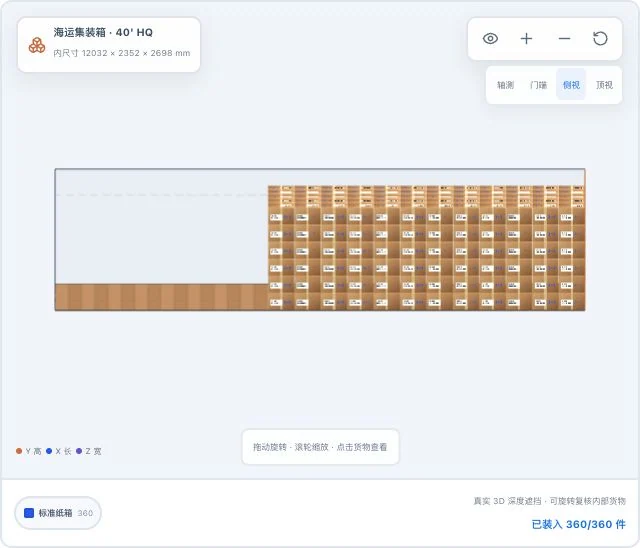
Loading side view · Real system screenshot
The same default demo cargo, with only the original 3D viewpoint changed. Simulated loaded quantities do not mean actual loading or safety acceptance is complete.
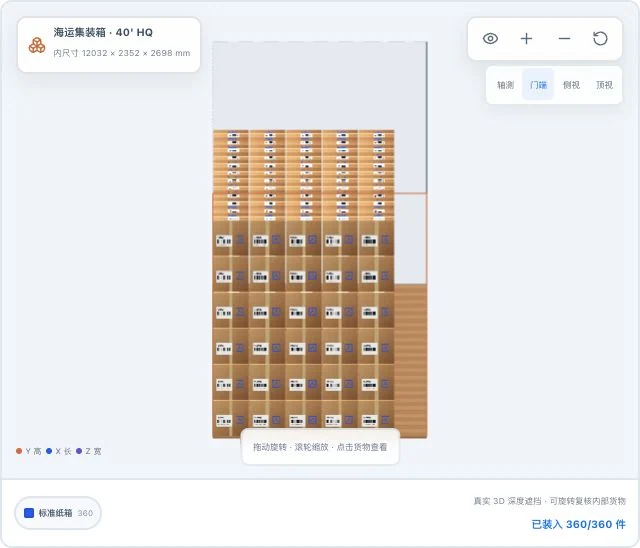
Loading door-end view · Real system screenshot
Original door-end view of the same default demo inputs. This simulation crop does not establish actual stacking strength, handling operations, or transport safety.
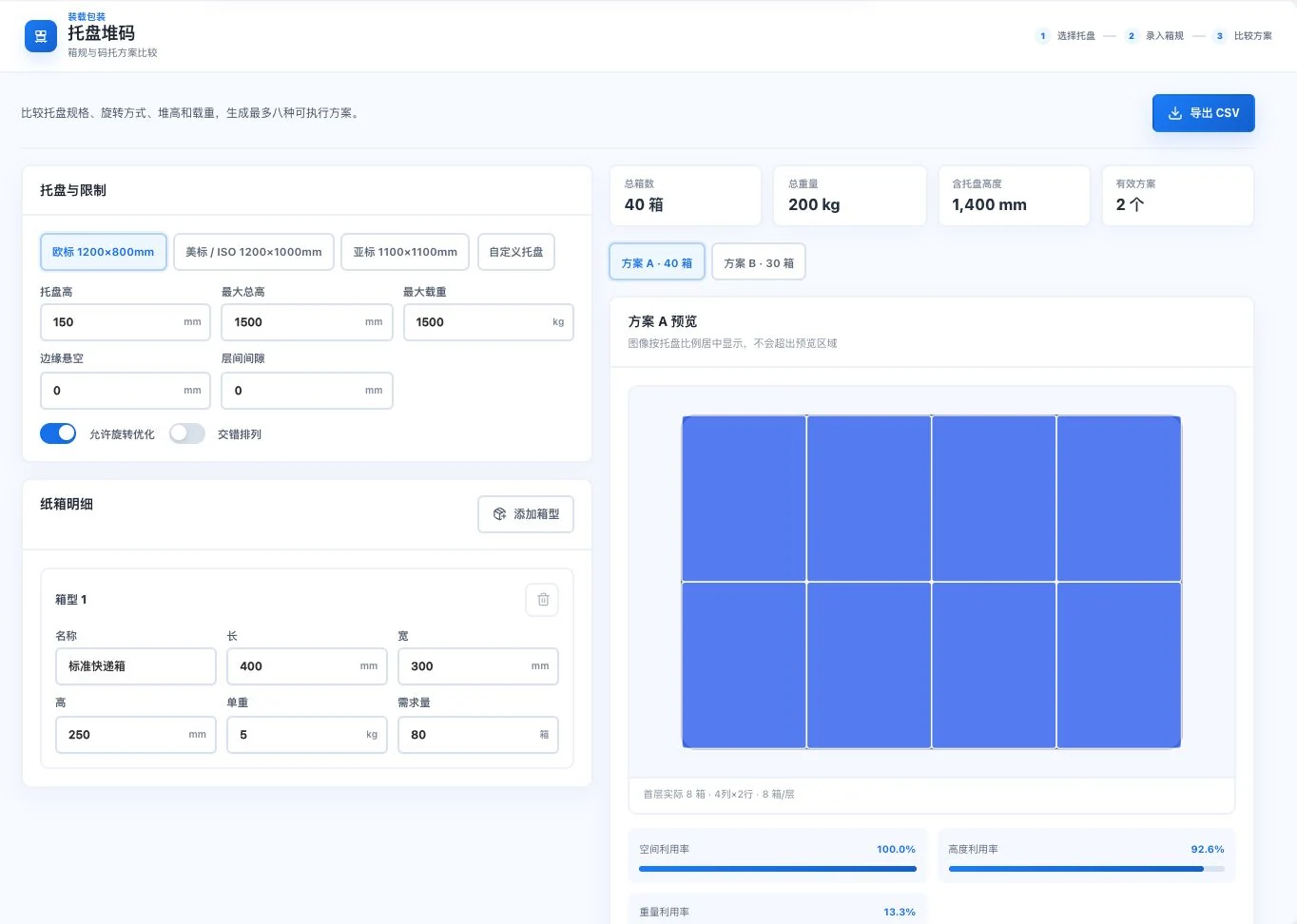
Pallet-stacking candidates · Real system screenshot
Euro pallet and standard shipping cartons are original default demo inputs, with two valid candidates visible. No export occurred. Utilization does not establish verified physical stability.
Overall. Side. Door end. A basis from every angle.
View space overall, stacking height from the side and arrangement from the door end. The same inputs, checked from another angle. Take loading discussions from dimensions to visuals.
The three views come from the same actual calculation example. Theoretical plans do not guarantee loading capacity or on-site safety.
See these highlights
Beyond carton counts. Every detail in the space.
Useful capabilities are found in each specific task.
01 / Explore more details
A new angle. See the remaining space.
Side and door-end views reveal different carton-layer relationships.
Loading side view · Actual interface detail
The same default demo cargo, with only the original 3D viewpoint changed. Simulated loaded quantities do not mean actual loading or safety acceptance is complete.
Pallet-stacking candidates · Actual interface detail
Euro pallet and standard shipping cartons are original default demo inputs, with two valid candidates visible. No export occurred. Utilization does not establish verified physical stability.
Check batch size, inspection level and tier together.
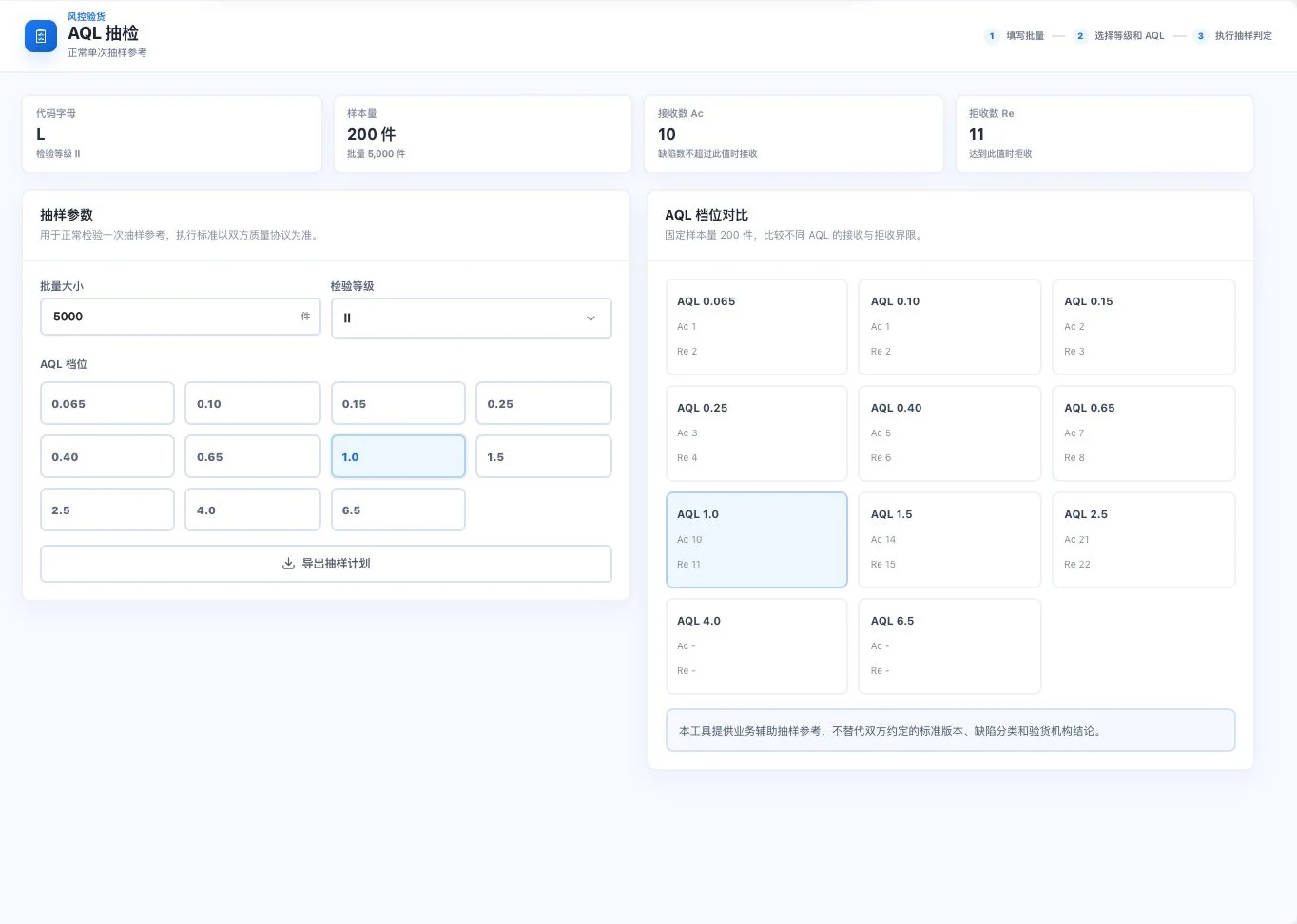
Sampling inspection quantity reference · Actual interface detail
5,000 units, level II, and AQL 1.0 are original default demo conditions. No inspection or export occurred. Actual sampling follows the parties’ quality agreement and applicable standards.
Calculate with actual carton specifications, carriers and limits. No on-site safety or capacity guarantee is implied.
Numbers come from current feature definitions or real interfaces. Workflow numbers explain the presentation on this page; demonstration data is not a promise of efficiency or business results.View all features and conditions
Designed for everyday work
Each estimate adds a basis for on-site discussion.
One set of cartons. See placement in 3D.
Bring dimensions, quantities, weight and container type together into theoretical loading estimates.
The following illustrates inputs and outputs. 3D visuals are theoretical estimates; on-site checks are still required.
What you provide, what the software helps organize and what needs confirmation next.
The task
You provide
The software helps organize
You confirm
3D container loading
Container type, carton dimensions, quantity and weight
Carton counts, placement and space references
Actual dimensions, load capacity, stability and safety
Pallet stacking
Pallet dimensions, carton specifications and height limits
Candidates for different stacking layouts
Packaging strength, securing and operating conditions
Sampling reference
Batch size, inspection level and sampling tier
Reference inspection quantity for those conditions
Customer agreements and formal inspection plans
Container and pallet candidates
How cartons fit.Start with the conditions.
Dimensions, orientation, quantities, height limits and load limits belong in the same loading discussion.
Container loading starts with actual cargo dimensions, quantities, weight and container type. The 3D scene references placement order, space, volume and center of gravity. Switch to side and door-end views to inspect layers. Prepare a CSV plan for further business discussion.
The pallet tool compares orientations, layers, loads and heights, showing up to 8 valid candidates. This limit is an interface rule, not validation of packaging strength, securing methods or physical stability. Moisture estimates require separate transport and packaging conditions.
Pallet-stacking candidates · Real system screenshot
Euro pallet and standard shipping cartons are original default demo inputs, with two valid candidates visible. No export occurred. Utilization does not establish verified physical stability.
01
One set of cargo conditions
Confirm actual carton specifications, weight, usable carrier dimensions and placement restrictions.
02
Compare different placements
View container loading in 3D from three angles. Compare pallet candidates by orientation, layers and quantities.
03
Check again on site
Confirm load capacity, packaging strength and securing methods before deciding the actual loading plan.
Stop here
See only a theoretical carton count, without clear layers, height limits or weight conditions.
Continue this way
View carton counts with placement diagrams. Review dimensions, loads and actual packaging conditions individually.
Theoretical calculations and candidate visuals do not guarantee loading capacity, stability or on-site safety.
Checks before delivery
Inspections and documents.Conditions to confirm.
Make batch sizes, inspection levels and clause checklists a shared basis for discussion.
Enter actual batch size, inspection level and AQL tier to view code letters, sample sizes and acceptance and rejection limits. Normal single-sampling references must align with customer quality agreements, defect classifications and applicable standards.
The letter-of-credit checklist records outstanding dates, transport, documents and special terms individually. Save human judgments for specialist review. Checklists do not replace bank review, and sampling tools do not replace physical inspections.
Sampling inspection quantity reference · Real system screenshot
5,000 units, level II, and AQL 1.0 are original default demo conditions. No inspection or export occurred. Actual sampling follows the parties’ quality agreement and applicable standards.
01
Align the parameters first
Actual batch size, inspection level, tier and quality agreement must relate to the same shipment.
02
View the limits separately
Record sample sizes and acceptance and rejection limits separately, beyond a single sampling quantity.
03
Confirm conclusions yourself
Follow formal inspection procedures and pass letter-of-credit matters to the relevant parties for review.
Stop here
Say only "sample to the standard" without recording batch size, level and tier.
Continue this way
Specify inputs, reference quantities and acceptance/rejection limits, then inspect under the actual agreement.
Instructional example. It is not a quality approval, bank document review or acceptance guarantee.
Explore every feature
Every tool. A specific purpose.
6 features, with body text directly visible. Read real interfaces alongside process notes, or open individual feature pages for more detailed inputs, outputs and examples.
01
Container loading estimates
Implemented; configuration required
LDG-038
Before loading. See the plan.
Give loading discussions a concrete picture while comparing the conditions that affect loading.
Review 3D layouts, order, volume, weight and center-of-gravity references by cargo and container type. Export plans as CSV. Actual dimensions, load capacity and loading safety need review.
How to continue
01
Choose a container type and enter cargo dimensions, quantity, weight, and restrictions.
02
View 3D placement, loading order, space, weight, and center-of-gravity references.
03
Review and export CSV for further on-site checks.
Use and review
Calculations depend on inputs and models. Professionals must verify actual dimensions, load capacity, packaging, and safety.
3D container loading · Real system screenshot
40' HQ, standard-carton dimensions, and 360 units are original default demo conditions. The screen is an input-driven simulation. No CSV export occurred; actual load capacity and safety require review.
Loading side view · Real system screenshot
The same default demo cargo, with only the original 3D viewpoint changed. Simulated loaded quantities do not mean actual loading or safety acceptance is complete.
Loading door-end view · Real system screenshot
Original door-end view of the same default demo inputs. This simulation crop does not establish actual stacking strength, handling operations, or transport safety.
Consider pallet dimensions and carton orientation together.
Compare carton layers, orientation, count, load capacity and height. View up to 8 valid candidates and export results. 8 is the candidate limit; actual physical stability is not validated.
How to continue
01
Choose pallet specifications and enter carton dimensions, stacking height, and load capacity.
02
Adjust rotation, interlocking, and gaps to view valid candidate plans.
03
Compare layers, top views, and utilization, then export for review.
Use and review
Eight candidates is the model limit. Actual stability and packaging strength still require testing.
Pallet-stacking candidates · Real system screenshot
Euro pallet and standard shipping cartons are original default demo inputs, with two valid candidates visible. No export occurred. Utilization does not establish verified physical stability.
Keep moisture-control discussions focused on clear environmental and packaging conditions.
Estimate desiccant quantities from transport and packaging conditions. Outputs are references and do not guarantee moisture protection.
How to continue
01
Enter container type, route, transit days, and loading ratio.
02
Compare climate, cargo moisture absorption, and pre-drying conditions.
03
Compare material quantities and placement, then review the packaging plan.
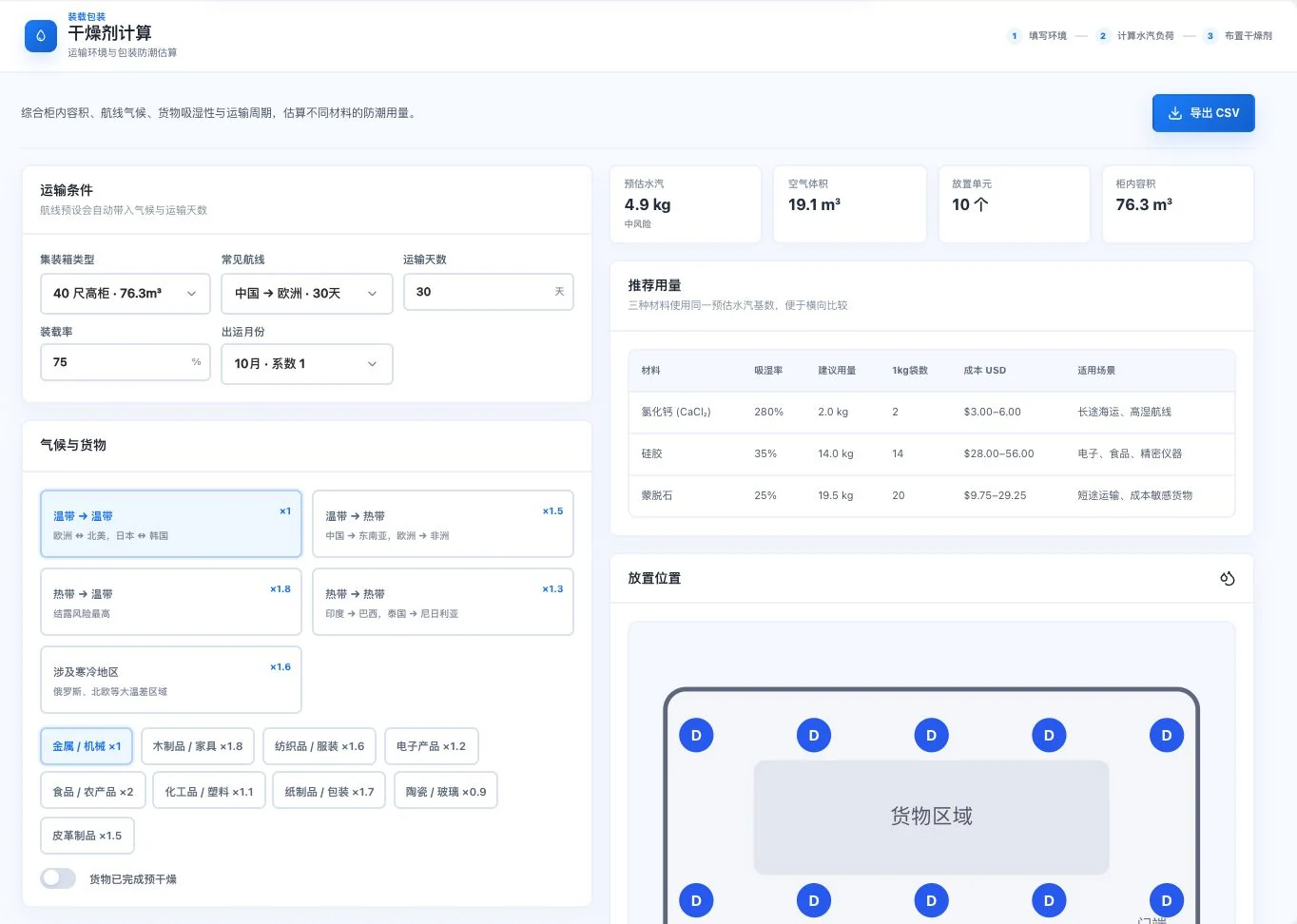
Moisture-control material quantity reference · Real system screenshot
Original default container, route, transit days, and material assumptions. Costs and quantities are reference estimates. No export occurred; actual moisture protection and supplier prices are not guaranteed.
Use and review
Quantities are reference estimates, not a guarantee of moisture protection. Confirm actual cargo and supplier conditions.
Carton counts and volume. Alongside the carrier’s limits.
Prepare shared specifications for initial loading and transport-capacity discussions.
Calculate carton counts and volume from carton specifications, dimensions and container or truck conditions, then view the loading preview. Check inputs against actual goods; results do not replace on-site loading confirmation.
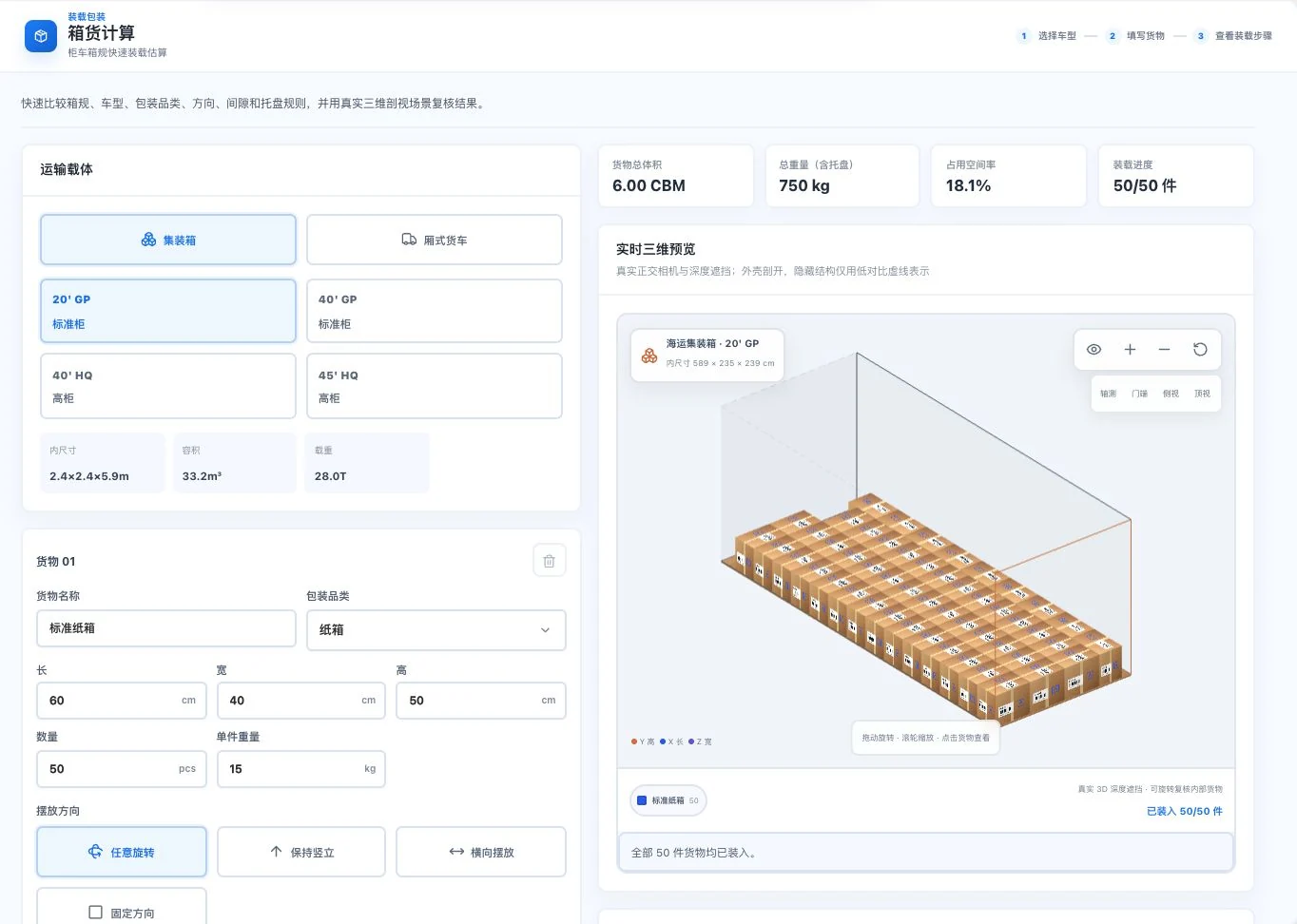
Carton quantities and 3D preview · Real system screenshot
Container, carton dimensions, 50 units, and weight are default demo inputs. Quantities and occupancy are simulated results. No physical cargo was loaded; verify actual usable dimensions and constraints.
How to continue
01
Choose current container or vehicle specifications.
02
Enter carton dimensions, quantity, and actual dimensions.
03
View loading counts, volume, and previews; verify actual restrictions.
Use and review
Results do not replace on-site loading confirmation. Verify usable container or vehicle dimensions and cargo specifications.
Organize clauses requiring confirmation into an itemized business checklist.
Check letter-of-credit clauses and outstanding items individually to create a business checklist. Results do not replace bank document review.
How to continue
01
Enter letter-of-credit details or readable demo or owned text.
02
Check dates, transport, documents, and special conditions against a checklist.
03
Record human judgments and export for further review.
Use and review
Assisted checks do not replace bank document examination. Contract facts and executable conditions require human verification.
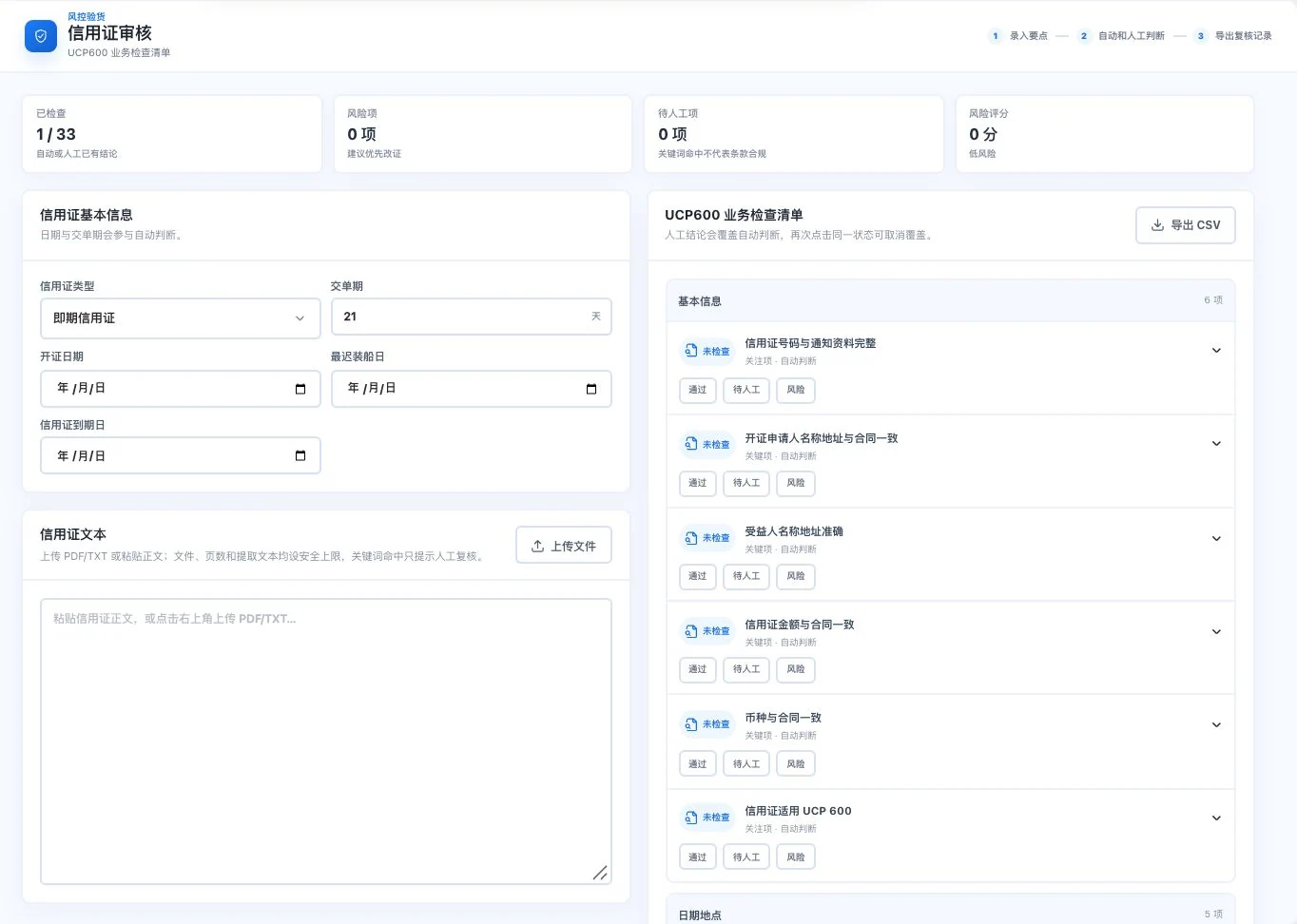
Letter-of-credit checklist · Real system screenshot
Letter-of-credit text and dates are empty. Only one of 33 items has a status. 0 risks is the current blank-form statistic, not evidence of safety or review approval. No export occurred.
How many to inspect. Know acceptance and rejection.
Prepare clear parameters and corresponding references for sampling discussions.
Look up sample sizes and acceptance and rejection counts for normal single sampling. Actual inspection follows the quality agreement and applicable standards.
How to continue
01
Enter the actual lot size and select the inspection level and AQL.
02
View the code letter, sample size, and acceptance or rejection limits.
03
Prepare inspection against the quality agreement and applicable standard.
Use and review
A reference for normal single sampling only. Confirm the standard version, defect classification, and inspection conclusion.
Sampling inspection quantity reference · Real system screenshot
5,000 units, level II, and AQL 1.0 are original default demo conditions. No inspection or export occurred. Actual sampling follows the parties’ quality agreement and applicable standards.
Visuals and calculations rely on input and model assumptions. Check actual dimensions, packaging strength and safety. Sampling references and letter-of-credit checklists do not replace inspection agreements or bank document review.
Product facts and availability notes
This catalogue explains existing features and their conditions. Availability depends on the release, account permissions, service configuration and completed validation. Some items are internal-only or still await operational validation.