Register and log in through the entry points.
Register through the current flow and choose password or SMS login.
See the actual stepsRegistration, login and account details
Keep your identity and account information in a clear entry point.
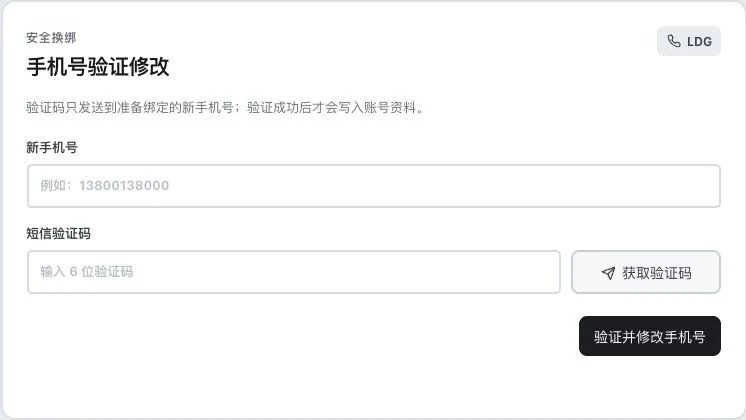
Original blank phone-update form. Light-colored numbers are field prompt examples. No verification code requested or entered, and no account change occurred. Successful SMS verification is not established.
See this feature's highlights.
Register through the current flow and choose password or SMS login.
See the actual stepsCheck and edit your own details in the account area.
See the actual stepsFor login issues, submit a help request describing the specific problem.
See how to checkKeep your identity and account information in a clear entry point.
How the feature works. Actual results depend on information, permissions, and service requirements.
When to use it
When starting or resolving account issues, use currently available sign-in methods and your own profile tools.
your own account and the currently permitted password or SMS method.
login status, profile changes or specific symptoms.
Complete steps
Log in with a password or a linked, verified phone number, and edit account information through available entries. SMS login needs a ready provider and human-verification service. Submit a ticket for account issues; the current interface has no self-service password-recovery entry.
Register through the current flow and choose password or SMS login.
Check and edit your own details in the account area.
For login issues, submit a help request describing the specific problem.
Explain the feature through real work
Suppose you encounter a sign-in problem.
Hypothetical scenario · Feature explanation, not a customer case or completed AI resultUnderstand the tool and human handling separately
Keep your identity and account information in a clear entry point.
Check and edit your own details in the account area.
This compares feature handling scopes. Scenarios explain the sequence, not measured efficiency or completed customer cases.
Connect the work from step to step
After signing in, check your profile. If problems remain, submit clear symptoms and appropriate screenshots without exposing credentials.
Return to Accounts and team workspace for the complete workflowUnderstand before use
SMS login depends on the provider and human verification. There is currently no self-service password recovery. Retired WeChat and QQ login methods are unavailable.
Product facts and FAQsBack to the product feature directoryMore details in this product
Keep submissions and review progress available for reference.
Explore this feature on its own