Check requirements beforehand.
Prepare identity or business information according to current permission requirements.
See the actual stepsSubmit identity and company information
Keep submissions and review progress available for reference.
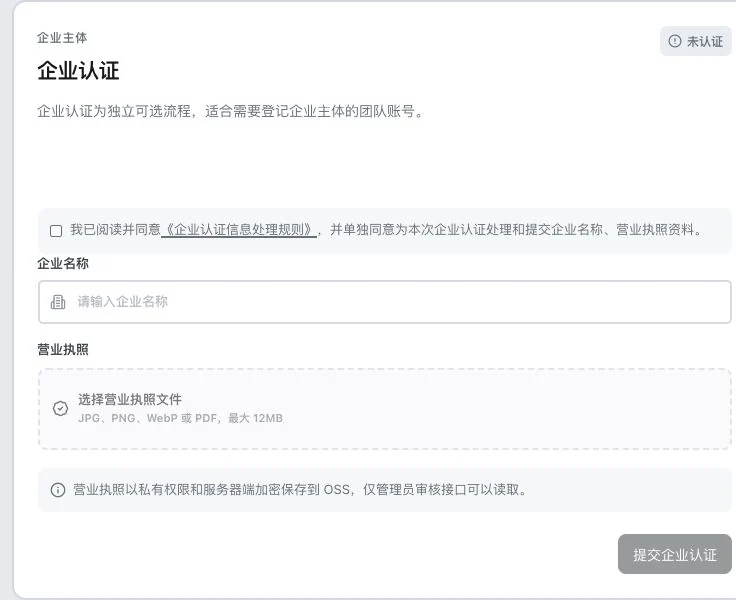
Company name is empty. No processing-rule agreement, license upload, or review submission occurred; status is unverified. The entry does not indicate verified business identity or guaranteed customer credit.
See this feature's highlights.
Prepare identity or business information according to current permission requirements.
See the actual stepsAfter submission, view review status and requests for more information.
See the actual stepsContinue processing your information according to actual feedback.
See how to checkKeep submissions and review progress available for reference.
How the feature works. Actual results depend on information, permissions, and service requirements.
Complete steps
Submit identity or company information under current permission requirements and view review status. Verification does not guarantee customer creditworthiness.
Prepare identity or business information according to current permission requirements.
After submission, view review status and requests for more information.
Continue processing your information according to actual feedback.
Explain the feature through real work
Suppose a company submission requires additional information.
Hypothetical scenario · Feature explanation, not a customer case or completed AI resultWhen to use it
When current permissions require identity or company information, prepare the relevant material and review actual verification feedback.
the identity or company documents required by the current process.
the relevant permission, submitted information and review status.
Understand the tool and human handling separately
Keep submissions and review progress available for reference.
After submission, view review status and requests for more information.
This compares feature handling scopes. Scenarios explain the sequence, not measured efficiency or completed customer cases.
Connect the work from step to step
Use relevant permissions according to actual verification results. Other business checks remain separate.
Return to Accounts and team workspace for the complete workflowUnderstand before use
Verification only describes the relevant information process. It does not guarantee customer credit or other business outcomes.
Product facts and FAQsBack to the product feature directoryMore details in this product
Keep separate usage records for different purposes.
Explore this feature on its own