Unsubscriptions retain restrictions.
Review unsubscribed, bounced and blocked addresses.
See the actual stepsUnsubscribe and bounce handling
Carry opt-out and failure records into future work.
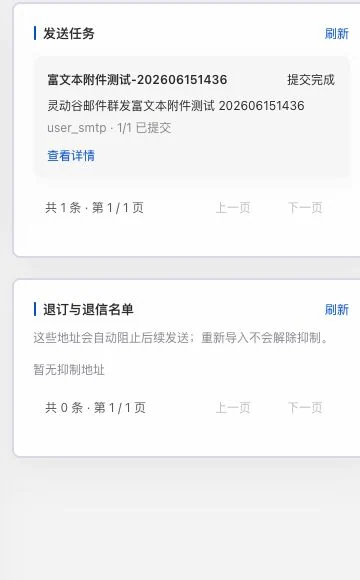
An old rich-text attachment test task shows submission complete; unsubscribe and bounce lists are empty. This does not prove current queue delivery or customer receipt. No queue controls were executed.
Carry opt-out and failure records into future work.
Source: unsubscribed, bounced, and blocked addresses. Reimporting does not automatically lift restrictions.
See this feature's highlights.
Review unsubscribed, bounced and blocked addresses.
See the actual stepsRetain handling records and contact restrictions according to actual receipts.
See the actual stepsKeep checking existing states when preparing another list.
See how to checkUnderstand the tool and human handling separately
Carry opt-out and failure records into future work.
Retain handling records and contact restrictions according to actual receipts.
This compares feature handling scopes. Scenarios explain the sequence, not measured efficiency or completed customer cases.
Explain the feature through real work
Suppose an unsubscribed address appears again in a new list.
Hypothetical scenario · Feature explanation, not a customer case or completed AI resultWhen to use it
When an unsubscribe, bounce or block occurs, carry that status forward into future list checks.
actual opt-out requests, receipts and block records.
the corresponding address and current task.
Complete steps
Save unsubscribed, bounced and blocked addresses to avoid contacting people who opted out. Reimporting does not automatically remove restrictions. Check actual statuses separately for provider acceptance, delivery and replies.
Review unsubscribed, bounced and blocked addresses.
Retain handling records and contact restrictions according to actual receipts.
Keep checking existing states when preparing another list.
Connect the work from step to step
When editing the next task's list, retain opt-out and exception evidence and verify communication scope against actual status.
Return to Email and WhatsApp · Linbo for the complete workflowUnderstand before use
Reimporting does not automatically remove restrictions. Final delivery and replies follow actual status.
Product facts and FAQsBack to the product feature directoryMore details in this product
Understand the usage conditions of each integration route separately.
Explore this feature on its own